Bookkeeping Single Entry: How It Works and When to Switch
Published on
By Tony Newcome — Founder of AnchOps · Owner, Pizza Harbour
This article was drafted with AI assistance and reviewed by Tony Newcome, a working restaurant operator.
Single-entry bookkeeping records each transaction once, usually in a cashbook, instead of as paired debit and credit entries that must balance. It's a practical starting point for simple operations, but credit sales, inventory and debt can make a cash-only view inadequate.
You've closed the restaurant, checked the card batch and counted the drawer. There's enough money for tomorrow's delivery, but you're less certain about the supplier invoices beside the register or what's still owed to staff. The useful question isn't whether your bookkeeping looks advanced. It's whether you can make the next decision without guessing.
Table of Contents
- Single Entry Defined and Compared With Double Entry
- What the recording rule really means
- Single-entry vs double-entry on key criteria
- A Restaurant Week Recorded Both Ways
- Five restaurant events recorded both ways
- Where the profit picture changes
- Pros and Cons for a Restaurant Running Single Entry
- Where simplicity helps
- Where the gaps become expensive
- Tax and Record Keeping Rules to Follow
- Records to keep for a single-entry restaurant book
- Make the evidence retrievable
- How to Set Up Single-Entry Books Step by Step
- Build the daily recording routine
- A cashbook template
- Close and review consistently
- Deciding Whether to Stay Single Entry or Switch
- Switch triggers for a single-entry restaurant book
- Prepare a clean handover
Single Entry Defined and Compared With Double Entry
Say a taqueria owner is counting the cash drawer on Sunday night while supplier invoices pile up beside the register. A single-entry cashbook can explain the money received and paid during service. Unless the owner keeps an additional bill schedule, it won't explain all the obligations waiting in that pile.
Think of single entry as a checkbook register with useful labels. It shows money moving through the account, but it doesn't prove that the remaining balance covers everything the restaurant owes.
What the recording rule really means
Historically, single entry wasn't a standardized recipe. The Encyclopedia.com account of accounting and bookkeeping describes charge-and-discharge records used by estates and government offices for stewardship: showing what was received, paid or owed rather than measuring overall profit.
That distinction still matters. A notebook containing cash receipts and a separate list of customer debts can belong to the single-entry family, even though the owner writes in several places. What's missing is a complete, self-balancing ledger connecting every economic effect.
Double entry makes those connections explicit. Paying a supplier changes cash and the amount owed to that supplier; buying equipment changes cash and equipment holdings. Debits and credits describe the account effects, not just money out and money in.
For a plain-language explanation of that vocabulary, HireAccountants' guide to understanding debits and credits is a useful companion.
Single-entry vs double-entry on key criteria
| Criterion | Single entry | Double entry |
|---|---|---|
| Recording rule | One entry per transaction, usually in a cashbook | Equal debit and credit effects across the accounts involved |
| Accounts used | Mainly cash in and cash out, with categories for expenses | Full chart of accounts: assets, liabilities, equity, income and expenses |
| Built-in error check | None; no debit-credit balance test | Trial balance must balance or an error is visible |
| Balance sheet | Not produced reliably without extra schedules | Produced from the ledger after reconciliation and adjustments |
| Typical user | Sole traders and cash-only microbusinesses | Companies with credit sales, inventory, loans or payroll complexity |
| Tools needed | Spreadsheet or simple cashbook app | Accounting software or a bookkeeper |
| Lender and investor readiness | Usually weak without conversion | Standard financial-statement format expected |
Read the recording and accounts rows together. Single entry reduces posting work because the owner categorizes a receipt or payment without maintaining all the related ledger balances. Double entry requires more structure, but that structure supports questions about assets, obligations and ownership.
The error-check row needs a qualification. An unbalanced trial balance flags unequal postings, but balanced books can still contain a duplicated transaction or an expense assigned to the wrong category. In a cashbook, a duplicated sales receipt may look completely ordinary until someone compares it with the POS report or bank deposit.
The balance-sheet and lender-readiness rows describe a different problem: completeness. A bank statement can confirm cash, but it can't establish the value of equipment, unpaid bills and outstanding loans. A lender generally needs those pieces connected, not scattered across emails and folders.
Practical rule: Single entry matches the question an owner asks after a shift: what money moved? Double entry matches the question a lender asks at year-end: what does the business own and owe?
Tools don't decide the method. A spreadsheet can contain a full double-entry ledger, while an app can function as little more than a categorized cashbook. Choose the structure based on the answers you need, not the appearance of the software.
A Restaurant Week Recorded Both Ways
Consider a hypothetical restaurant with Friday card sales of $6,400, a $1,800 produce delivery on net-30 terms, $2,900 in weekly payroll and $420 in pooled tips paid to staff. The produce supplier receives payment 30 days later, so that payment belongs outside the opening week.
For clarity, assume the card sales settle in full without processing fees, the produce is used during the week and the payroll figure represents wages without separate withholding complications. The tips were collected before payout and already recorded as cash held for staff, not restaurant revenue.
Five restaurant events recorded both ways
| Event | Single-entry cashbook line | Double-entry journal entry |
|---|---|---|
| Friday card sales of $6,400 settle | Friday; card sales; cash in $6,400; cash out $0; food sales | Debit cash $6,400; credit food sales $6,400 |
| Produce delivery $1,800 on net-30 | Delivery day; no cashbook entry yet | Debit food cost $1,800; credit accounts payable $1,800 |
| Weekly payroll of $2,900 paid | Payday; payroll; cash in $0; cash out $2,900; wages | Debit wages $2,900; credit cash $2,900 |
| Pooled tips of $420 paid | Payout day; staff tips; cash in $0; cash out $420; tip payouts, excluded from operating expense | Debit tips payable $420; credit cash $420 |
| Produce supplier paid after 30 days | Payment day; supplier payment; cash in $0; cash out $1,800; food cost | Debit accounts payable $1,800; credit cash $1,800 |
Friday's sales are straightforward because the sale and receipt fall together. The produce delivery is where the cashbook goes quiet: the kitchen receives and uses the food, but no payment has happened.
In the accrual journal, accounts payable means the supplier is owed money. When the restaurant eventually pays, the bookkeeper removes that obligation and reduces cash. The payment doesn't create another food expense.
Where the profit picture changes
In this scenario, sales less wages leave $3,500 before the omitted produce cost and other operating expenses. Recognizing the produce used reduces that subtotal to $1,700. The cash-based view therefore looks $1,800 more profitable for the opening week, assuming everything else is equal.
The tips don't reduce either operating subtotal because the restaurant is passing staff money through, not paying an additional restaurant expense. A cashbook can still record the payout, but its reporting category must keep that distinction intact.
If the produce remained unused, an accrual bookkeeper would generally record inventory first and recognize food cost as it was consumed. Receipt of stock and consumption of stock aren't automatically the same event.
A supplier payment date tells you when cash left. It doesn't necessarily tell you when the kitchen used the food.
The immediate fix is an unpaid-bill schedule reviewed each Monday. Record the supplier, invoice reference, due date, amount and payment status, then check the total before deciding how much cash is available for discretionary spending.
Pros and Cons for a Restaurant Running Single Entry
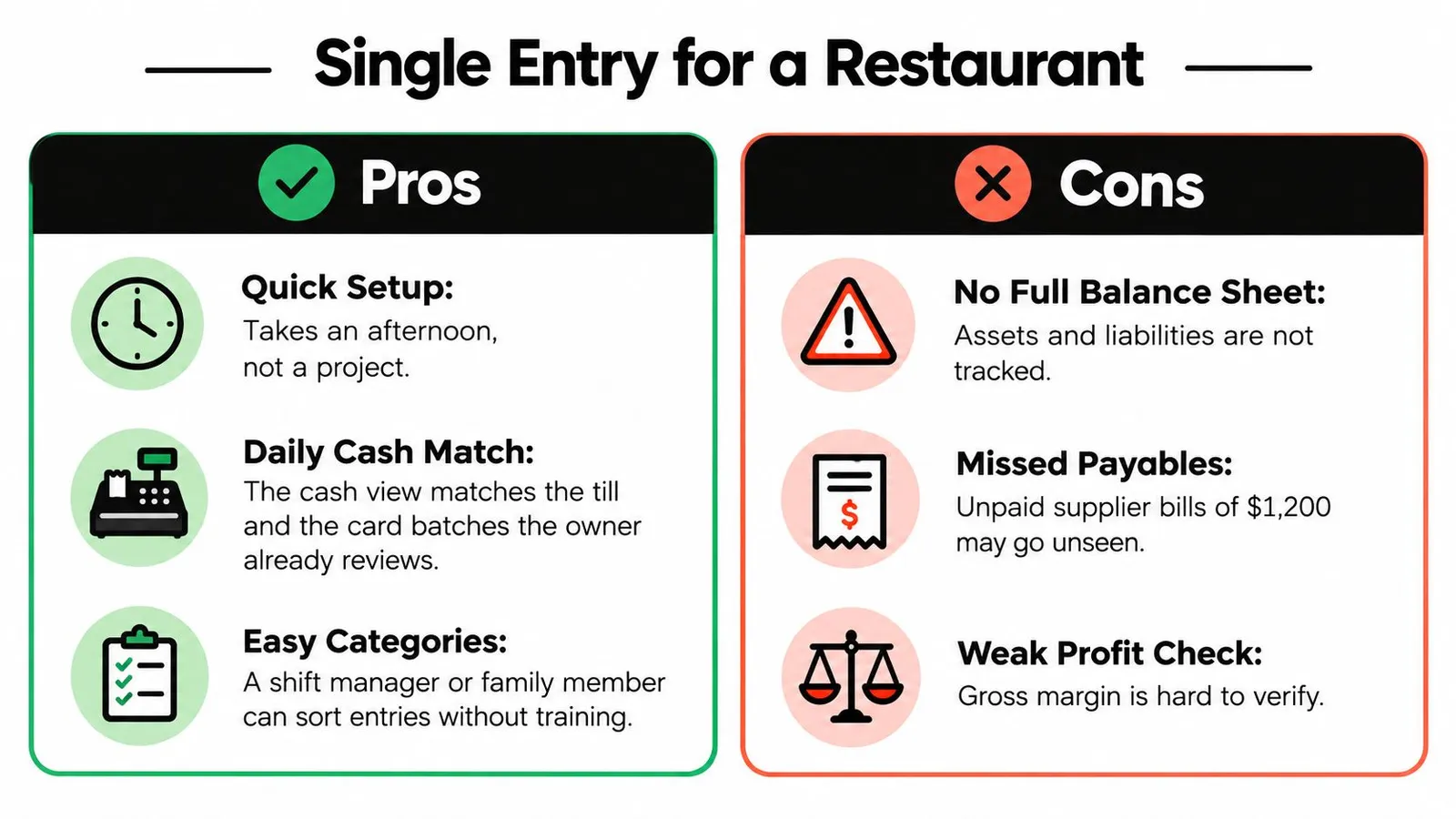
The strongest reason to start with single-entry bookkeeping is that managers already understand the underlying documents. They review till counts, card settlements, supplier receipts and payroll reports during ordinary restaurant work.
A basic cashbook can turn those records into a useful routine without a lengthy implementation project.
Where simplicity helps
- Quick setup: A straightforward spreadsheet can be ready in an afternoon if the source records are organized.
- Familiar daily view: Categories connect directly to till reports, card batches and payments.
- Accessible handover: A shift manager or family member can learn consistent categories without learning journal mechanics first.
- Low software overhead: An existing spreadsheet tool may be sufficient, although review time still has a cost.
- Useful tax preparation: Organized summaries and supporting documents give the tax preparer evidence to work from.
Where the gaps become expensive
The hidden-liability problem deserves its own attention. Unpaid suppliers, unsettled delivery-platform receipts and tips still owed to staff can make the bank balance look more comfortable than the business really is.
The FreshBooks explanation of single-entry bookkeeping identifies the underlying limitation: without paired records for receivables, payables, inventory and equity, the books don't independently connect operating activity with the full financial position.
In operating terms, a cashbook isn't a complete list of what you own and owe. Nor can you verify gross margin just by subtracting food payments from sales when purchases, consumption and payment fall in different periods.
Keep these controls active using the routines in the setup steps:
- Monthly bank reconciliation: Match recorded movements to the statement and resolve differences.
- POS-to-cash review: Compare sales, settlements, cash declarations and exceptions.
- Written payout approval: Require documented approval for payroll and tip disbursements.
These controls improve a simple system; they don't turn it into a complete ledger. When maintaining the supporting schedules becomes a substantial bookkeeping job of its own, conversion may be the simpler choice.
Tax and Record Keeping Rules to Follow
Single entry describes record structure; cash basis describes recognition timing. They're often used together, but choosing a cashbook doesn't by itself determine which accounting method your business may use for tax.
For US federal recordkeeping, the IRS guide to records businesses should keep emphasizes supporting documents and gives examples including a business checkbook, cash-receipts summaries, a check-disbursements journal, a depreciation worksheet and employee-compensation records.
Records to keep for a single-entry restaurant book
| Record | What it proves | How often |
|---|---|---|
| Daily cash-receipts summary | Sales received each day, including card and cash | Daily |
| Monthly cash receipts and disbursements summary | Monthly totals used for tax reporting | Monthly |
| Business bank statements and checkbook | Money that actually moved in and out | Reconciled monthly |
| Supplier invoices and receipts | Each expense is real and tied to the business | At the time of purchase |
| Payroll and tip-payout records | Wages and tips paid to each person | Each pay period |
| Equipment depreciation worksheet | Asset cost and depreciation claimed | Yearly |
The practical obligation is to preserve the story behind each line. A bank debit establishes that money left an account; the supplier invoice explains what the restaurant bought and why it belongs in the business records.
Record transactions generally as part of the daily close, identify each income source and capture expense documents when the expense occurs. If a supplier hasn't been paid, place the invoice in the unpaid-bill schedule rather than pretending the absence of a cashbook payment means nothing happened.
Make the evidence retrievable
Use the same reference in the cashbook and the document filename. A sales line might point to a POS closing report, while a payroll line points to an approved payroll register and its payment confirmation.
Keep staff-payment categories precise. The distinction between a service charge and a tip matters when deciding which records support restaurant revenue and which support amounts owed or distributed to employees.
Electronic records must remain accessible for inspection. Preserve readable exports and attachments, not just access to a subscription that someone may later cancel.
- Reconcile: Investigate missing deposits, duplicate payments and uncleared transactions before treating a month as complete.
- Retain: Apply the retention period appropriate to the return, asset, employment record or unresolved matter; don't delete everything under a blanket rule.
- Localize: Check state, national and local requirements for sales taxes, payroll and document retention.
These IRS points concern US federal administration. Operators elsewhere need their own jurisdiction's rules; Everglow Prosperity's guide to Australian tax record retention requirements is a useful starting point for Australian businesses, followed by advice specific to their circumstances.
How to Set Up Single-Entry Books Step by Step
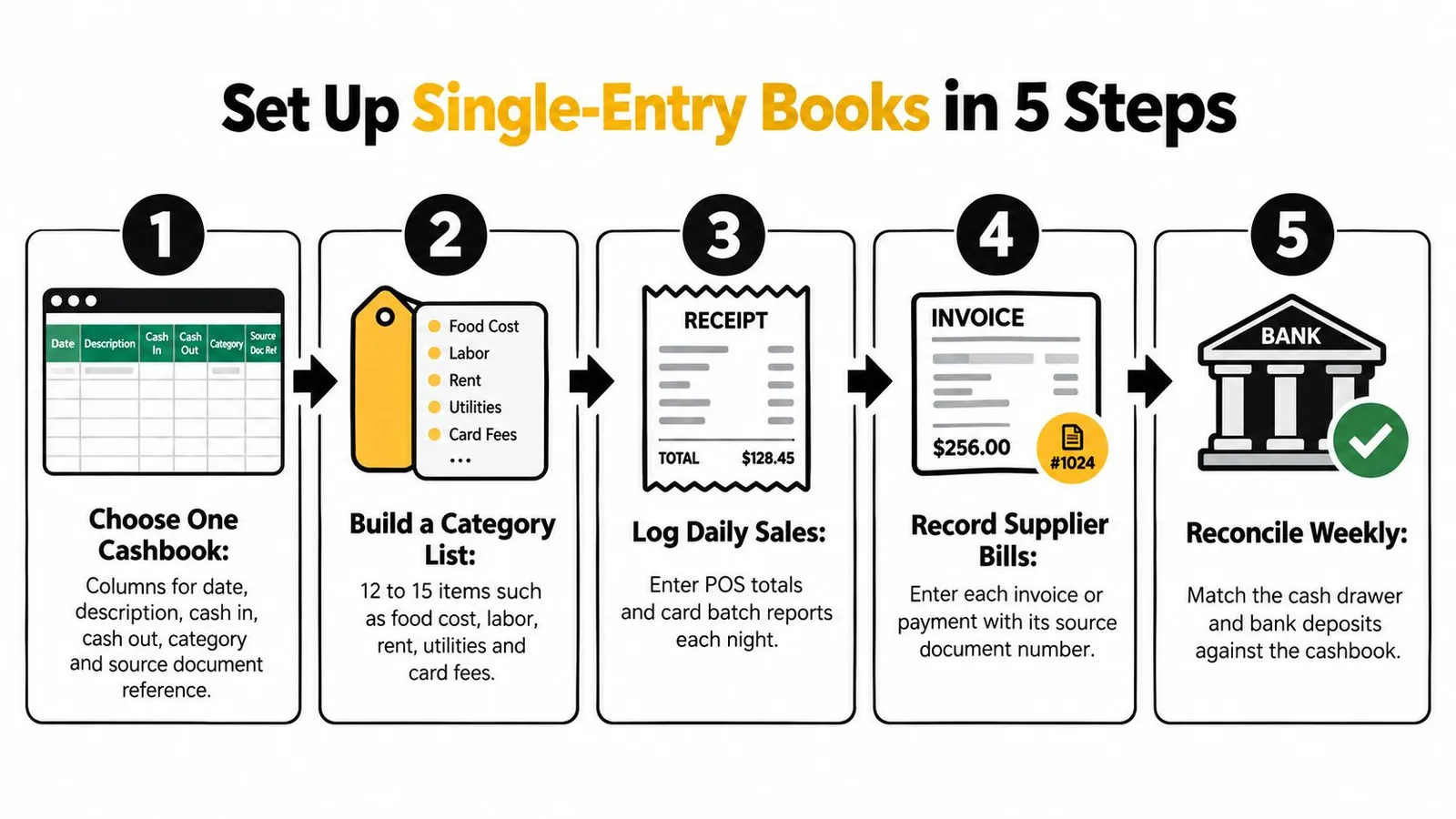
Start with a cashbook someone can maintain after a busy service, not a workbook so elaborate that everyone postpones updating it. The IRS discussion in Publication 583 describes single entry as based primarily on the income statement and emphasizes receipt and disbursement summaries supported by underlying records.
Build the daily recording routine
Choose one cashbook. Use Excel, Google Sheets or a simple cashbook app with columns for date, description, cash in, cash out, category and source reference. Protect formula cells and keep business transactions separate from personal spending.
Build a manageable category list. A practical starting design is 12 to 15 categories, including food cost, beverage cost, wages, tip payouts, rent, utilities, card fees, repairs and supplies. Keep loans and owner withdrawals separate from operating income and expenses.
Record sales from the POS close. Enter actual card settlements at the net deposit amount and note processing fees separately. Preserve gross sales and the settlement reconciliation so fees aren't hidden or deducted twice.
Attach the evidence. Give every expense line an invoice reference or receipt filename. For unpaid purchases, save the document to the bill schedule until payment creates the cashbook entry.
A cashbook template
These hypothetical template rows demonstrate formatting only. Their dates are independent of the earlier credit-purchase scenario.
| Date | Description | Cash in | Cash out | Category | Source reference |
|---|---|---|---|---|---|
| 6/14 | Friday card batch, net deposit | 6,400.00 | 0.00 | Food sales | Z-report 0614 |
| 6/15 | Produce invoice 4471 paid | 0.00 | 1,800.00 | Food cost | Invoice 4471 |
If fees were withheld from that hypothetical deposit, the category total alone wouldn't represent gross food sales. Add the settlement detail to the sales reconciliation before calculating margins.
Close and review consistently
Use approved payroll and tip reports. Enter payroll from the approved register, with timecards as support, and enter tips from the payout report rather than memory. A documented payroll automation workflow helps clarify the handoff between approved hours and payment records.
Reconcile the bank account monthly. Match deposits and withdrawals, identify outstanding items and investigate every unexplained difference. Check drawer counts and deposits more frequently during normal cash handling.
Maintain supporting schedules. Keep unpaid supplier bills, equipment, loans and owner withdrawals identifiable outside the operating cash summary. Assign responsibility for updating each schedule.
Review sales and cost relationships. Compare sales, food and beverage cost as a share of sales, and labor as a share of sales. Label cash-based ratios clearly when payment timing prevents a reliable operating-margin comparison.
If categorization still feels uncertain, Grow My Acorn's guide to understand accounting for small businesses provides useful grounding. Consistent classification is more valuable than adding categories nobody uses reliably.
Deciding Whether to Stay Single Entry or Switch
Single entry isn't wrong by default. The risk depends on transaction complexity and reporting needs, not merely how much revenue passes through the till.
The IRS guidance in Publication 583 describes single entry as the simplest system and potentially practical for a newly established small business, while cautioning that it isn't suitable for everyone. Treat it as a stage with an exit test, not a permanent identity.

Switch triggers for a single-entry restaurant book
| Trigger | Why single entry breaks | Action |
|---|---|---|
| You sell on credit or invoice customers | Receivables stay invisible until paid | Keep an open-invoice schedule or convert |
| You hold inventory beyond a few days of stock | Unsold food and beverage cost is not shown | Move to double entry with an inventory account |
| Supplier bills regularly cross month-end | Expenses shift between periods | Track payables and review them monthly |
| You buy equipment or take a loan | Assets and debt are absent from the cash view | Record them on separate schedules, then convert |
| You run more than one location or entity | Results cannot be compared or combined cleanly | Switch to double entry |
| A lender or investor asks for a balance sheet | Single entry cannot produce one reliably | Convert with an accountant |
| Cash differences you cannot explain | No debit-credit check exists to catch the error | Investigate now and add controls, then convert |
The stock trigger is an operating prompt, not a legal cutoff. The core issue is whether unused inventory materially changes your interpretation of purchases and profitability.
A cash-only microbusiness without customer credit, meaningful stock or debt may remain on a controlled cashbook. A restaurant managing delayed settlements, complex payroll, financing or rapid growth has stronger reasons to adopt a connected ledger.
Prepare a clean handover
Conversion goes more smoothly when categories are consistent and attachments are complete. Better labor planning also helps distinguish planned staffing costs from approved hours and actual payroll payments.
- Establish opening cash: Carry forward the reconciled bank balance, accounting for outstanding items.
- Open the schedules: Assemble receivables, payables, inventory, equipment and loan balances at the conversion date.
- Map the history: Match cashbook categories to ledger accounts and retain source references.
- Confirm the opening position: Have the accountant check assets, liabilities and equity before relying on the new reports.
Switching methods isn't an admission that the cashbook failed. It means the business now needs answers the original system wasn't designed to provide.
Count the triggers that apply this month. If none apply, schedule a quarterly review; if any apply, arrange a conversion conversation this quarter and prepare POS, payroll and tip-system exports for the handover.
AnchOps helps shift-based teams manage schedules, approve timecards and export payroll records, with Toast-connected tip pools and payouts for restaurants. Those approved operational records give your bookkeeper better support for either a cashbook or a double-entry ledger. Visit AnchOps to see how it can simplify the work behind your restaurant's books.
Your back-of-house partner is ready
AnchOps handles scheduling, tip calculations, labor costs, and timecards — so you can focus on your restaurant, not your paperwork.