Restaurant Payroll Automation: Boost Efficiency in 2026
Published on
By Tony Newcome — Founder of AnchOps · Owner, Pizza Harbour
This article was drafted with AI assistance and reviewed by Tony Newcome, a working restaurant operator.
Restaurant payroll automation means connecting your POS, schedule, and time clocks so hours, tips, blended rates, and overtime calculate themselves — before the pay run, not as a Friday cleanup. The biggest gains come from the places manual payroll breaks weekly: tip math, split shifts, and last-minute edits. This guide covers the core components, the business case, and implementation.
That's the moment most restaurant owners decide they need payroll automation. Not because “automation” sounds modern, but because manual payroll in a restaurant breaks down in the same places every week. Tips. split shifts. blended rates. overtime. last-minute edits. disconnected systems. The pain isn't just the time spent fixing payroll after the fact. It's the fact that by the time payroll exposes the labor problem, the money is already gone.
The practical win comes when payroll stops being a back-office cleanup task and starts working with your scheduling, POS, and labor targets before the pay run ever happens. That's where restaurants get the biggest gains.
Table of Contents
- The Hidden Costs of Manual Restaurant Payroll
- Where manual payroll actually hurts
- The hidden financial drag
- What Payroll Automation Really Means for a Restaurant
- It's not just paying people faster
- The integration problem most articles skip
- The Core Components of an Automated Payroll System
- Automated time capture
- Tip and gratuity calculation
- Dynamic pay rules engine
- Seamless integrations
- The Real Business Value Beyond Saving Time
- Better labor decisions on the floor
- What mature automation changes
- How to Implement Payroll Automation in Your Restaurant
- Stage 1 and 2 define the work before software touches it
- Stage 3 is where most avoidable mistakes happen
- Stage 4 is training, not just access
- Measuring Success KPIs for Payroll Automation
- Five KPIs that matter in restaurants
- How to read the numbers correctly
- Your Payroll Automation Launch Checklist
- Evaluation
- Implementation
- Post-launch
The Hidden Costs of Manual Restaurant Payroll
Manual restaurant payroll rarely fails in one dramatic way. It leaks money through dozens of small misses. I've seen the pattern in busy stores where managers close the week with one spreadsheet open, the POS in another tab, text messages from staff on their phone, and a legal pad full of shift notes that somehow became part of the payroll system.
The obvious cost is time. The less obvious cost is what that scramble does to decision-making. When payroll takes hours of cleanup, managers stop using labor data proactively and start treating it like a historical record.
Data shows 67% of operators spend over 100 hours annually on manual payroll processing, yet most automation guides focus only on post-cycle efficiency rather than the proactive cost control needed to hit labor targets before and during shifts (restaurant payroll processing research).
Where manual payroll actually hurts
A restaurant doesn't run on one clean pay rule. It runs on exceptions.
- Shift swaps create lag: One manager approves a change in chat, another updates the floor chart, and payroll never sees the final version cleanly.
- Tip handling gets messy fast: Direct tips, tip pools, service charges, and delivery distributions often live in separate reports or side calculations.
- Role changes distort overtime: A worker might clock hours in two jobs with different pay rates during the same week.
- Closing managers become data clerks: Instead of coaching staff or watching labor, they spend time chasing missing punches and corrections.
That's why overtime mistakes keep showing up late. If you're still piecing hours together by hand, your overtime process is already vulnerable. A tighter restaurant overtime tracking workflow usually exposes how much avoidable cleanup sits upstream of payroll.
Practical rule: If managers are editing timecards from texts, screenshots, and memory, you don't have a payroll process. You have a weekly recovery exercise.
The hidden financial drag
Manual payroll also blocks visibility. You can't manage labor tightly when your true labor picture appears only after the week is over. At that point, overscheduling, accidental overtime, and bad clock data have already turned into cost.
Global payroll processing accuracy averages 75%, and 32% of organizations report it takes two or more pay cycles to rectify mistakes (payroll automation accuracy findings). In a restaurant, that delay hits trust as much as process. Employees don't care whether the error came from the POS export, the schedule, or payroll. They care that their pay was wrong.
Payroll automation matters because it closes that gap. It gives operators one system to capture hours cleanly, apply rules consistently, and stop finding labor surprises after the week is already lost.
What Does Payroll Automation Really Mean for a Restaurant?
A lot of operators hear “payroll automation” and think it means pushing one button instead of three. That definition is too small for restaurant reality.
In an office setting, payroll software can behave like a sedan. Smooth road, predictable route, same kind of pay cycle every time. A restaurant needs something closer to an all-terrain vehicle. The ground changes every shift. People work different roles, earn tips under different rules, swap sections, cover rushes, and cross overtime thresholds in ways generic systems don't handle well.
It's not just paying people faster
For restaurants, payroll automation means a rules-driven system that can absorb operational complexity without forcing your team back into spreadsheet fixes.
It should be able to handle things like:
- Tip structures that change by role: Servers, bussers, bartenders, runners, and delivery staff don't all get paid the same way.
- Split shifts and role-based pay: One employee might work prep in the morning and serve at night.
- Tip credit and wage compliance: The system has to apply your pay rules correctly, not just calculate gross wages.
- Manager approvals tied to real data: Time, schedule changes, and payroll inputs need to line up before you approve the run.
The integration problem most articles skip
The biggest failure point usually isn't the payroll engine itself. It's the gap between systems.
Most guides fail to address the critical challenge of ensuring smooth data flow between POS, scheduling, and payroll systems to prevent duplicate entry errors that cost $291 per mistake on average, a major risk when handling complex restaurant rules like split shifts and tip credits (restaurant payroll integration issues).
That's why generic software often disappoints restaurant teams. It may process payroll well enough once the data is perfect. The problem is that restaurant data rarely starts perfect. It flows from the POS, schedule, manager edits, and team behavior on the floor.
A useful outside reference is this efficient payroll management guide, especially if you want a broader operational view of how payroll process discipline affects finance and HR. The key restaurant takeaway is simple. If your systems don't talk to each other, payroll automation turns into payroll cleanup with better branding.
Restaurants don't need “faster payroll” nearly as much as they need payroll data that survives the mess of daily operations.
What Are the Core Components of an Automated Payroll System?
Not every payroll platform is built for hospitality, and not every “automated” workflow is automated. The systems that work in restaurants usually have four practical components. If one is missing, managers end up doing the missing work manually.
Automated time capture
Manual payroll starts with bad inputs. If time entries come from handwritten edits, exported CSV files, or manager memory, the payroll run is already compromised.
A solid setup pulls approved hours directly from your operating systems so clock-ins, breaks, and role changes don't need to be rekeyed. POS-connected time data is therefore critical. The goal isn't just convenience. It's preserving one source of truth from the floor to payroll.
Payroll automation reduces administrative error rates by 85% and processing cycle time by 60% compared to manual systems, thanks to automated tax bracket calculations, overtime pay logic, and benefits allocation engines (payroll automation performance data).
Tip and gratuity calculation
Restaurant payroll can quickly become problematic. If a manager is still doing end-of-night tip math on paper, in notes, or in a custom spreadsheet, the process isn't scalable.
A better system should calculate:
- Tip pools by role: Servers, support staff, and bartenders can each follow different pool rules.
- Direct tip allocations: Credit card and declared cash tips should flow into payroll cleanly.
- Service charge treatment: Charges need to be classified correctly before payroll is finalized.
- Delivery and third-party distributions: Off-premise revenue creates its own payout headaches.
If you want to see how operators think about this problem at a practical level, this restaurant tip calculation resource is useful because it reflects the practical math teams are trying to get off managers' plates.
Dynamic pay rules engine
Restaurants don't need static payroll templates. They need a rules engine.
That means the system should be able to apply your actual policies for overtime, breaks, split shifts, role rates, and exceptions without someone rebuilding the logic every pay period. Generic payroll software often breaks here because it assumes one employee equals one pay pattern.
Operator note: If your payroll clerk still keeps a side spreadsheet for “special cases,” your system hasn't captured the rules that actually run the restaurant.
Seamless integrations
The best payroll automation setups don't ask your team to become systems translators. Data should move from scheduling, POS, and timekeeping into payroll without duplicate entry.
A simple way to evaluate vendors is to ask what still has to be keyed in by hand after setup. If the answer includes hours, tips, role changes, or approvals, automation is incomplete. This is also why it helps to compare small business payroll software with a bias toward integration depth, not just payroll features on a checklist.
Here's a quick way to assess the four components:
| Component | Manual version | Automated version |
|---|---|---|
| Time capture | Managers fix punches by hand | Approved time flows from operating systems |
| Tip handling | Spreadsheet or napkin math | Rules-based calculations inside the workflow |
| Pay rules | Exceptions handled manually | Overtime and role logic applied consistently |
| Integrations | Re-entry across tools | Data moves once and stays aligned |
If a platform can't do all four, it won't remove payroll chaos. It will just relocate it.
The Real Business Value Beyond Saving Time
Most operators buy payroll automation to reduce admin work. That's fair. But the larger payoff shows up before payroll runs, not after.
Restaurants win when labor decisions happen during the week, during the day, and during the shift. If your labor data only becomes usable at payroll close, you're managing history instead of margin. Value comes from integrated systems that turn payroll inputs into operating signals early enough to act on.
Better labor decisions on the floor
When schedule data, sales trends, and labor rules are connected, managers can see whether they're drifting toward overstaffing while service is still unfolding. That changes payroll from a weekly accounting event into a daily control system.
Labor doesn't become expensive at payroll submission. Instead, it becomes expensive at 4:30 p.m. when sales are soft and you leave the floor staffed for a rush that never comes. Operators who can spot that pattern early have options. Operators who discover it in a payroll report don't.
What mature automation changes
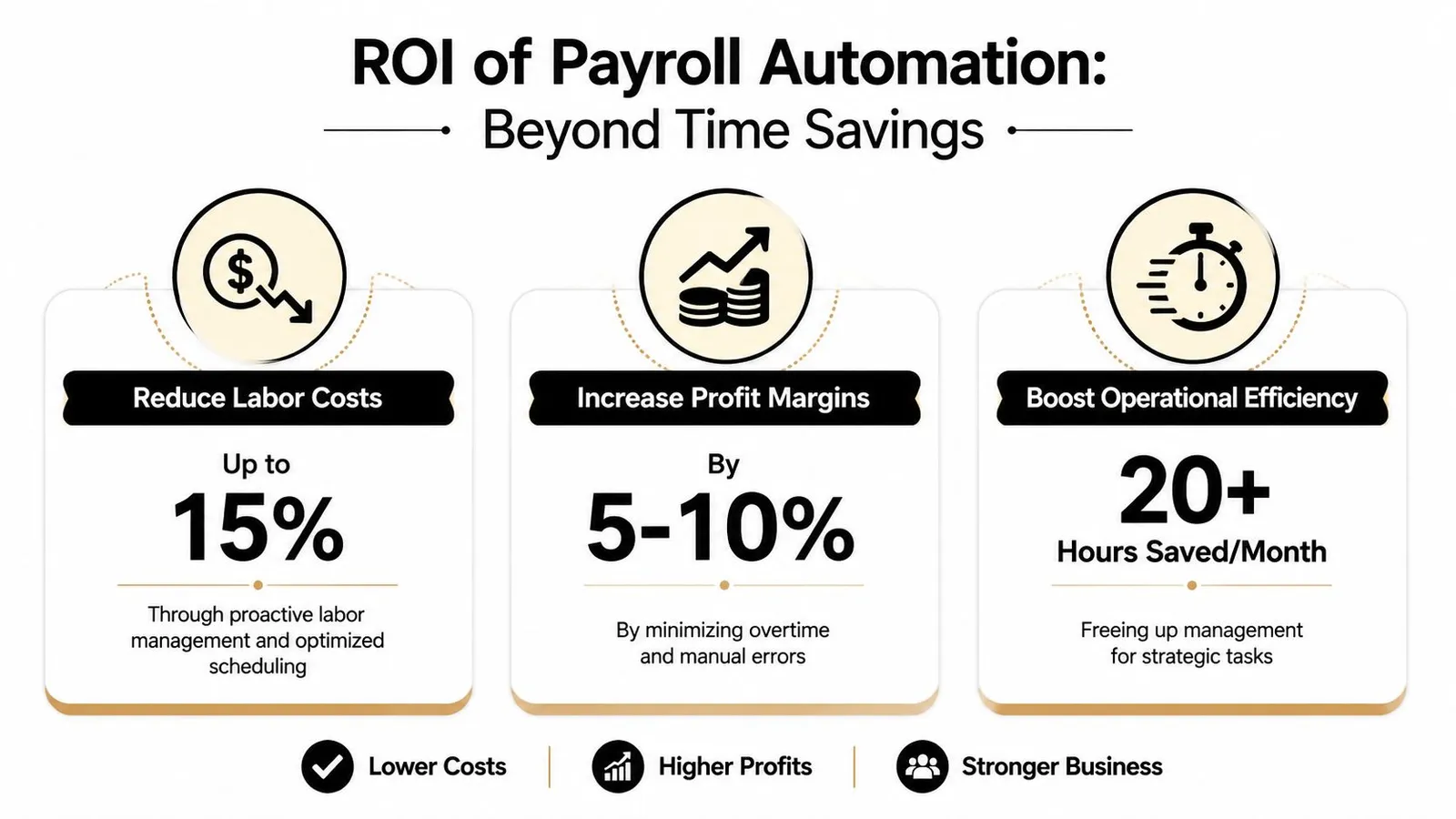
Organizations with mature payroll automation achieve 40% lower cost per employee and 35% higher staff productivity, driven by integrated data flows that eliminate manual time capture and overtime premium errors (payroll benchmarking data).
That stat matters for restaurants because it points to something bigger than clerical efficiency. Mature automation connects labor decisions, pay rules, and reporting into one operating system. Managers spend less time reconciling and more time acting.
A few practical examples:
- Before the shift: You can compare projected labor against expected sales instead of staffing from habit.
- Mid-shift: Managers can adjust cuts, breaks, or section assignments before labor drifts further.
- After the shift: Payroll approval becomes verification, not reconstruction.
The strongest payroll workflow is the one that prevents bad labor decisions upstream, not the one that cleans them up elegantly on Friday.
Saving time still matters. But protecting margin during live operations matters more. That's the business case many payroll articles miss.
How Do You Implement Payroll Automation in Your Restaurant?
Most restaurant payroll rollouts fail for one reason. The software gets configured before the operation gets defined. If your rules live in managers' heads, old spreadsheets, or “how we usually do it,” no platform will clean that up for you.
A better rollout is operational first, technical second.
Stage 1 and 2 define the work before software touches it
Start by documenting exactly how payroll works today. Not how you want it to work. How it works on a real week with real exceptions.
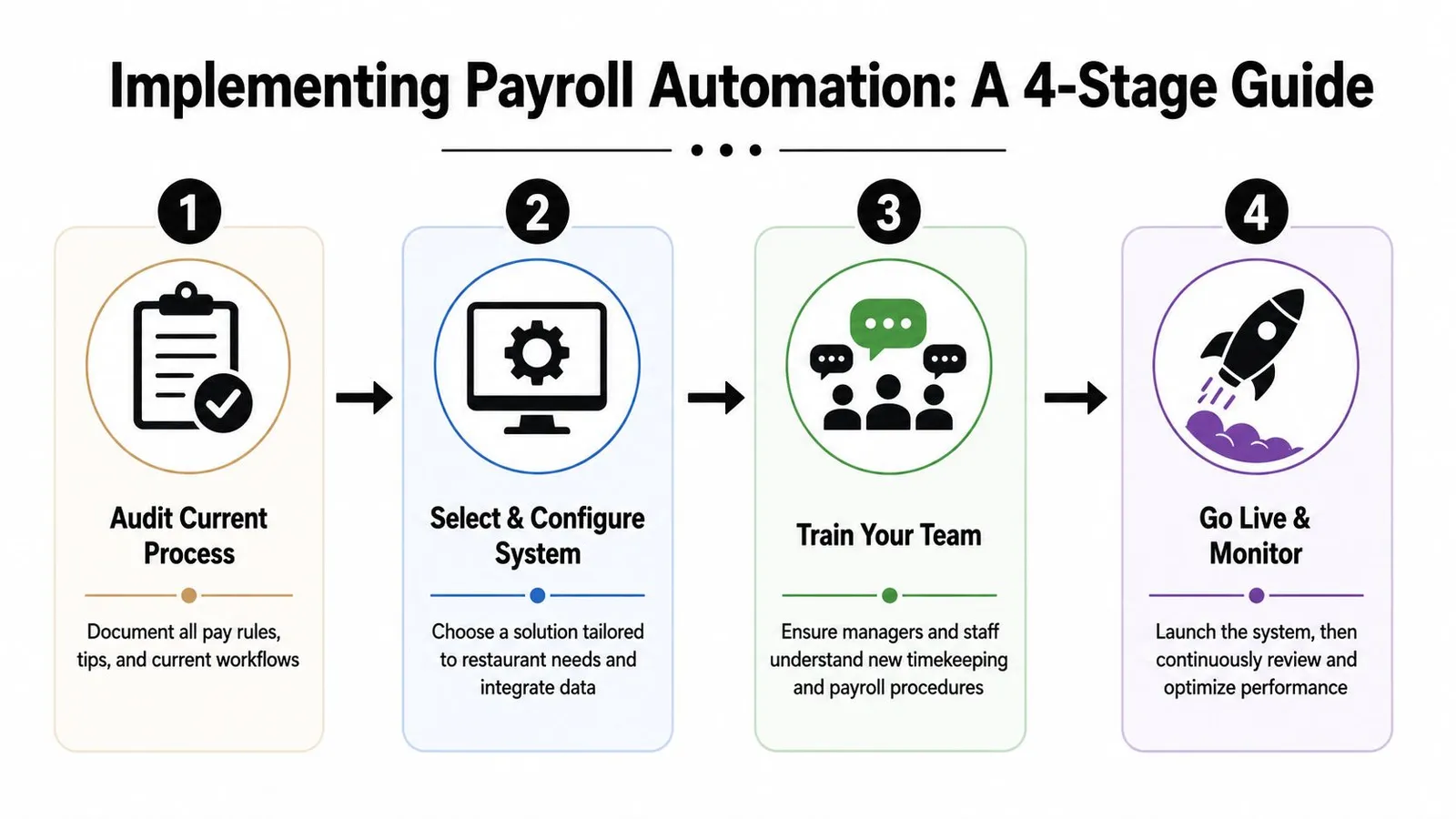
Audit your current process
List every pay rule that affects a check. Include role-based rates, tip pools, tip-outs, split shifts, break policies, overtime handling, manager approvals, and any exceptions that currently trigger manual edits.Choose the right partner
Don't evaluate software on dashboard polish alone. Look at how it handles restaurant workflows, how well it integrates with your POS and scheduling process, and how much manual re-entry remains after setup.
A quick test helps here. Ask a vendor to explain how one employee working two roles, earning tips, and triggering overtime will flow through the system. If the answer gets vague, the platform probably isn't built for your operation.
Stage 3 is where most avoidable mistakes happen
Once you've selected a system, configure it to match your operation closely. This is not the time to “simplify” your rules by ignoring edge cases. Edge cases are where payroll trust gets lost.
Use parallel testing for at least one live cycle. Run the new system beside your old process and compare outputs line by line. Check time totals, role rates, tip distributions, deductions, and approvals.
Here's a useful implementation sequence:
- Map real policies first: Don't start with defaults if your stores already have established labor rules.
- Import clean employee data: Fix titles, pay rates, and active status before the first test run.
- Test exception scenarios: Use examples with shift swaps, missed punches, multiple roles, and manual adjustments.
- Confirm approval ownership: Make sure managers know who approves hours, who reviews exceptions, and who signs off on final payroll.
A short product walkthrough can help managers see what a cleaner workflow looks like in practice:
Stage 4 is training, not just access
Training shouldn't stop at “here's your login.” Managers need to understand what they're responsible for approving, when exceptions must be fixed, and what the system will not guess for them. Staff need to know how to clock properly, review entries, and report errors early.
Enterprises that transitioned from legacy, non-integrated systems to contemporary automated platforms experienced an estimated 32% decrease in payroll processing costs and achieved accuracy rates of 99.7%, a stark improvement over non-integrated solutions (integrated payroll system findings).
That kind of result doesn't come from buying software. It comes from implementation discipline.
Measuring Success KPIs for Payroll Automation
Payroll automation is only worth the effort if you can prove it changed the operation. The easiest way to lose momentum is to rely on vague feedback like “it feels faster.” Measure the before and after with a small KPI set that managers can review every week.
Five KPIs that matter in restaurants
Start with metrics that connect directly to the problems manual payroll creates.
- Payroll processing time: Track total manager and admin hours spent preparing, reviewing, correcting, and submitting each pay cycle.
- Payroll correction volume: Count how many edits, off-cycle fixes, or employee pay complaints happen per period.
- Labor cost versus sales: Review this daily, not just at period close. A simple restaurant labor cost calculator helps standardize the discussion.
- Overtime concentration: Watch where overtime clusters by store, role, or manager. Patterns matter more than one bad week.
- Manager admin time versus floor time: If payroll automation is working, managers should spend less time reconciling data and more time running service.
How to read the numbers correctly
Don't judge success from a single payroll run. Early implementation often surfaces old problems that were previously hidden. That's a good sign, not a failure.
Use a simple scorecard like this:
| KPI | What to look for |
|---|---|
| Processing time | Fewer hours spent on collection and reconciliation |
| Correction volume | Fewer post-payroll fixes and complaints |
| Labor cost visibility | Faster recognition of overstaffing trends |
| Overtime control | Fewer surprise threshold crossings |
| Manager bandwidth | More time on coaching and service execution |
Bench test: If the system runs payroll faster but managers still discover labor overruns after the week closes, the automation improved administration, not operations.
The best KPI review happens in the same meeting where you discuss labor, scheduling, and shift performance. Payroll data shouldn't live in isolation. In restaurants, it's one more operating control.
Your Payroll Automation Launch Checklist
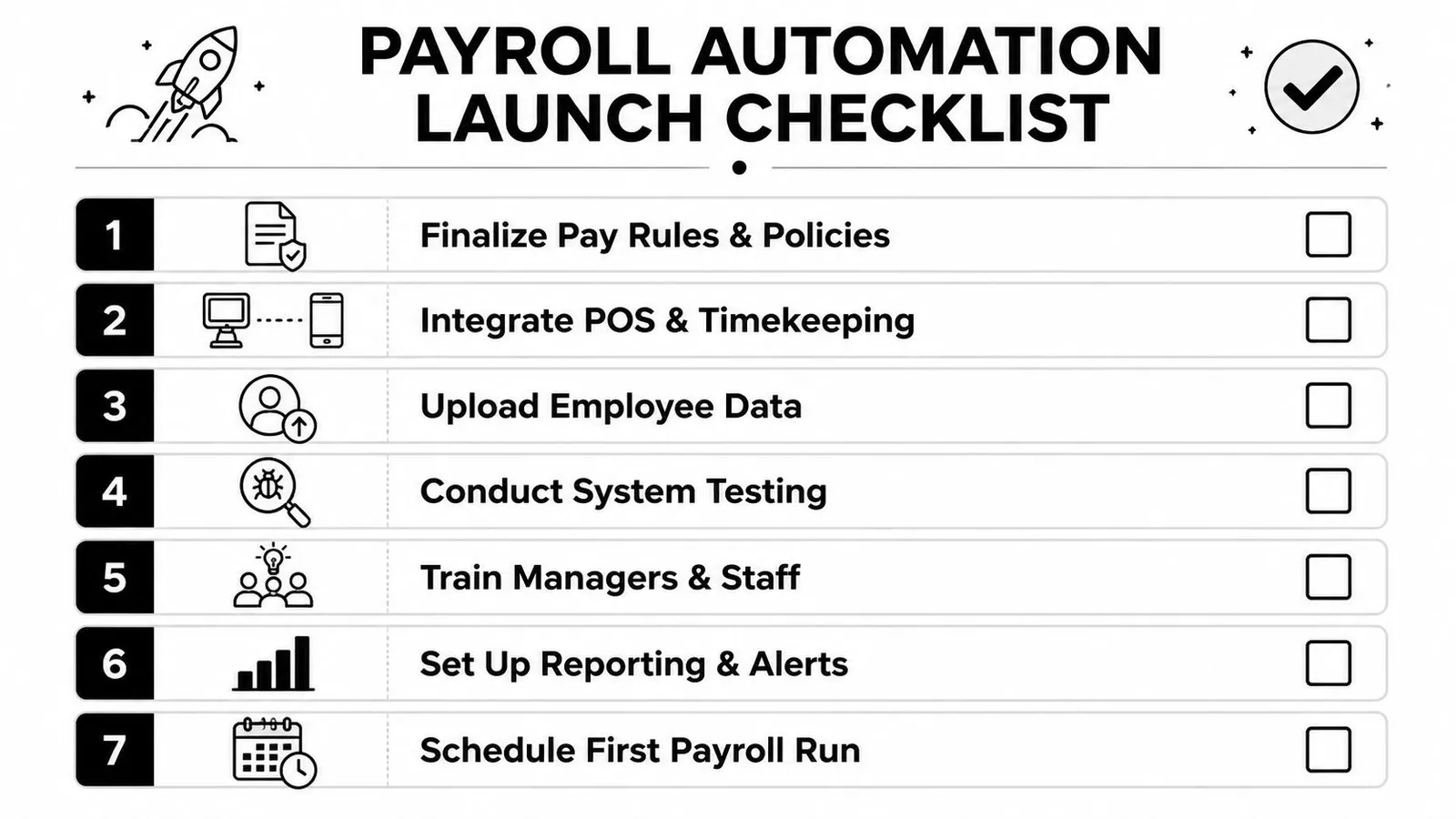
If you're about to switch systems, keep the rollout simple and concrete. Most payroll problems start when operators move too quickly on software and too loosely on process. A short checklist keeps the launch grounded in what needs to work on Monday morning.
Evaluation
- Map pay rules clearly: Document role rates, overtime treatment, tip-outs, tip pools, break rules, and approval responsibilities.
- List every manual handoff: Note where hours, tips, and edits currently move by spreadsheet, text, or verbal instruction.
- Verify integration fit: Confirm how the payroll system will connect with your POS, scheduling flow, and timekeeping process.
Implementation
- Upload clean employee records: Fix bad titles, wrong rates, duplicate profiles, and inactive staff before testing.
- Run parallel payroll tests: Compare old and new outputs using a week that includes common exceptions.
- Train by responsibility: Managers need approval training. Staff need timekeeping training. Admin teams need audit and review training.
Post-launch
- Review the first cycles closely: Watch for recurring exception types, approval delays, and employee questions.
- Set reporting habits: Build a weekly rhythm for labor review, overtime review, and payroll correction tracking.
- Refine rules quickly: If one policy keeps creating manual work, fix the workflow before that workaround becomes permanent.
The operators who get the most from payroll automation don't treat launch as the finish line. They treat it as the point where payroll becomes part of daily labor control instead of a weekly cleanup project.
If you want a restaurant-first system that connects scheduling, labor forecasting, tip calculations, timecard review, and payroll prep in one workflow, AnchOps is built for that reality. It helps operators see projected labor before schedules go live, catch overages during the shift, automate tip math from Toast data, and turn payroll from a weekly scramble into a cleaner operating routine.
Your back-of-house partner is ready
AnchOps handles scheduling, tip calculations, labor costs, and timecards — so you can focus on your restaurant, not your paperwork.