Reporting an Absence: A Manager Guide for 2026
Published on
By Tony Newcome — Founder of AnchOps · Owner, Pizza Harbour
This article was drafted with AI assistance and reviewed by Tony Newcome, a working restaurant operator.
Report an absence as early as possible, through the channel your policy names, with the shift, the reason, and whether you can find coverage — then the manager confirms receipt, decides who needs to know, and starts the replacement search immediately. It's the first move in a live coverage workflow; log it so payroll and scheduling trust the record.
A manager has to read the message, confirm the shift, decide who needs to know, and get a replacement moving before the dining room starts stacking up. The employee owes a clear report. The manager owes a fast acknowledgment, a clean handoff, and a record that payroll and scheduling can trust. If you want a practical model for the rest of this process, the conversation around agentic AI for EX teams is useful because it frames absence handling as a workflow, not a one-off message.
Table of Contents
- The Moment a Call-Out Hits the Floor
- When and How to Report an Absence
- Use the right channel, then fall back if needed
- Scripts and Checklists for Reporting an Absence
- Same-day call-out script
- Multi-day absence script
- Third-party or hospitalization script
- No-Call No-Show and Late-Start Thresholds
- What each category means on the floor
- Manager Workflow After the Report
- What each step produces
- Using AnchOps to Cut the Coverage Chaos
- One path from report to paid
- Your Reporting an Absence Playbook
The Moment a Call-Out Hits the Floor
The first thing I read is simple, who, when, and for which shift. If I have those three pieces, I can decide whether I'm covering the bar myself, pulling someone from prep, or asking the front-of-house lead to reshuffle sections before service gets away from us. If I don't have those pieces, I'm already behind.
The second thing I confirm is whether the absence is a same-day call-out or a late notice for a future shift. That matters because the fix is different. A same-day text at 4:15 for a 4:30 shift forces immediate coverage and a quick update to the prep list, while a next-day absence gives me time to move people, adjust the station map, and tell the opener what changed. When a manager treats both as the same kind of problem, the dining room pays for it.
Practical rule: the absence report starts the staffing chain. I'm not just logging a message, I'm triggering coverage, comms, and payroll follow-through.
A restaurant floor makes that plain fast. One missing expo can slow every server. One missing bartender can turn a decent Friday into a bottleneck behind the rail. That's why the report has to flow into a real response, not just sit in a phone thread that three people misread.
The cleanest teams also keep the record where the shift can be found later, not buried in a personal chat. If you're building that kind of process, it helps to look at real-world SOP documentation and treat absence handling the same way you'd treat opening procedures or closing checks. The bar for this moment is straightforward, the manager needs enough information to act now, and the employee needs to know the message was received.
When and How Should You Report an Absence?
Employees should report an absence before the shift starts, not after the fact. A practical rule used in workplace guidance is to notify the manager as soon as possible, with some policies requiring notice no later than one hour after the normal starting time or one hour before the scheduled start (University of Glasgow attendance policy). In my experience, the earlier window works better on the floor because it gives a chance to reassign the section before guests are seated.
Use the right channel, then fall back if needed
The clean order is phone first, text second, app notification third. The phone call matters because the manager can ask the one question that affects coverage, “How long are you out?” The text or app message matters because it leaves a paper trail when the manager is in a walk-in cooler, on the line, or already handling another call-out.
If the supervisor isn't reachable, the report should move to the manager on duty. Silence is not a fallback plan.
A small independent restaurant may run this from a single phone and a group chat. A larger operation with HR or payroll systems should still keep the same backbone, because the reporting flow has to produce a usable record, not just a courtesy notice. The biggest miss I see is not the reason itself, it's the missing duration. Without a likely return date or at least a check-in time, coverage becomes guesswork.
| Field | Example | Why It Matters |
|---|---|---|
| Employee name | Maria Lopez | Identifies who is out |
| Scheduled shift | Dinner line, 4 p.m. to close | Tells the manager what coverage is missing |
| Date and time of contact | 3:50 p.m. on Tuesday | Proves the report was made in time |
| Reason category | Illness, transport, family issue | Helps classify the absence consistently |
| Expected duration | “Today only” or “Through Thursday” | Drives coverage and schedule changes |
| Callback number | Best mobile number | Lets the manager follow up fast |
| Doctor's note status | “Will send if required” | Reduces back-and-forth later |
That table is the difference between a usable report and a vague “can't make it.” For managers tracking staffing, the restaurant availability and coverage tracking approach is useful because it reinforces that availability data and absence data have to live together, or the schedule gets messy fast.
The same logic holds whether you're running a neighborhood bistro or a bigger operation with HR. If every absence is reported the same way, coverage gets faster, payroll gets cleaner, and the person opening the next shift isn't trying to decode three different message styles at once.
Scripts and Checklists for Reporting an Absence
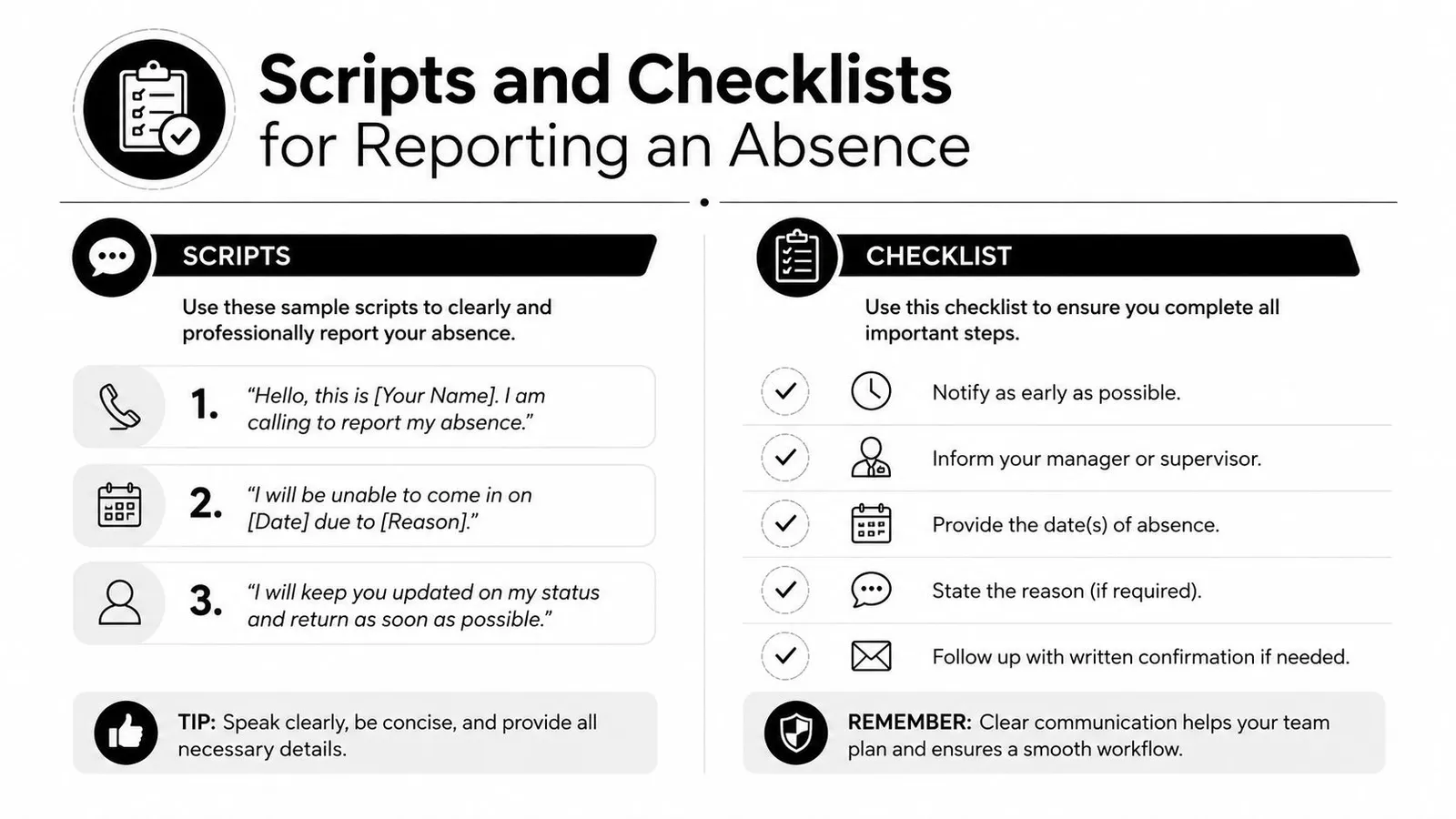
員工一缺席,管理者要先拿到可用資訊,不是先猜情況。短訊可以,電話也可以,重點是把排班、原因、預計缺席時間和可回撥方式一次交代清楚。太短只會讓人來回追問,太長又會拖慢尖峰時段的調度。
Same-day call-out script
“Hi, this is Jordan. I'm scheduled on sauté tonight at 5 p.m., and I can't make the shift because I'm sick. I expect to miss today only, and I'll check in by noon tomorrow. You can reach me at this number if you need anything else.”
Checklist
- Shift: Name the station and start time.
- Reason category: Keep it broad.
- Expected duration: Say whether it's one shift or more.
- Callback: Include the best number.
Multi-day absence script
“Hi, this is Jordan. I'm out for my scheduled shifts on Wednesday and Thursday due to a medical issue. I expect to return Friday, and I'll confirm by 3 p.m. Thursday if that changes. Please let me know if you need anything else from me.”
Checklist
- Scheduled dates: List each affected shift.
- Expected return: Give the best estimate you can.
- Check-in time: Set one.
- Callback: Make it easy to reach you.
Third-party or hospitalization script
“This is Jordan's sister calling. Jordan has been hospitalized and can't contact the restaurant right now. Jordan is scheduled for the 6 p.m. shift on the grill, and we'll update you as soon as we know more. Please call this number for any follow-up.”
Checklist
- Who is calling: State the relationship.
- Employee identity: Say the employee's name.
- Shift affected: Include the shift details.
- Follow-up contact: Give a number that works.
On the manager side, keep the reply just as tight. Acknowledge the report, confirm the shift, and ask only for what you need to cover the floor. Do not ask for medical details, and do not push for a return date the employee cannot give yet. A clean acknowledgment sounds like, “Got it, I've logged your absence for tonight and I'm finding coverage now.”
If your operation wants this kind of consistency in a documented format, real-world SOP documentation shows how repeatable work becomes a shared standard. When the same report starts repeating across shifts, the timestamps you captured here become the evidence trail that separates a coverage problem from an attendance problem.
No-Call No-Show and Late-Start Thresholds
The floor can't treat every attendance problem the same way. A no-call no-show is one bucket, a late start is another, and an early departure is a third. If you blur them together, you end up disciplining the wrong thing and confusing the team about what triggers escalation.
What each category means on the floor
A no-call no-show means the employee failed to show up for the scheduled shift and failed to notify the employer. One policy source says each day without a report or call can count as a separate event, and another treats it as a no-call no-show if the employee is more than two hours past the scheduled start time with no contact (Indeed no-call no-show policy overview). A late start means the employee did contact you but arrived after the scheduled start. An early departure means they worked part of the shift and then left before the end.
The key question is not whether the person was inconvenient, it's whether they communicated before the shift broke down.
In discipline, the policy ladder is usually verbal warning, then written warning, then suspension, then termination. The more serious the silence, the faster the ladder moves. Some handbooks are much stricter, but the manager's job is to apply the company rule that exists, not improvise one on the spot.
| Category | Definition | Typical 1st Offense | Typical 2nd Offense | Documentation to Capture |
|---|---|---|---|---|
| No-call no-show | Scheduled shift missed with no notice | Verbal or written warning | Suspension or termination | Time of shift, time of any contact, reason given or no contact, witness if any |
| Late start | Employee reports but arrives after start time | Verbal warning | Written warning | Scheduled start, actual arrival, reason, whether notice was given |
| Early departure | Employee leaves before shift ends | Coaching or warning | Written warning | Time left, who approved it, reason, affected station |
That table is the practical lens for the shift lead. If someone texts at 6:15 for a 6 p.m. line shift, that's not the same as disappearing until 8 p.m. with no message. The record has to capture the timestamp, the reason given, any witness, and whether the employee attempted contact at all, because that's what protects the manager when the conversation gets formal later.
What Should a Manager Do After the Report?
The moment the report lands, I move in a fixed order. First, I acknowledge receipt and confirm the duration, so the employee knows the message was logged. Second, I check the schedule and mark every open shift that the absence touches. Third, I post a coverage request with the role, the station, and the timing, so people know what they're claiming.
Fourth, I confirm the cover in writing and tell the on-shift team what changed. Fifth, I update the schedule and rebuild the labor projection, because a cover who was already near a full week can create overtime exposure. Sixth, I log the absence reason in the timecard system with the proper code so payroll doesn't have to guess later.
What each step produces
- Acknowledgment message: Proof the absence was received.
- Open-shift note: A visible list of what still needs coverage.
- Coverage request: A specific ask, not a vague “anyone available?”
- Confirmed replacement: A written handoff to the person taking the shift.
- Updated schedule: The live version the team should follow.
- Timecard code: The payroll record that closes the loop.
The hardest mistake is thinking the shift is covered once someone says yes in a text thread. It isn't covered until the right person knows, the schedule shows it, and the timecard reflects it. If your team swaps shifts often, the shift swap management workflow is worth studying because the same handoff discipline applies when an absence turns into a replacement.
The cleanest stores also keep the closing lead in the loop if the swap changes tip distribution or section assignments. That avoids a lot of awkward corrections at the end of the night, and it keeps the payroll file aligned with what happened on the floor.
Using AnchOps to Cut the Coverage Chaos
The mess after a call-out usually comes from fragmentation. One text goes to a manager, another to a group chat, a third to a shift lead, and the schedule gets edited in two places before anyone is sure which version is real. A single shift-based workflow fixes that by tying the report, the coverage request, and the timecard together.

One path from report to paid
When the absence is logged, qualified team members can be notified right away, and the coverage request can include the role, station, and tip-pool impact so the right person claims it first. That matters more than a generic “need help tonight” blast, because in a restaurant the difference between expo, bar, and line coverage changes the night in different ways.
The other big win is timecard sync. The missed hours can be coded in the same system that receives the replacement's clock-in, which means payroll doesn't need a second cleanup pass. If you're trying to reduce after-hours cleanup in support workflows, reduce after hours ticket load is a useful parallel, because the same logic applies here, fewer handoffs means fewer mistakes and less late-night chasing.
AnchOps fits that model as one option for shift-based scheduling, coverage, and timekeeping. Its scheduling, coverage, and timecard tools are built to keep the report, the swap, and the labor projection in the same flow, which is exactly what a busy restaurant manager needs when the floor is already in motion. For scheduling context, the AnchOps scheduling workflow shows how the schedule, coverage request, and labor view stay linked instead of living in separate silos.
Your Reporting an Absence Playbook
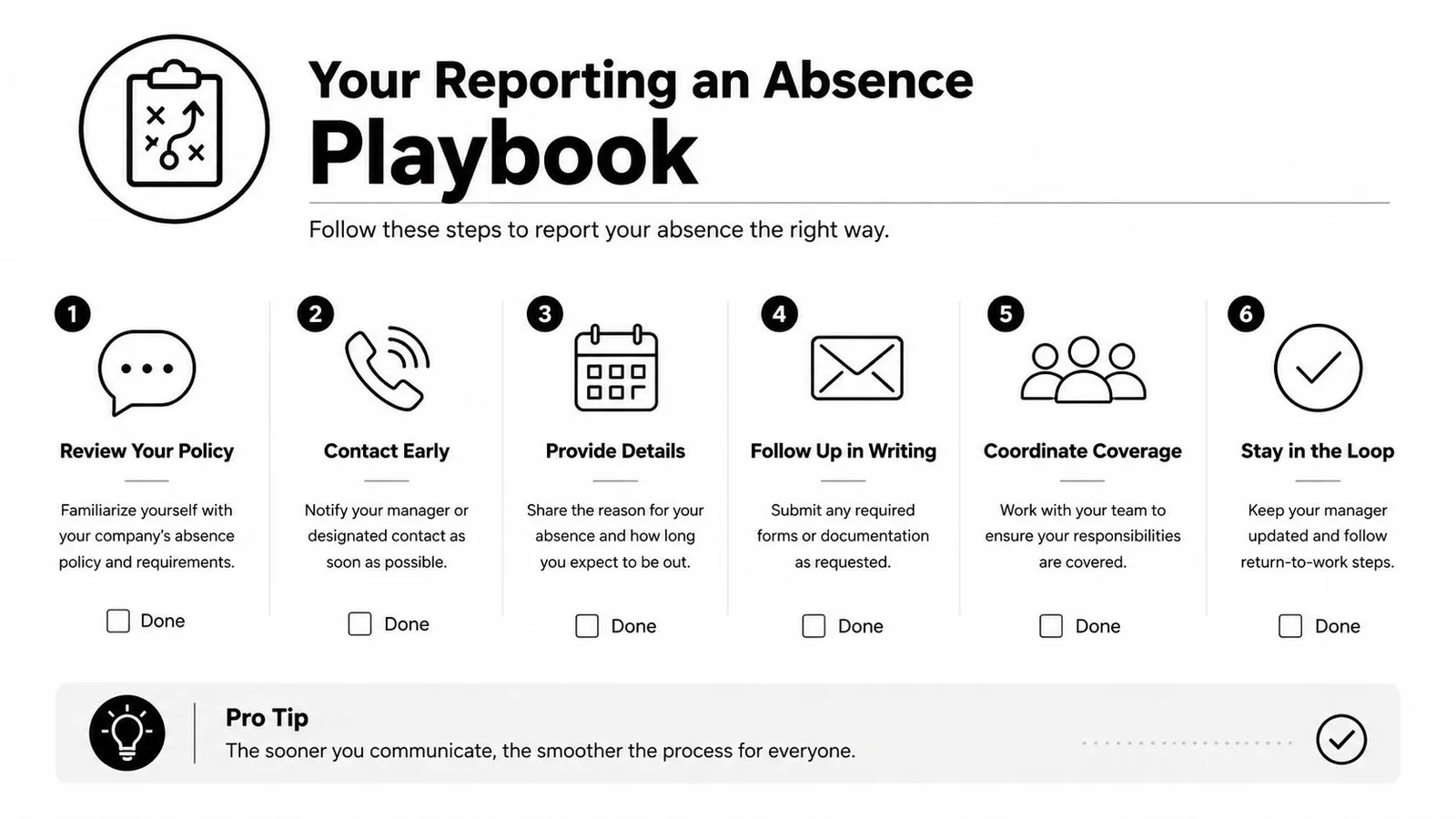
Run the same loop every time. The employee reports within the window, uses the right channel, and gives the shift, reason category, duration, callback, and note status. The manager logs it, posts coverage to qualified staff, assigns the replacement, updates the timecard and payroll, and tells the closing lead if the swap affects tips or sections.
Then the system does its part. It keeps the notification trail, syncs the new schedule, and shows the labor-cost change against the prior shift. That record matters because it separates a real coverage decision from a memory-based one.
Before the next schedule goes out, I check four things: every absence has a reason code, every coverage request has a confirmed claimant, every timecard edit is signed off, and every no-call no-show lands in the discipline tier written in policy. If those four checks pass, the next shift starts cleaner than the last one ended. If they don't, the same chaos shows up again on the next call-out.
If you want a cleaner way to handle call-outs, shift swaps, coverage requests, and timecards in one place, AnchOps gives restaurant managers a practical system to run that workflow without juggling texts and clipboard notes. It fits the exact problem this guide covers, from the first absence report to the final payroll entry.
Your back-of-house partner is ready
AnchOps handles scheduling, tip calculations, labor costs, and timecards — so you can focus on your restaurant, not your paperwork.