Create Staff Schedule: Save Time & Money
Published on
By Tony Newcome — Founder of AnchOps · Owner, Pizza Harbour
This article was drafted with AI assistance and reviewed by Tony Newcome, a working restaurant operator.
To create a staff schedule that survives service, forecast labor needs from your sales history, build a reusable template around those patterns, then fill shifts by availability and skill — and set a process for swaps and coverage before you publish. Scheduling from scratch every week is what produces schedules that look finished on paper and collapse at the first call-out.
That's why so many restaurant schedules look finished on paper but fall apart in service. The job isn't just to create staff schedule coverage for next week. It's to build a schedule that can survive callouts, protect service, and stay close to labor targets once the doors open.
Table of Contents
- Stop Rebuilding Your Schedule from Scratch Every Week
- The schedule is an operating tool
- Stop treating each week like a one-off
- Gather Your Scheduling Ingredients First
- Build one source of truth
- What works and what doesn't
- Use Sales History to Forecast Your Labor Needs
- Read the pattern, not just the total
- Turn forecast into staffing decisions
- Build a Reusable Template Not a Disposable Schedule
- Build the week by pattern
- A template should carry structure, not assumptions
- What a solid template includes
- Manage Swaps and Coverage Without the Chaos
- Swaps need rules, not group texts
- The policy that actually works
- Protect the manager from becoming the bottleneck
- Publish Schedules and Monitor Labor Costs in Real Time
- The schedule has to be enforced
- Build a mid-shift control habit
Stop Rebuilding Your Schedule from Scratch Every Week
Most managers don't hate scheduling because they dislike planning. They hate it because they're rebuilding the same week again and again, only with different problems layered on top. The names change, the requests change, the sales pattern shifts a little, and the whole process turns into a memory test.

When the schedule lives across paper notes, screenshots, group texts, and whatever the closing manager remembered to mention, you're not really scheduling. You're recovering from missing information. That's why the process feels so expensive even before payroll starts.
TimeForge reports that the average restaurant manager using pen and paper spends 2.21 hours every week just scheduling employees, which equals 5.52% of the work week in its review of restaurant scheduling statistics. That's not a small admin chore. That's recurring operating time pulled away from prep, coaching, service standards, and shift control.
The schedule is an operating tool
A weak schedule creates the same predictable messes.
- You overstaff slow periods because no one trusted the sales pattern enough to trim.
- You understaff the rush because the schedule was built around availability first and demand second.
- You spend all day reacting because the first draft had no margin for real life.
- You lose the mid-shift because labor decisions happen after the damage is done.
If you're trying to tighten labor during service, it helps to understand what a manager is expected to do in that part of the day. This guide on how to staff a restaurant mid shift is useful because it frames the handoff between setup, peak coverage, and the adjustments that happen once sales start showing their true pace.
A schedule should make the shift easier to run. If it creates more negotiation, more exceptions, and more cleanup, it wasn't built well enough.
Stop treating each week like a one-off
The fix starts with a mindset change. Don't think of scheduling as filling boxes on a grid. Think of it as creating a repeatable labor system that you refine each week.
That changes the question from “Who can I put where?” to “What does this business need, and how do I build coverage that holds up when the day gets messy?” Once you ask that, the schedule gets sharper fast.
Gather Your Scheduling Ingredients First
Good schedulers do the same thing good kitchens do before service. They prep first. Trying to create staff schedule coverage before you've gathered the right inputs is like firing tickets before prep is done. You can do it, but you'll pay for it all shift.
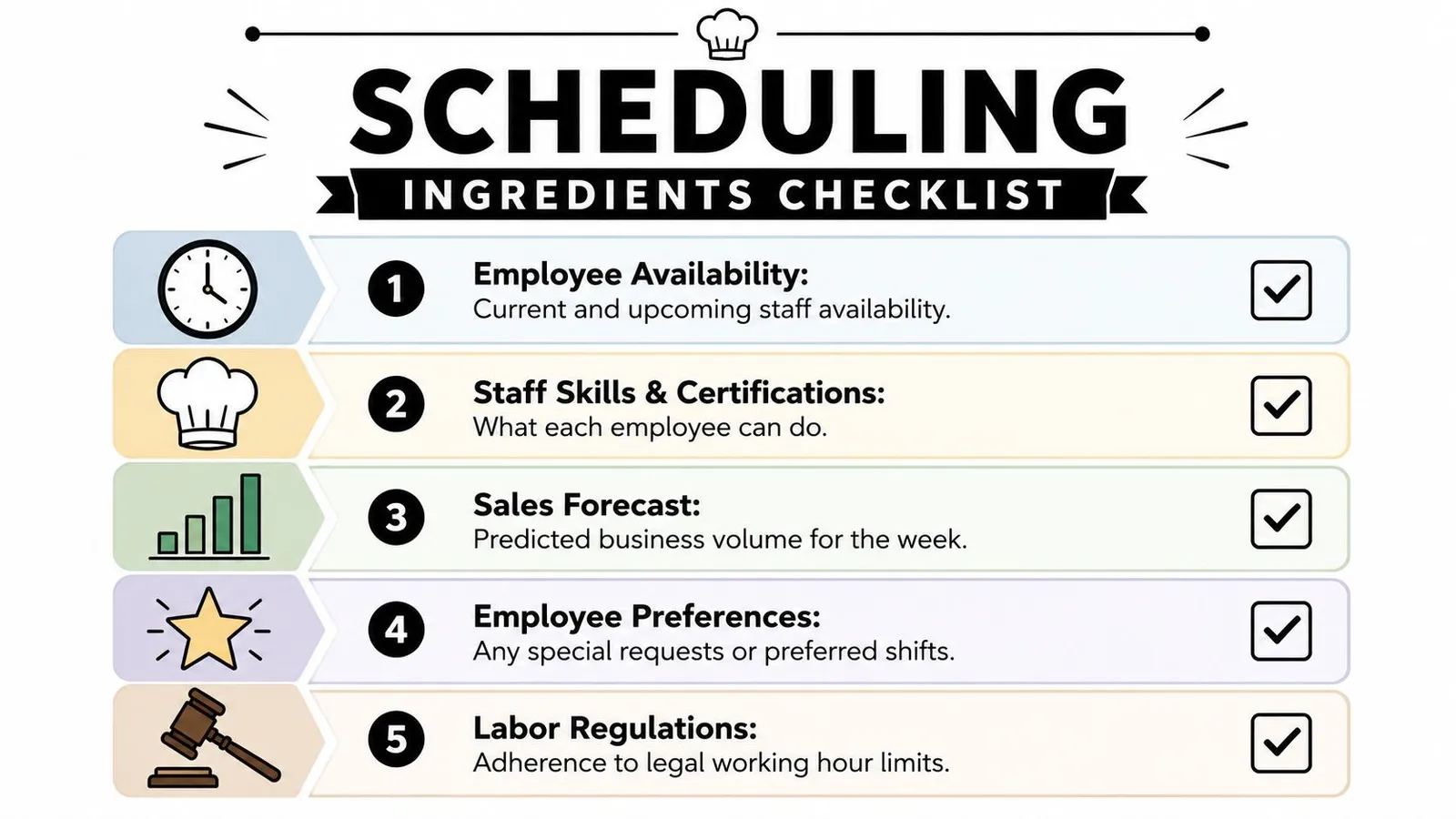
The biggest mistake is opening the spreadsheet or scheduling app too early. If availability is incomplete, skills aren't documented, and approved time off is sitting in text messages, the schedule is already unstable before the first shift is assigned.
Build one source of truth
Before you touch the week, gather five things in one place.
- Availability that's current: Not what someone could work last month. What they can work this week and next.
- Role qualifications: Who can open bar, who can expo, who can close grill, who can train, who can run solo.
- Time-off decisions: Approved requests need to be locked, not revisited every time you build.
- Employee preferences: Not every preference can be honored, but known preferences help you reduce friction.
- Rules and limits: Overtime policies, break rules, max-hour guardrails, and any house scheduling standards.
A lot of managers know this in theory, but they still collect it in scattered channels. That's what breaks the process. The issue isn't usually lack of effort. It's lack of structure.
What works and what doesn't
Here's the practical difference.
| Approach | What happens |
|---|---|
| Requests by text | Managers miss details and revisit the same conversations |
| Verbal availability updates | Shift leads schedule from memory and make preventable mistakes |
| Skills kept “in your head” | The wrong person gets assigned to a critical station |
| One shared system | The draft starts cleaner and changes stay visible |
Practical rule: If a manager has to remember it, it's not part of the system yet.
The best setup is boring, and that's the point. Every employee updates availability in one place. Every approved request is stored there. Every role tag is visible there. Then the schedule starts from facts instead of guesswork.
Once you've done this, building the week gets faster. More importantly, the schedule survives contact with reality better because it was built from complete information, not scraps.
How Do You Forecast Labor Needs from Sales History?
Managers usually know their busy nights. What they often don't map clearly is how demand changes by daypart, station, and hour. That's where labor drift starts. If the forecast is vague, the schedule will be vague too.
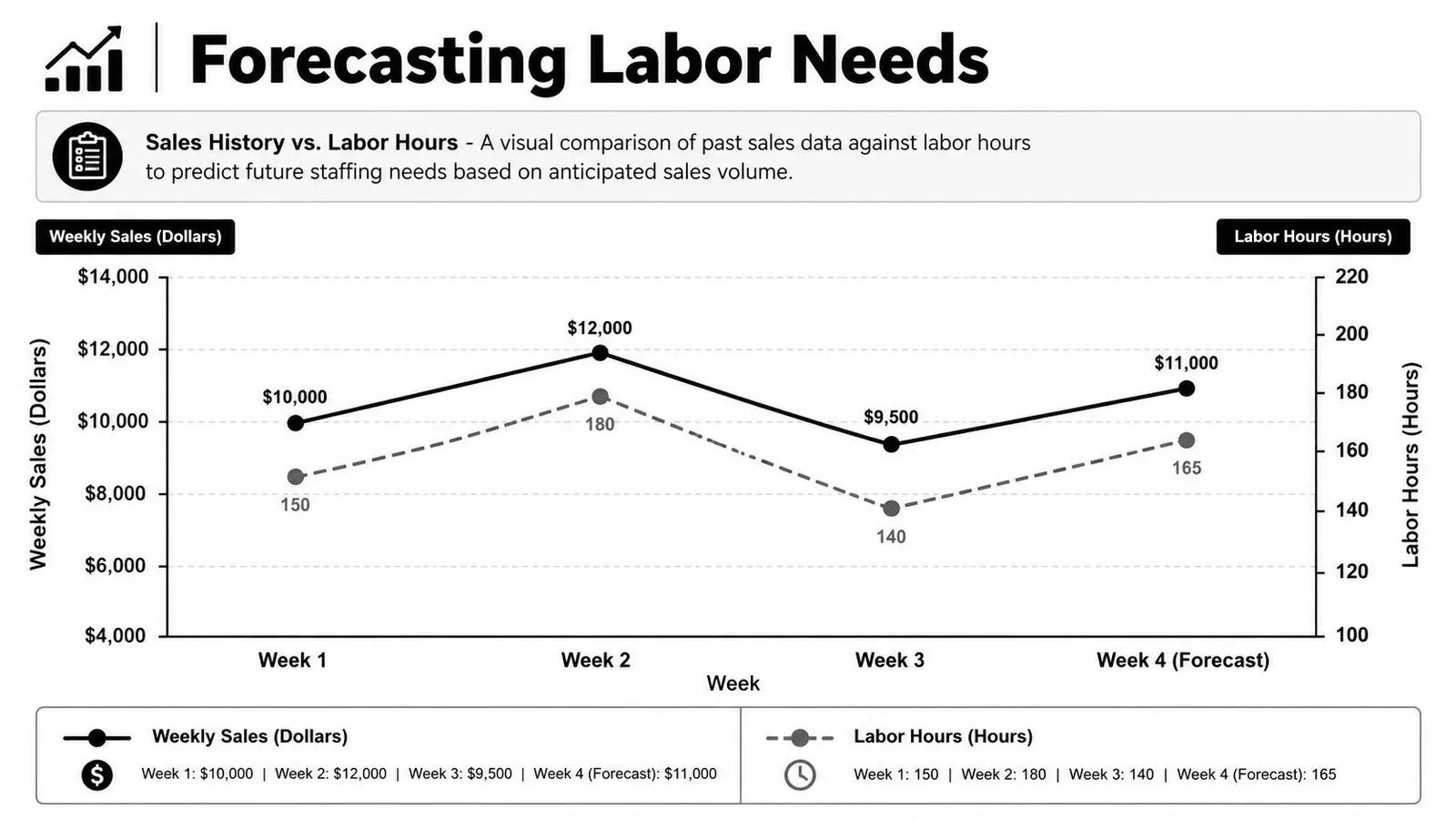
The modern process is more disciplined. Contemporary guidance from hospitality software and operations sources consistently breaks scheduling into a four-step workflow: forecast business demand, translate that demand into required labor, build the schedule, and then adjust it as conditions change, according to NetSuite's hospitality staff scheduling guidance. That sequence matters because it forces you to schedule from demand outward, not from availability inward.
Read the pattern, not just the total
Weekly sales totals help, but they don't tell you enough on their own. A strong forecast looks at where volume lands.
Review patterns such as:
- Lunch versus dinner mix
- Early week versus weekend behavior
- Weather-sensitive periods
- Booking-heavy shifts
- Event-driven spikes in your trade area
Then translate those patterns into labor by role. Not “Friday is busy.” Something tighter. Friday dinner needs stronger line coverage, a host setup that can absorb the door, and front-of-house staffing that matches the actual rush window instead of the whole night.
If you want a deeper walkthrough on turning POS data into practical labor planning, this piece on restaurant sales forecasting is worth reviewing.
Turn forecast into staffing decisions
A forecast only helps if it changes staffing decisions. That means asking better questions while you build.
| Forecast signal | Scheduling decision |
|---|---|
| Reservations load early | Bring support in before the rush, not after it starts |
| Sales dip after late lunch | Cut overlap instead of carrying excess coverage |
| Strong bar mix | Staff for beverage execution, not just table count |
| Event nearby | Add flexible backup, especially in prep and host positions |
The point isn't mathematical perfection. It's to stop using generic weekly templates when the business has already told you what it usually does.
Some tools can connect this directly to your POS data. AnchOps, for example, syncs sales history and employee availability to generate labor forecasts and draft schedules before publishing. That's useful when you want the first pass to reflect demand rather than last week's guess.
Your sales history is the closest thing you have to a scheduling coach. Use it.
Why Build a Reusable Template Instead of a Disposable Schedule?
Starting from a blank page every week is a choice. For most restaurants, it's the wrong one. You already know what a normal Tuesday lunch looks like. You know what Friday dinner usually needs. You know which dayparts require heavier prep, stronger leadership, or extra closing support. Build from that.
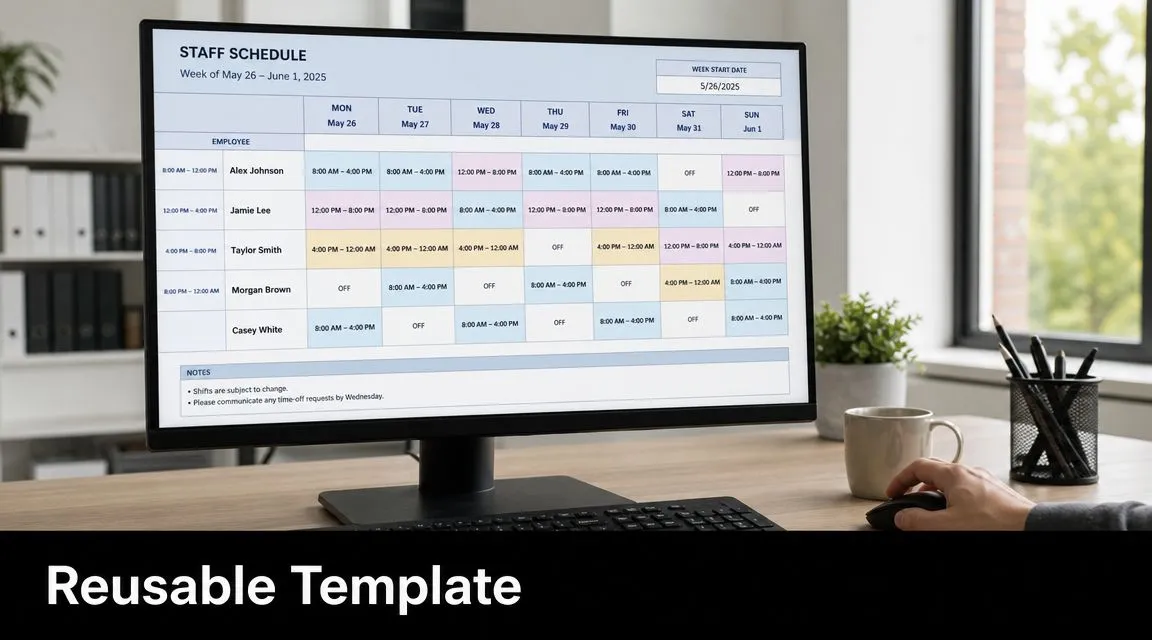
A reusable template doesn't mean a rigid schedule. It means a baseline model of how your restaurant runs when demand is normal. From there, you adjust for holidays, private events, vacations, weather risk, or staffing gaps.
Build the week by pattern
A good master template includes the shifts and roles you repeatedly need, not just the people who worked them last time.
That usually means defining:
- opening, peak, and closing coverage
- station-specific needs by daypart
- lead roles for each major service
- built-in overlap where handoffs usually get messy
- optional flex shifts that can be added or removed
With this approach, managers save real time. Instead of solving the whole week from zero, you're editing a working draft.
A template should carry structure, not assumptions
The template should answer operational questions before names are added. How many closers do you need on a normal Thursday? Which prep role can convert into service support if volume runs hot? Where do you need cross-trained coverage instead of a single point of failure?
Those answers belong in the template. Personal preferences and one-off exceptions come later.
A quick visual example helps here:
What a solid template includes
| Template element | Why it matters |
|---|---|
| Core shifts by daypart | Prevents rebuilding predictable coverage |
| Role-based slots | Keeps the schedule focused on operational need |
| Flex positions | Gives you room to adjust without rewriting everything |
| Open and close anchors | Protects the moments where service breaks down fastest |
The trap is making the template too specific. If it depends on the exact same people every week, it becomes fragile. Keep the structure stable. Let the assignments move.
That's the difference between a schedule that saves time and one that just copies old mistakes faster.
How Do You Manage Swaps and Coverage Without the Chaos?
Publishing the schedule is when a second job begins. Now you're managing swap requests, late changes, dropped shifts, family emergencies, and the employee who suddenly remembers they can't work Saturdays. This part breaks weak systems fast.
A manager who builds a decent schedule can still lose the week if there's no process for exceptions. In these situations, labor usually leaks. A harmless-looking swap creates overtime. A coverage fix puts the wrong person in a key spot. A rushed approval solves tonight and creates a bigger hole tomorrow.
Swaps need rules, not group texts
The common failure is treating every change as a private conversation. One person texts the manager. Another asks a shift lead. Someone says they found coverage, but no one checks whether that person is trained for the role or whether the switch pushes hours too high.
That's why understaffing, overstaffing, overtime creep, and weak exception handling show up so often in scheduling problems, as noted in hospitality employee scheduling guidance from doForms. The problem isn't only the original schedule. It's the lack of controls after publication.
The policy that actually works
You need a short, enforceable process.
Employees can request a release or swap
They should initiate the request inside a shared system, not across random messages.
They can suggest coverage
That removes the manager from being the first-line negotiator for every issue.
Management approves against rules
Check role qualification, hour impact, and whether the move weakens another shift.
The change updates visibly
Everyone should see the final approved version in one place.
If a swap isn't documented, approved, and reflected in the live schedule, it hasn't happened.
For restaurants that rely on temporary help during rough coverage weeks, outside support can help if it's used carefully. If you need an example of the kind of specialist backup some operators use, Relief Chefs UK's page on flexible culinary talent shows the broader idea. Bring in backup for skill gaps, not as a substitute for having a process.
For a tighter workflow around releases and approvals, this guide on handling restaurant shift swaps lays out the operational side clearly.
Protect the manager from becoming the bottleneck
The goal isn't to stop changes. That won't happen. The goal is to stop every change from becoming a custom negotiation run through one exhausted manager.
When the rules are clear, employees learn what qualifies as an acceptable swap. When approvals happen in a system, you keep a record. When coverage is checked against role fit and hours, you avoid solving one problem by creating two more.
Publish Schedules and Monitor Labor Costs in Real Time
Most scheduling advice stops too early. It tells you how to assign shifts, post the week, and notify the team. That's useful, but it misses the part that decides whether the schedule works.
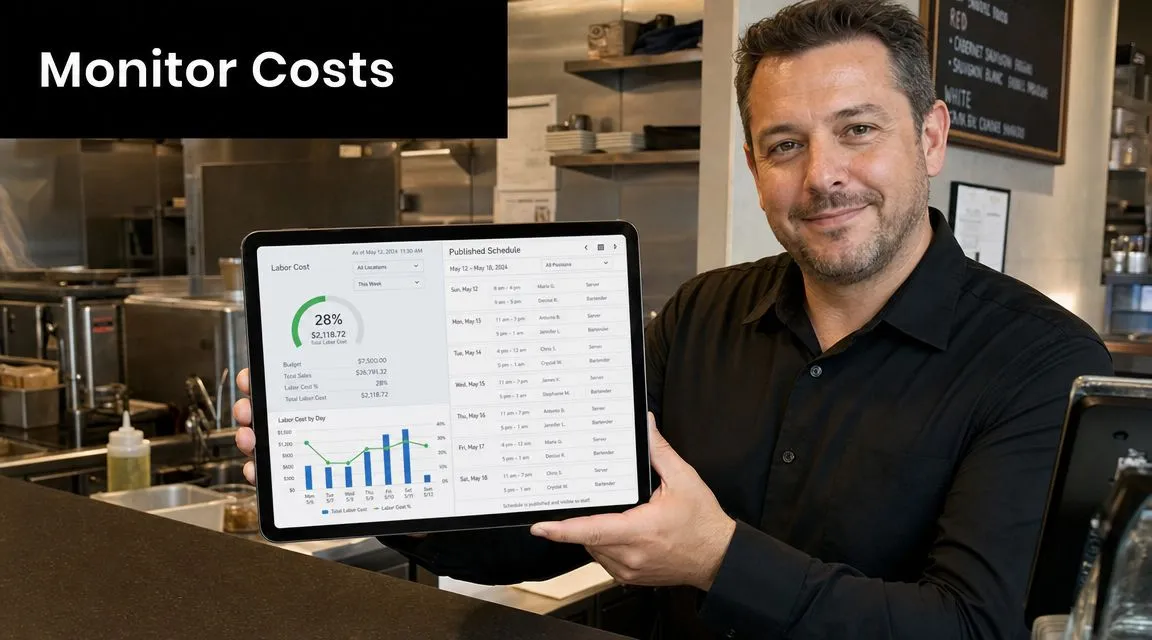
Once service starts, the schedule becomes a live operating plan. Sales come in faster or slower than expected. Staff clock in early. Someone lingers after the rush. A quiet lunch turns into a dead afternoon, but nobody cuts in time. That's how labor drift happens. Not from one huge mistake, but from a dozen small decisions nobody catches early enough.
A frequently missed angle in “create staff schedule” content is what happens after the schedule is built: real-world schedule enforcement and same-day labor drift control. The under-served question is not “how do I create a schedule?” but “how do I create one that stays on budget?” That point comes from 7shifts' discussion of scheduling software for Toast POS, and it matches what operators run into every day.
The schedule has to be enforced
A published schedule means very little if clock-in behavior and mid-shift decisions ignore it. If staff can clock in too early, stay too long, or pile labor into a slowdown without anyone noticing, then the schedule was only a suggestion.
That's why the post-publication routine matters:
- Review projected labor before the shift starts
- Watch actual sales against forecast as the shift unfolds
- Catch early clock-ins and unnecessary overlap
- Make small cuts before the miss becomes expensive
- Keep managers accountable for labor movement during service
The best labor conversations happen while there's still time to act. Waiting until end-of-week reporting might tell you what went wrong, but it won't give you the hours back.
Build a mid-shift control habit
This doesn't need to be complicated. One manager should own labor visibility during each service. They should know what the schedule projected, what the shift is doing, and what options exist if the pace changes.
Watch labor during the shift, not after payroll. That's when the useful decisions still exist.
Tools that connect scheduling to live sales data are valuable here because they close the loop between planning and execution. For operators who want that view, restaurant labor cost tracking is the kind of workflow to look for. The key is simple. Your schedule should tell you what you planned, and your live dashboard should tell you when reality is moving away from that plan.
When you create staff schedule coverage this way, the job doesn't end at publish. It ends when the shift lands close to target without hurting service.
AnchOps fits this workflow for restaurants that want scheduling, labor forecasting, and mid-shift labor control in one system. If you want to move from static schedules to schedules that stay aligned with real sales and live staffing, take a look at AnchOps.
Your back-of-house partner is ready
AnchOps handles scheduling, tip calculations, labor costs, and timecards — so you can focus on your restaurant, not your paperwork.