Systems for Work: Boost Restaurant ROI in 2026
Published on
By Tony Newcome — Founder of AnchOps · Owner, Pizza Harbour
This article was drafted with AI assistance and reviewed by Tony Newcome, a working restaurant operator.
Restaurant systems for work fall into a few classes — scheduling, time and attendance, payroll, and communication — and ROI comes from connecting them so labor data lives in one place instead of a wall printout, a group chat, and a manager's head. Compare the classes, weigh the trade-offs, choose against your pain points, then implement step by step.
That's the moment most restaurant operators realize they don't just have a staffing problem. They have a systems problem.
A lot of restaurants still run on a patchwork of tools that were added one emergency at a time. Scheduling sits in one app. Time punches sit somewhere else. Payroll gets rebuilt in a spreadsheet. Tip-outs happen at close with a calculator and crossed-out notes. Mid-shift decisions come from instinct because nobody can see labor against sales quickly enough to act. The work gets done, but the friction is everywhere.
The hidden cost isn't only overstaffing or overtime. It's the nightly tip math, the timecard cleanup before payroll, the missed chance to cut or hold a shift early, and the management energy spent translating data between disconnected systems instead of running service.
Table of Contents
- Understanding the Need for Systems for Work in Restaurants
- The patchwork problem inside a normal shift
- Why integration changes behavior
- Defining Classes of Workplace Systems for Restaurants
- Why categories matter before you shop
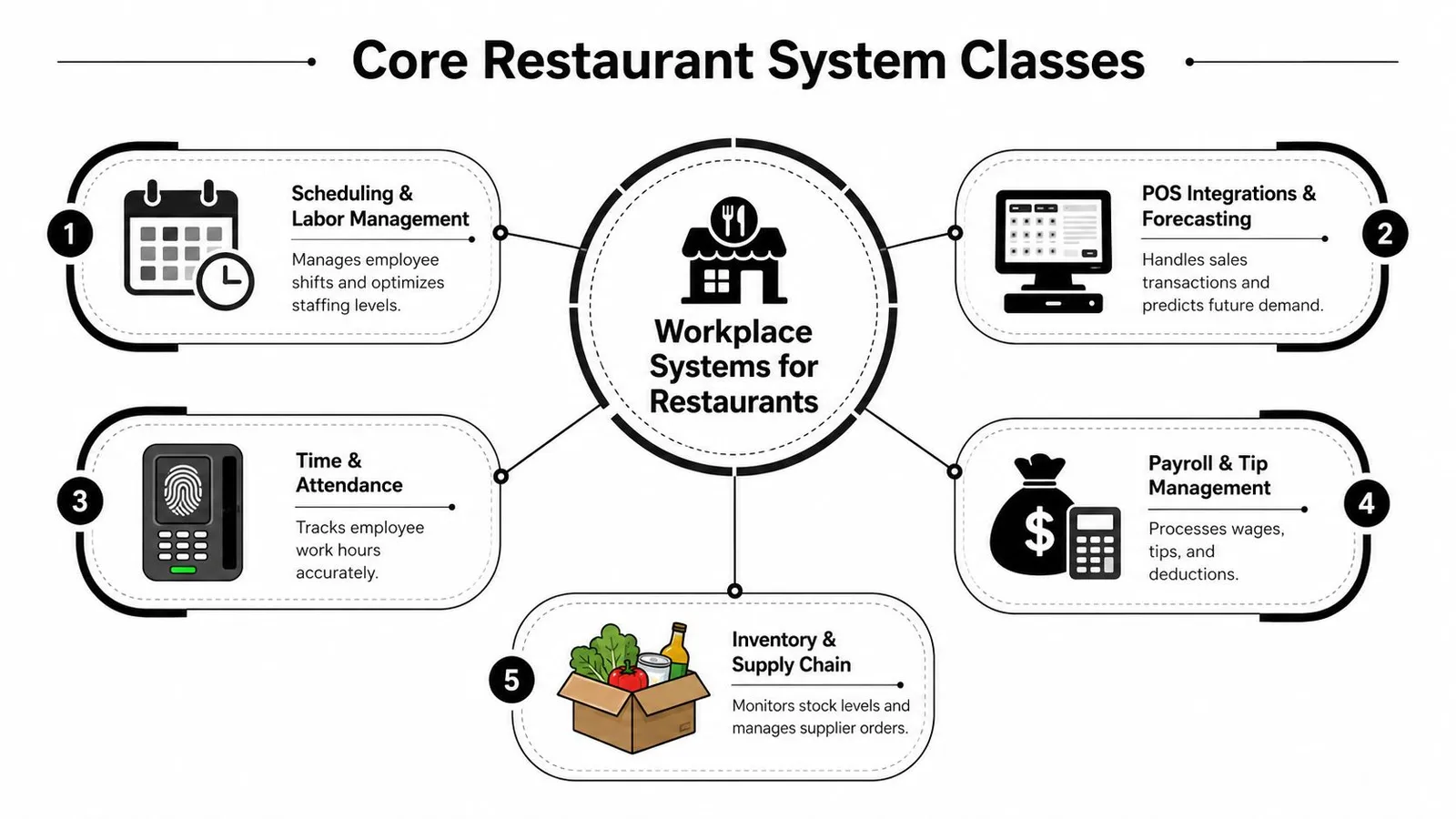
- The five classes most restaurants rely on
- Analyzing Benefits and Trade Offs of System Classes
- Where the gains show up first
- Where operators usually get surprised
- How to Choose the Right System for Your Restaurant
- Five criteria that separate a fit from a headache
- Selection Criteria Importance by Operator Type
- Step by Step Implementation of Workplace Systems
- A rollout that respects how restaurants actually operate
- Common mistakes during go live
- Real World Examples and ROI from System Adoption
- What ROI looks like in a single location
- What multi unit teams should track every week
- Conclusion and Next Steps for Restaurant Operators
Why Do Restaurants Need Systems for Work?
Julia manages a neighborhood bistro. Her day starts with a sales forecast, but by lunch she's juggling a no-show line cook, a handwritten break log, and a payroll question from last week that nobody can trace back cleanly. The POS knows what sold. The time clock knows who clocked in. The schedule explains what was supposed to happen. None of them agree fast enough to help her in the middle of service.
That's where systems for work stop being abstract software talk and start feeling like oxygen.
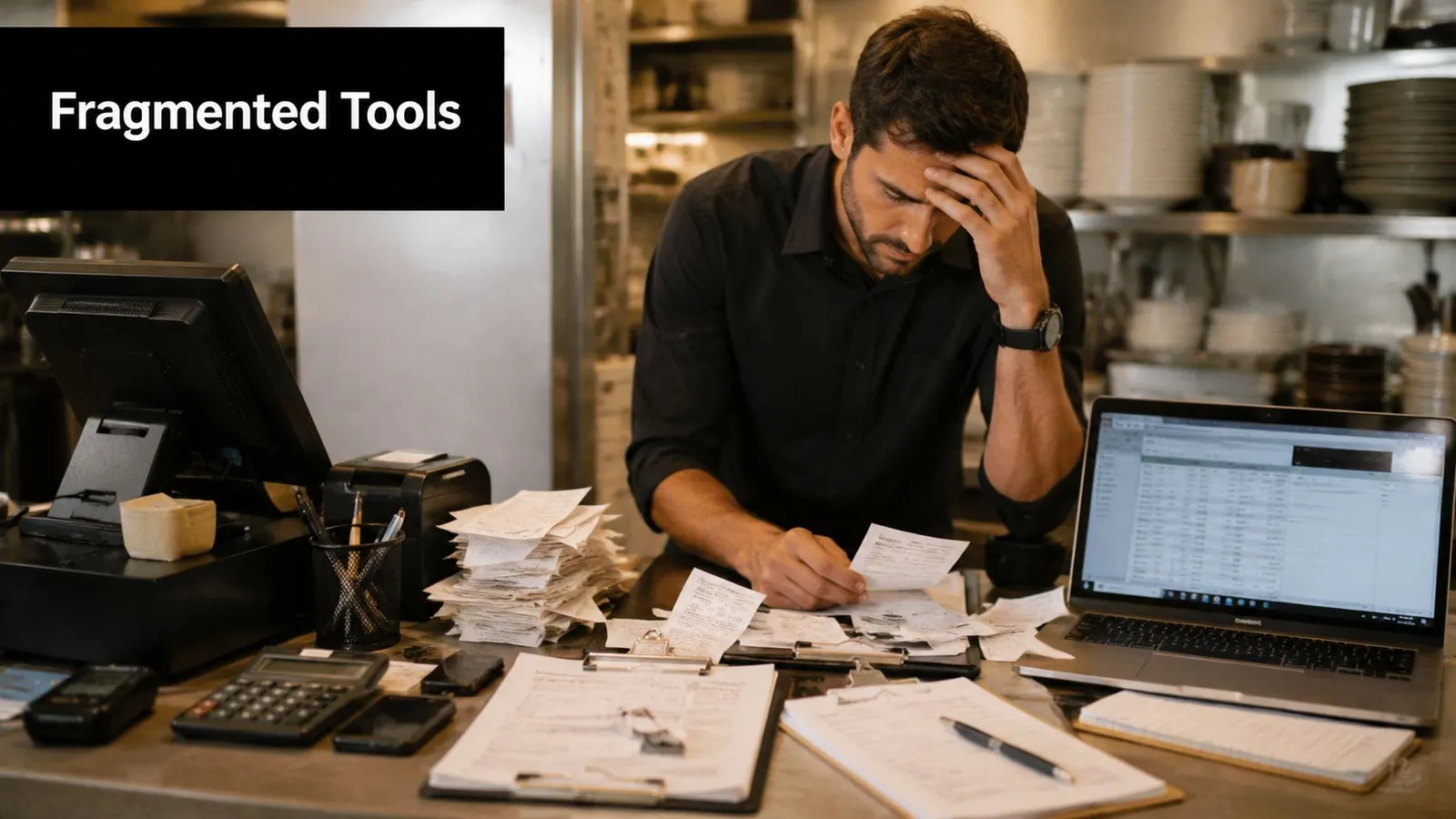
A connected labor setup changes the rhythm of the shift. Instead of rebuilding reality from texts, punch edits, and sales exports, managers can see scheduling, hours, exceptions, and labor cost in one operational flow. That matters because workforce software isn't just a digital schedule. It connects scheduling, time tracking, compliance, and payroll into one workflow, and AI-powered auto-scheduling can deliver 64% time savings compared with manual scheduling methods, according to this workforce management software overview.
The patchwork problem inside a normal shift
When tools don't talk to each other, restaurants leak time in small, familiar ways:
- Schedule confusion: A server swaps a shift in text messages, but the manager forgets to update the posted schedule.
- Timecard cleanup: Someone misses a break entry, and payroll turns into detective work.
- Blind labor drift: Sales slow down after the rush, but no one notices labor percentage creeping up until the day is over.
- Tip distribution friction: Closing managers spend late-night energy doing math instead of closing cleanly.
Practical rule: If a manager has to retype the same labor data into more than one place, the restaurant doesn't have a tool problem. It has a system design problem.
Operators who want a broader operational checklist often find useful overlap in 10Seat's restaurant success strategies, especially around building repeatable routines instead of relying on memory.
A good place to frame the bigger objective is workforce optimization for restaurants. The point isn't to automate everything. It's to make staffing, labor cost, and admin work visible early enough to act on them.
Why integration changes behavior
Integrated systems don't just save clicks. They change decisions.
When labor data lives in one place, a manager can approve time before payroll instead of after payroll problems appear. They can spot whether they're overstaffed during a lull and make a small adjustment early, not a disruptive one late. They can stop treating every week like a fresh recovery operation.
That's what restaurant systems for work are really for. They turn a hectic shift from a guessing game into a managed process.
Defining Classes of Workplace Systems for Restaurants
Most software searches go wrong before the first demo. An operator asks for “a scheduling app” when what they need is a chain of connected functions: forecast demand, build shifts, capture worked time, calculate pay, and move information cleanly into payroll.
The category has expanded far beyond punch clocks. As Easy Metrics explains in its labor management system overview, the LMS market evolved from basic time tracking into platforms that capture data from time clocks, POS, HRIS, and other systems for real-time productivity analysis.
Why categories matter before you shop
Think of these classes like stations on the line. If expo, grill, and pantry each work independently, tickets drag and mistakes multiply. Software behaves the same way. You don't need one giant product for every restaurant task, but you do need clear handoffs.
If you're comparing platforms, a practical starting point is this roundup of restaurant management software options, which helps frame where products overlap and where they don't.
The five classes most restaurants rely on
Scheduling and labor management
This is the planning brain. It builds shifts from availability, role requirements, forecasts, and labor rules.
A good scheduling system works like a recipe blueprint. You're not reinventing Friday dinner service every week. You're using templates, then adjusting for reservations, seasonality, events, and sales trends. The stronger platforms also surface projected labor before the schedule is published.
POS integrations and forecasting
The POS records what happened. Forecasting tools use that history to shape what should happen next.
When this class works well, sales patterns feed labor planning without manual copying. Managers can align staffing to demand instead of staffing to habit. In restaurants, that often means seeing lunch and dinner as two different labor problems, not one long shift.
Time and attendance
This class answers a simple question that becomes complicated fast: who worked, when, and under what exceptions?
It handles punches, breaks, edits, approvals, and attendance issues. The value isn't glamorous, but it's foundational. If worked time is messy, every downstream decision gets messier too.
Payroll and tip management
Buyers frequently underestimate the full burden. Plenty of tools mention payroll. Fewer solve the nightly grind of tip pools, delivery distributions, and export-ready payroll review in a way that matches how restaurants close the day.
Most software comparisons focus on forecasting because it sells well in demos. Operators often feel the bigger relief when tip calculations and timecard review stop eating up nights and Mondays.
Inventory and supply chain
Inventory isn't always grouped with labor systems, but in practice it belongs in the same operating conversation. Labor planning and purchasing affect each other. A prep-heavy menu, a delivery spike, or a supplier issue changes staffing needs just as surely as reservations do.
This category becomes even more important when compliance enters the picture. For example, operators navigating special menu processes may also need guidance on mastering Irish restaurant allergen challenges, because operational systems work best when they support real service constraints, not just back-office reporting.
A restaurant doesn't need to buy all five classes at once. It does need to understand where each class starts, where it ends, and where data should flow next.
Analyzing Benefits and Trade Offs of System Classes
At 11:47 p.m., the dining room is empty, chairs are up, and the manager is still in the office. Not because service went badly. Because three servers swapped sections, one bartender worked two roles, two delivery orders were refunded, and the tip pool no longer matches the POS summary. On paper, the restaurant had software. In practice, the manager is still doing math with a calculator and a legal pad.
That gap is where system classes separate fast.
A scheduling tool can cut schedule-building time. A payroll module can reduce closeout work. A POS integration can sharpen staffing decisions. But restaurants feel the difference most in the hidden admin load that piles up after service: nightly tip math, missed-break edits, labor drifting up mid-shift, and payroll review that turns Monday into cleanup day.
Where the gains show up first
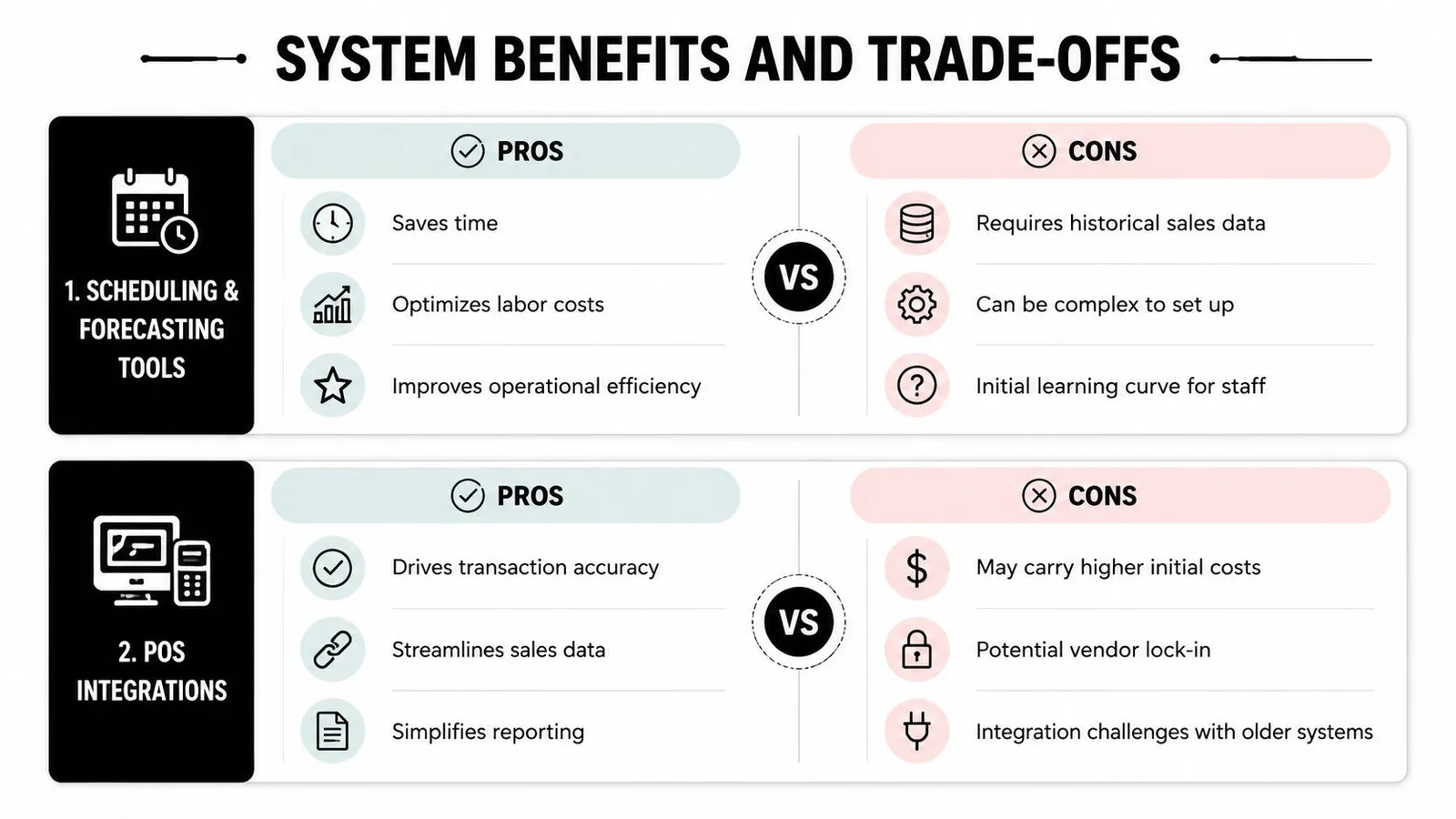
Scheduling and forecasting tools usually create the first obvious win. Managers get hours back because they stop rebuilding the same week from scratch. As noted in the 2024 State of the Restaurant Industry report from the National Restaurant Association, labor remains one of the biggest operating pressures for restaurants, which explains why faster scheduling gets attention so quickly.
But speed alone does not solve much. Auto-schedules are only as good as the inputs behind them. If availability is outdated, sales patterns are distorted, or roles are set up loosely, the software produces mistakes faster.
POS-connected forecasting helps in a different way. It gives managers a better read on labor drift while the shift is still happening. If lunch runs soft or a rainstorm kills patio traffic, the system can show labor moving off target early enough to cut, reassign, or hold. Without that connection, many operators discover the problem after the shift, when labor reports become a postmortem instead of a tool.
Time and attendance systems earn their keep in the arguments they prevent. A clean punch record settles disputes faster, flags exceptions earlier, and makes approvals less subjective. The trade-off is upkeep. Someone still has to maintain permissions, review edits, and decide how strict the rules should be.
Where operators usually get surprised
Implementation friction is rarely dramatic. It looks more like small daily annoyances that keep managers in manual mode.
Here is how that tends to play out:
Scheduling tools
- Upside: Faster schedule creation, easier shift swaps, clearer view of planned labor.
- Compromise: They depend on accurate availability, role mapping, and enough historical data to produce usable schedules.
POS-connected forecasting
- Upside: Better staffing alignment and earlier visibility into mid-shift labor drift.
- Compromise: Older POS setups, custom menus, and inconsistent sales categories can make setup messy.
Time and attendance
- Upside: Fewer punch errors, stronger approval workflows, cleaner paid hours.
- Compromise: Devices, rules, and exception handling need active oversight.
Payroll and tip modules
- Upside: Less closeout admin, fewer handoffs before payroll, and less nightly tip math.
- Compromise: Shallow integrations still leave managers checking exports and recalculating edge cases by hand.
One operator opening a specialty concept learned this quickly. The menu, staffing mix, and service model were all thoughtfully planned, but back-office routines were not. That is common in new openings, including teams seeking consulting to open your Yemeni café, where front-of-house vision is often clearer than the daily labor and tip workflow that follows opening week.
The best test is not the demo path. It is the exception path. Late punch. Split role. Missed break. Voided check. Tip pool adjustment. Payroll export mismatch. That is where a system proves whether it removes admin work or merely relocates it.
There is also a clear trade-off between precision and usability. A highly configured setup can give a multi-unit group tighter controls and cleaner reporting across locations. The same setup can frustrate a single-unit operator who just needs managers to make fast, consistent decisions during a busy Friday service.
Strong systems win by fitting the restaurant's real operating habits. They reduce friction where the hours disappear, especially in the work nobody brags about: reconciling tips, cleaning timecards, and catching labor problems before the shift is over.
How Do You Choose the Right System for Your Restaurant?
Most buying mistakes happen because restaurants shop for features before they define operating priorities. A shiny dashboard won't help if managers avoid using it at 5 p.m. A cheap app won't stay cheap if it creates manual cleanup every payroll cycle.
Labor targets are a good example of choosing the right objective. The 25% to 35% labor cost range works better as a guardrail than a hard minimum, because chasing the lowest possible percentage can create understaffing that hurts service and revenue, as noted in Turnozo's restaurant staffing analysis.
Five criteria that separate a fit from a headache
1. Scalability
An independent café and a multi-unit group don't outgrow software the same way.
A single store may value speed and simplicity first. A growing group needs role permissions, location-level reporting, and repeatable templates that keep managers from inventing their own process at each store.
2. Integration depth
This is the big one. Ask what syncs.
Does employee data move automatically? Do time entries flow into payroll? Do sales forecasts update labor planning? Can tip distributions reflect POS activity without nightly rework? “Integration” sometimes means little more than a CSV file.
3. Ease of use
A system that requires a long manager workaround every day isn't operationally elegant, no matter how polished the homepage looks.
Watch the demo with your hardest moment in mind: a callout, a shift swap, a missed punch, a closeout with tips, a payroll approval morning.
4. Cost structure
Don't just compare subscription price. Compare management effort.
A lower monthly fee can still cost more if managers spend hours every week cleaning data, recalculating tip-outs, or rebuilding schedules. Operators planning a new concept often benefit from broader startup guidance too, such as consulting to open your Yemeni café, because software choices should match the service model you're building.
5. Vendor support
Restaurants don't need generic support. They need operational support.
Ask how onboarding works, how quickly policies can be configured, and what happens when payroll rules or scheduling practices change. A vendor that understands restaurant exceptions will save more time than one with a larger feature menu.
Selection Criteria Importance by Operator Type
| Criteria | Independent Priority | Multi-Unit Priority |
|---|---|---|
| Scalability | Medium. Enough room to grow without overbuilding today | High. Standards must hold across locations |
| Integration depth | High. Small teams can't afford duplicate entry | High. Data consistency matters even more at scale |
| Ease of use | High. GMs need fast adoption | Medium to high. Training matters across many managers |
| Cost structure | High. Cash discipline is immediate | Medium. Total operational impact often matters more |
| Vendor support | High. Small teams need responsive help | High. Rollouts and policy consistency depend on it |
A smart buying process usually looks like this:
- Map the pain first: Write down where labor admin piles up now.
- Bring in the people doing the work: GMs, payroll admins, and closing managers spot different risks.
- Test live scenarios: Use your own shift patterns, not canned demo examples.
- Check roadmap fit: Make sure the product supports how your restaurant is likely to run next, not just how it ran last year.
The goal isn't perfect software. It's a system your team can rely on during a busy week.
Step by Step Implementation of Workplace Systems
Buying software is a decision. Implementing it is a behavior change project.
Restaurants run on momentum, which means a sloppy rollout can poison adoption fast. If employees lose trust in schedules, punches, or tip calculations during the first week, they'll keep side systems alive in texts and notebooks long after the official launch.
A clean rollout starts with architecture. Paid time and worked time need to reconcile across labor, attendance, HRIS, and payroll, which is why this labor management system glossary from SG Systems stresses smooth integration to eliminate manual errors and prevent time theft.
A rollout that respects how restaurants actually operate
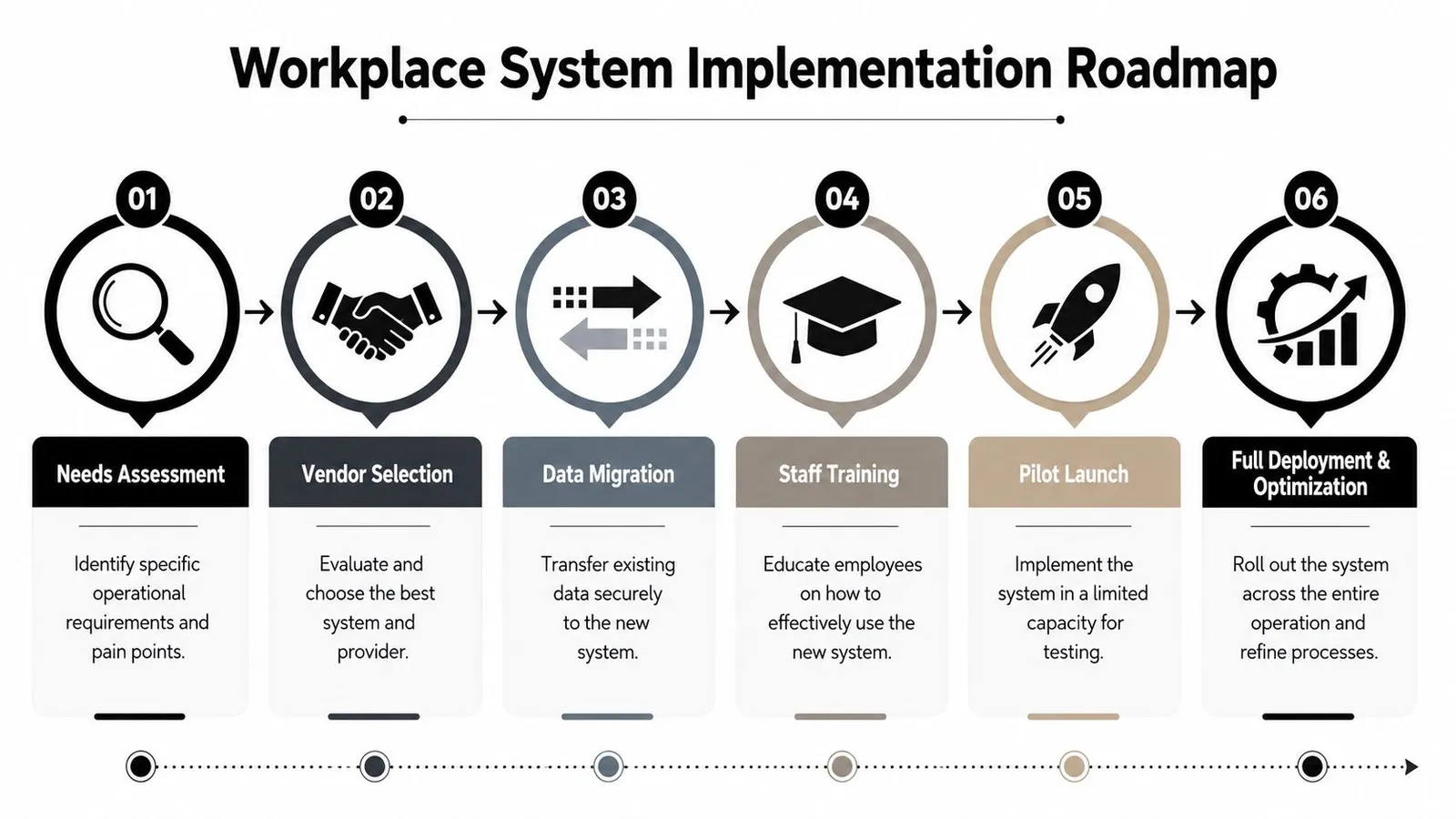
A practical rollout usually follows six phases:
Needs assessment
List current pain points in operational language. “Payroll takes too long.” “Managers can't see labor mid-shift.” “Tip-outs are manual.” This keeps the setup tied to real work instead of vendor vocabulary.Vendor selection
Score vendors against your own workflows. Include edge cases such as split shifts, overtime rules, role changes during a shift, and who approves exceptions.Data migration
Move employee records, roles, schedules, and rules carefully. Old data errors tend to look like “new software problems” once go-live starts.
Before the pilot phase, it helps to see a scheduling workflow in action:
Staff training
Train by role, not in one generic session. Servers need different instructions from GMs and payroll admins.Pilot launch
Start with one location or one manager group when possible. Run the new system alongside your old checks long enough to confirm schedule accuracy, tip handling, and payroll outputs.Full deployment and optimization
Once the basics are stable, tighten templates, permissions, and reporting habits. At this stage, systems start feeling natural instead of imposed.
For operators building schedules as part of the rollout, this guide on how to create a staff schedule is useful because implementation goes smoother when your scheduling logic is already consistent before the software mirrors it.
Common mistakes during go live
The common failures are boring, which is why they're dangerous:
- Skipping validation: Managers assume migrated rules are correct without checking edge cases.
- Overtraining on features: Staff learn menus they won't use, while missing the tasks they do every day.
- Launching during chaos: A holiday week or menu change is the wrong moment to test a new labor process.
- Ignoring parallel review: Restaurants should compare new outputs against current practices before trusting every number.
Start small enough to catch mistakes cheaply, but real enough that managers can feel whether the system helps during service.
When implementation works, the software disappears into the shift. Managers stop thinking about the tool and start using the information.
Real World Examples and ROI from System Adoption
At 10:45 p.m., the dining room is empty, but the manager is still at the office computer. One browser tab holds time punches. Another has credit card tips. A calculator sits between them for tip-outs. Someone forgot to clock out. One server swapped sections mid-shift. Payroll is tomorrow. This is what ROI often looks like before a restaurant buys a better system. Not in a spreadsheet first, but in the last hour of the night.
Restaurant labor costs leave very little room for sloppy admin. In 2024, full-service restaurants averaged 36.5% of sales for labor costs, while limited-service restaurants averaged 31.7%, according to these restaurant labor cost statistics. For operators, that benchmark matters less as a target than as a pressure point. If labor already runs that high, then nightly tip math, punch cleanup, and slow scheduling are not side issues. They are margin issues.
What ROI looks like in a single location
A neighborhood café is a good example. The owner builds the schedule every Sunday by texting staff, cross-checking availability notes, and trying to remember which barista can open and which one can close. During the week, callouts come through group chats. At close, a shift lead divides tips by hand and fixes missed punches before sending notes to payroll.
Nothing about that operation feels dramatic. It just bleeds time.
After system adoption, the first win usually is not a huge drop in labor percentage. It is getting the admin mess into one place. Scheduling pulls from recorded availability. Timecard edits sit beside the schedule instead of in a separate trail of texts and sticky notes. Tip distribution runs from the same shift data the manager already reviewed. Payroll prep gets shorter because fewer exceptions survive to the end of the week.
That hidden work matters because it often hides a second problem. Labor drift during the shift. The schedule may be reasonable at 10 a.m., then lunch runs soft, a patio section stays overstaffed, and no one catches it until after close. Modern labor planning works best when managers can see those small misses while service is still happening and make one or two early adjustments before the last slice of overstaffing turns into a full week of leakage.
A practical weekly scorecard for one store should track:
- Labor percentage against sales: Check whether managers catch drift during the shift, not only in the weekly recap.
- Overtime exposure: Spot employees approaching weekly limits before the extra cost hits payroll.
- Time spent building schedules: Measure manager hours saved, not just labor dollars.
- Tip and payroll exceptions: Fewer corrections usually mean the workflow is cleaner upstream.
One sentence matters here. Operators often chase savings in the schedule itself and miss the hour lost every night to reconciliation.
What multi unit teams should track every week
For a multi-unit group, the story changes. A strong GM at one store can hold the whole process together with memory, instincts, and late-night cleanup. Ten stores create ten different versions of that same workaround, and finance ends up sorting through the debris.
That is why consistency becomes the ultimate return.
Restaurant365's real-time labor reporting guide recommends setting alerts when labor percentage rises above 32%, working within a target range of 25% to 30%, and watching employees as they approach 40 hours before overtime is triggered. The same framework treats the ideal overtime KPI target as 0 and flags more than 5 hours per week as an alert threshold. Those numbers are useful because they force action during the week, while there is still time to adjust staffing, cuts, and break coverage.
Precision also depends on how closely a restaurant maps labor to demand. Paystreet's restaurant labor efficiency guidance notes that high-performing restaurants track sales per labor hour at $55+, review hourly sales patterns over at least 90 days, and schedule in 15-minute increments instead of broad hourly blocks. The point is not to copy those thresholds blindly. The point is that better labor control usually comes from closer observation. Broad averages miss the slow half hour after lunch, the prep overlap before dinner, and the extra body that stays on because no one noticed covers were fading.
A useful weekly review for a multi-unit team asks harder questions than, “Did labor come in high?” It asks which stores had late cuts, which managers spent the most time fixing timecards, where tip closeout produced repeated exceptions, and which location keeps losing the same last few points of labor performance after the shift starts.
Good reporting gives a manager a next move at 2 p.m., not a postmortem on Friday.
One option in this category is AnchOps, which focuses on restaurant labor planning, tip distribution, timecard review, and mid-shift labor alerts, with optional Toast POS integration for syncing employees, orders, time entries, and payments. For operators trying to reduce tool switching, that means scheduling, shift monitoring, and payroll prep can run inside one workflow instead of being patched together from separate systems.
The best ROI stories in restaurants are rarely flashy. They look like a GM getting 45 minutes back at close, payroll running with fewer edits, and a manager cutting one shift earlier on a slow Tuesday because the system showed labor drift while there was still time to fix it. That is the kind of return that keeps showing up every week.
Conclusion and Next Steps for Restaurant Operators
At 4:37 p.m., the dining room has not filled yet, but the pressure already has. A manager is checking callouts, answering a text about a missed punch, glancing at labor, and trying to remember whether last night's tip pool was ever corrected. None of those jobs look dramatic on their own. Together, they turn a manageable shift into one more night of catch-up.
That is why restaurant labor problems rarely begin and end with hourly rates. The primary burden sits in the admin work wrapped around labor. Tip math done by hand at close. Timecards cleaned up in a rush before payroll. Labor drifting mid-shift because no one sees the change early enough to cut, move, or hold. Those hidden tasks erode margin and manager attention.
An integrated system changes the feel of that 4:37 p.m. moment.
Instead of bouncing between a scheduling app, a spreadsheet, the POS, and a payroll screen, the manager can work from one operating view. They can see whether labor is slipping before dinner hits, catch exceptions before they pile up, and close the night without rebuilding tip-outs from scratch. The gain is not abstract. It shows up in fewer edits, faster closes, and fewer nights where the manager takes the problem home.
For operators deciding what to do next, keep the first steps practical:
- Audit your gaps: Where does labor data get retyped or reconciled manually?
- Run practical demos: Test callouts, tip-outs, missed punches, and overtime alerts.
- Pilot one location first: Fix exceptions before rolling out everywhere.
- Train by role: Keep the workflow simple for each user.
- Review quarterly: Systems drift if nobody tunes them.
The goal is not to buy more software. The goal is to remove the quiet work that keeps stealing time from the floor. When the right pieces are connected, that chaotic pre-service stretch becomes far more controlled. The manager still has decisions to make, but they are running the shift instead of repairing it.
AnchOps helps restaurant operators manage scheduling, labor targets, tip distribution, and payroll prep in one workflow, with optional Toast POS integration and mid-shift labor alerts built for day-to-day restaurant operations. If you want to test whether a more connected system fits your store, you can explore AnchOps and review its 15-day free trial alongside your current process.
Your back-of-house partner is ready
AnchOps handles scheduling, tip calculations, labor costs, and timecards — so you can focus on your restaurant, not your paperwork.