What Is Workforce Optimization: Restaurant Guide 2026
Published on
By Tony Newcome — Founder of AnchOps · Owner, Pizza Harbour
This article was drafted with AI assistance and reviewed by Tony Newcome, a working restaurant operator.
Workforce optimization in a restaurant means managing labor as a live system — forecasting demand, scheduling to that forecast, adjusting during the shift, and measuring results in your P&L — instead of finding out after payroll closes that you missed the target. This guide breaks down the five core components, the measurable benefits, and a practical implementation roadmap.
You meant to review last night's sales, place the produce order, and check this week's prep levels. Instead, your phone is full of schedule texts. A line cook can't work Friday. A server wants to swap Saturday. Someone else wants more hours. You're looking at yesterday's labor and wondering whether you paid for bodies you didn't need, or whether the extra person on the floor is the only reason service didn't fall apart.
That's the typical operating environment for most restaurants. Labor isn't a spreadsheet problem first. It's a live-shift problem. It changes by the hour, and if you manage it by gut feel alone, you usually find out you missed the target after payroll closes.
That's why the question isn't only what is workforce optimization. The better question is whether your system helps you make the right labor call before the schedule posts and during the shift when reality stops matching the plan.
Table of Contents
- The Daily Scramble to Control Restaurant Labor Costs
- Where gut-feel breaks down
- What operators actually need
- What Workforce Optimization Really Means for a Restaurant
- It's a cycle, not a schedule
- What it looks like on the floor
- The standard that matters
- The Five Core Components of Restaurant WFO
- Sales and labor forecasting
- Intelligent scheduling
- Real-time adjustments
- Labor analytics and reporting
- Automated payroll and tip management
- Benefits You Can Actually Measure in Your P&L
- What improved labor control looks like on paper
- Typical restaurant labor cost percentage targets
- A Practical Roadmap to Implementing WFO
- Phase one and two
- Phase three and four
- What usually breaks the process
- How to Choose the Right Workforce Optimization Tools
- Questions that actually matter
The Daily Scramble to Control Restaurant Labor Costs
Most operators don't lose control of labor in one dramatic moment. They lose it in small, familiar ways.
It starts when the schedule gets built from memory instead of sales patterns. Then a no-show hits. A manager keeps an extra closer “just in case.” Lunch runs soft, but nobody cuts because the dinner rush might come early. By the end of the day, the team survived, guests got served, and labor drifted over target.
That's why so much advice about labor feels incomplete. General guidance on effective restaurant labor management is useful, but on the ground you still need a way to answer harder questions fast. Can you trim one host at 2 p.m. without slowing turns? Should you hold that prep cook until the catering pickup clears? Is Friday already over budget before you even publish the schedule?
Where gut-feel breaks down
Gut feel works when the same manager watches the same pattern for years. It fails when business changes week to week, staffing is uneven, and everybody is making labor decisions from partial information.
A restaurant manager usually isn't short on effort. They're short on visibility. They can see who's clocked in, but not always what labor is trending toward by close. They know sales were slow at lunch, but not whether dinner will recover enough to justify keeping everyone. They hear employee requests, but can't easily see the cost of saying yes.
Practical rule: If you only learn your labor mistake after the shift ends, you're not managing labor. You're recording it.
That's the genuine opening for workforce optimization. Not as a corporate buzzword. As a working system that replaces reaction with structure.
What operators actually need
In restaurant terms, workforce optimization means getting out of the group-text economy and into a repeatable operating rhythm. You need to know labor before the schedule posts, not after. You need a process for deciding who stays, who gets cut, and when coverage needs to move.
A useful place to start is looking at labor before the schedule is published, not after the week is already baked in. That's why a guide on checking labor cost before posting a schedule matters. It shifts the conversation from “Can we fix this later?” to “Should we build it this way at all?”
Restaurants that stay stuck usually have the same pattern:
- They schedule to avoid complaints: It feels safer to overstaff than to hear service feedback.
- They react one shift at a time: Every decision solves today and creates next week's problem.
- They ignore execution: The schedule may be fine on paper, but no one manages labor drift during the shift.
That last one is where most articles stop too soon. Planning matters. Execution decides whether the plan holds.
What Does Workforce Optimization Really Mean for a Restaurant?
Workforce optimization is a simple idea dressed up in enterprise language. In a restaurant, it means putting the right people in the right roles at the right times, then adjusting fast when the shift stops behaving the way the forecast said it would.
Think of it as a prep list for labor. You don't prep randomly and hope the line can keep up. You estimate demand, stage the right product, assign the work, and keep adjusting through service. Labor should run the same way.
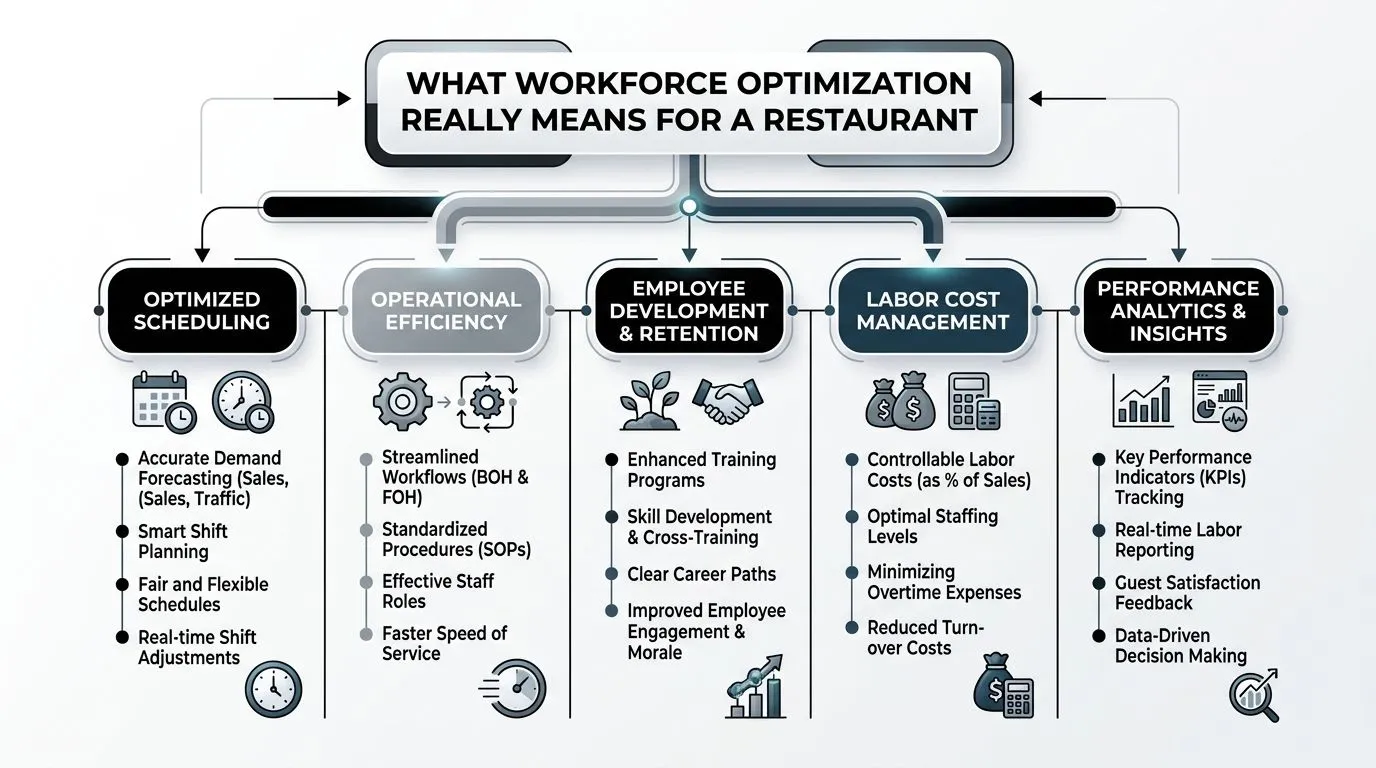
The broader market is moving in that direction. The global workforce optimization market is projected to reach $12.24 billion in 2026, which tells you this isn't a niche software category anymore. It's becoming a standard operating layer for businesses trying to improve productivity and control costs (Research and Markets).
It's a cycle, not a schedule
A lot of managers hear “workforce optimization” and think scheduling app. That's too narrow.
A real WFO process runs as a loop:
- Plan demand from sales history, events, seasonality, and daypart patterns.
- Build the schedule around labor targets, availability, and skill mix.
- Run the shift with live adjustments when sales, callouts, or pace changes.
- Review results so next week's schedule gets smarter.
If one of those steps is weak, the whole system gets noisy. Great forecasting won't save a manager who never cuts when traffic softens. Great scheduling won't help if the wrong people are assigned to the rush.
What it looks like on the floor
Here's the restaurant version of what is workforce optimization.
It's checking whether Friday dinner needs another expo or just a stronger pre-shift setup. It's seeing a dishwasher call out and deciding whether to flex a cross-trained utility person instead of paying overtime later. It's noticing by midafternoon that labor is running hot and making one small adjustment before the problem compounds all night.
Workforce optimization works when managers can make better labor decisions at 2 p.m., not just explain bad ones on Monday.
That's the part many definitions miss. They focus on planning because planning is neat. Restaurants aren't.
The standard that matters
If a system can forecast sales and build a schedule, that's useful. If it can also help a manager control labor during service, that's operational.
The difference matters because most labor misses don't come from having no schedule. They come from not executing the schedule with discipline once the day starts changing. In practice, workforce optimization is less about software labels and more about whether your labor process holds up when a cashier is late, patio traffic dies, or a private event runs longer than expected.
What Are the Five Core Components of Restaurant WFO?
Most restaurant labor problems trace back to five operating pieces. Miss one, and managers start compensating with overtime, overstaffing, or panic coverage.
The shift toward better systems is already visible. Eighty-seven percent of organizations plan to increase HR technology investments, and 47% already use predictive analytics for workforce planning, which shows how fast operators are moving from intuition to forecasting-based decisions (Second Talent).
A restaurant version of WFO should cover these five components.
Sales and labor forecasting
Forecasting is where labor discipline starts. You use POS history, daypart trends, local events, weather expectations, and known promos to estimate demand before the week begins.
A weak forecast creates fake certainty. Managers either staff heavy to protect service or staff lean and hope experienced people carry the shift. Neither is a system.
If you want a stronger starting point, sales-driven scheduling depends on using historical patterns instead of guessing. A practical breakdown of that process lives in this guide to restaurant sales forecasting.
Intelligent scheduling
Scheduling is where forecast turns into payroll risk.
Good schedules balance four things that often fight each other:
- Sales demand: How busy the restaurant should be by hour and daypart.
- Availability: Who can work the shift without creating churn later.
- Skill mix: Whether the people on the floor can handle the volume assigned.
- Labor target: What the shift can cost and still make sense.
Bad schedules usually fail because they optimize only one thing. The cheapest schedule often hurts service. The most comfortable schedule often bloats labor. The schedule that makes everyone happy can wreck the P&L.
Real-time adjustments
This is the execution gap, and it's where many teams lose the week.
Forecasting tells you what should happen. Real-time labor management deals with what is happening. Lunch is slower than expected. A prep task finished early. Delivery volume spiked while dine-in softened. The right move isn't always to cut headcount immediately. Sometimes it's to redeploy someone to prep, breaks, cleaning, or station support so you protect the rush and avoid overtime later.
If your labor process stops once the schedule posts, you don't have optimization. You have a calendar.
This is also the part where one tool can be useful without becoming the whole story. For example, AnchOps is built around pre-shift labor projections and mid-shift alerts, which is directly relevant if you want visibility on labor drift while service is still running.
Labor analytics and reporting
Post-shift review is where managers either improve or repeat themselves.
The numbers you want aren't abstract. You want to know which dayparts ran hot, which roles were consistently overbuilt, when breaks were poorly timed, and whether your labor target misses came from forecasting, scheduling, or execution. That's a different conversation from saying, “Labor was high last week.”
A good report helps you coach decisions, not just audit them.
Automated payroll and tip management
Back-office labor matters too. Timecard cleanup, tip-outs, tip pools, and payroll export work can drain manager hours and create errors that damage trust with the staff.
Automation matters here because admin time is still labor. If a manager spends late night hours fixing tip math or chasing missed punches, that's operational waste. A strong WFO setup doesn't stop at the schedule. It carries through to accurate pay, cleaner approvals, and less manual reconciliation.
Benefits You Can Actually Measure in Your P&L
The value of workforce optimization isn't that it sounds modern. The value is that it changes the math of the week.
Restaurants that track labor loosely often assume their problem is isolated. One long close. One extra prep cook. One manager who doesn't like cutting early. In reality, labor waste stacks in tiny layers across every daypart. Once you start measuring those layers, the P&L gets clearer.
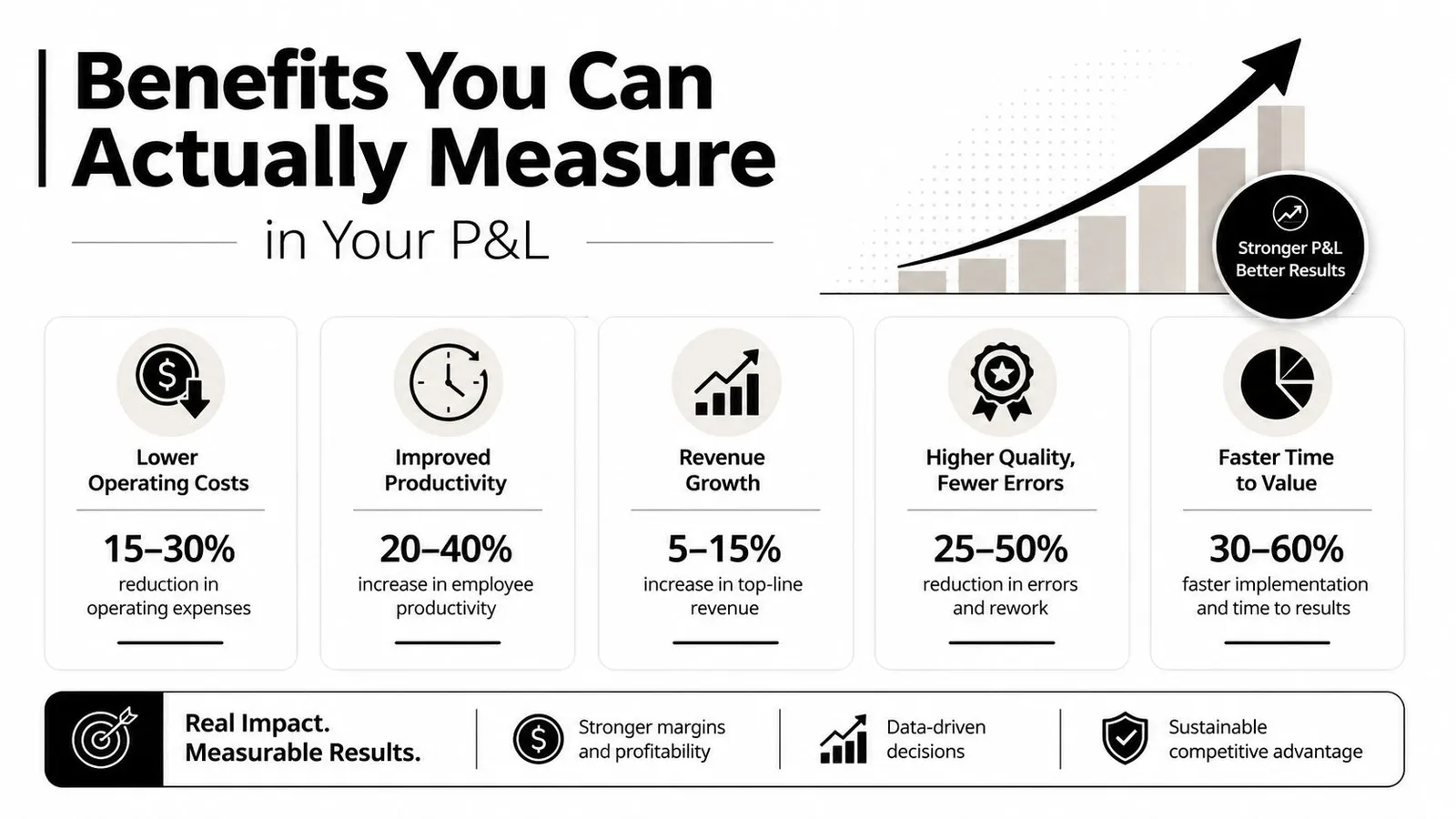
Restaurants have a solid benchmark here. Implementing a basic labor monitoring system can save up to 15% of labor costs, and adding predictive modeling with real-time feedback can drive an additional 5% to 10%, for a total 20% to 25% reduction in labor spend (FSR Magazine).
What improved labor control looks like on paper
The first measurable benefit is tighter labor percentage by shift and by week. Not because managers are slashing hours blindly, but because they stop paying for avoidable drift.
The second benefit is lower overtime pressure. A better labor system catches problems earlier. It doesn't leave a manager discovering on Saturday night that two people are about to push into expensive time.
The third benefit is operational consistency. When staffing matches actual need more often, service gets steadier. Guests don't feel the same swings between overstaffed awkwardness and understaffed chaos.
A fourth benefit is retention. Schedules built around real availability and fair coverage usually create less frustration than schedules built from whoever said yes last. One overlooked retention angle in workforce optimization is that internal mobility and better-fit scheduling support stability, especially in high-turnover environments (LinkedIn).
Operator check: If labor savings come from constant understaffing, the system isn't optimized. It's just pushing the cost into guest experience and turnover.
To keep this grounded, it helps to pair labor numbers with a broader view of output and consistency. A practical framework for measuring real team impact can help managers avoid the trap of looking at labor percentage in isolation.
If you need a quick benchmark for your own store, a restaurant labor cost calculator gives you a useful starting point for evaluating whether a schedule is even in range before you debate cuts.
Typical restaurant labor cost percentage targets
These ranges vary by concept, and that matters. A quick-service shop and a full-service dining room don't carry the same service burden.
| Restaurant Type | Target Labor Cost % |
|---|---|
| Quick Service/Counter Service | 20–30% |
| Fast Casual | 25–32% |
| Casual Dining | 28–35% |
| Upscale/Full Service | 30–38% |
| Fine Dining | 35–45% |
Those target ranges come from Chef's Resources. They're useful because they stop vague advice like “keep labor low” and replace it with concept-specific expectations.
One more trade-off is worth stating plainly. Labor cuts that look smart in the office can fail on the floor if the staff isn't flexible enough to absorb them. That's why execution matters as much as planning.
A Practical Roadmap to Implementing WFO
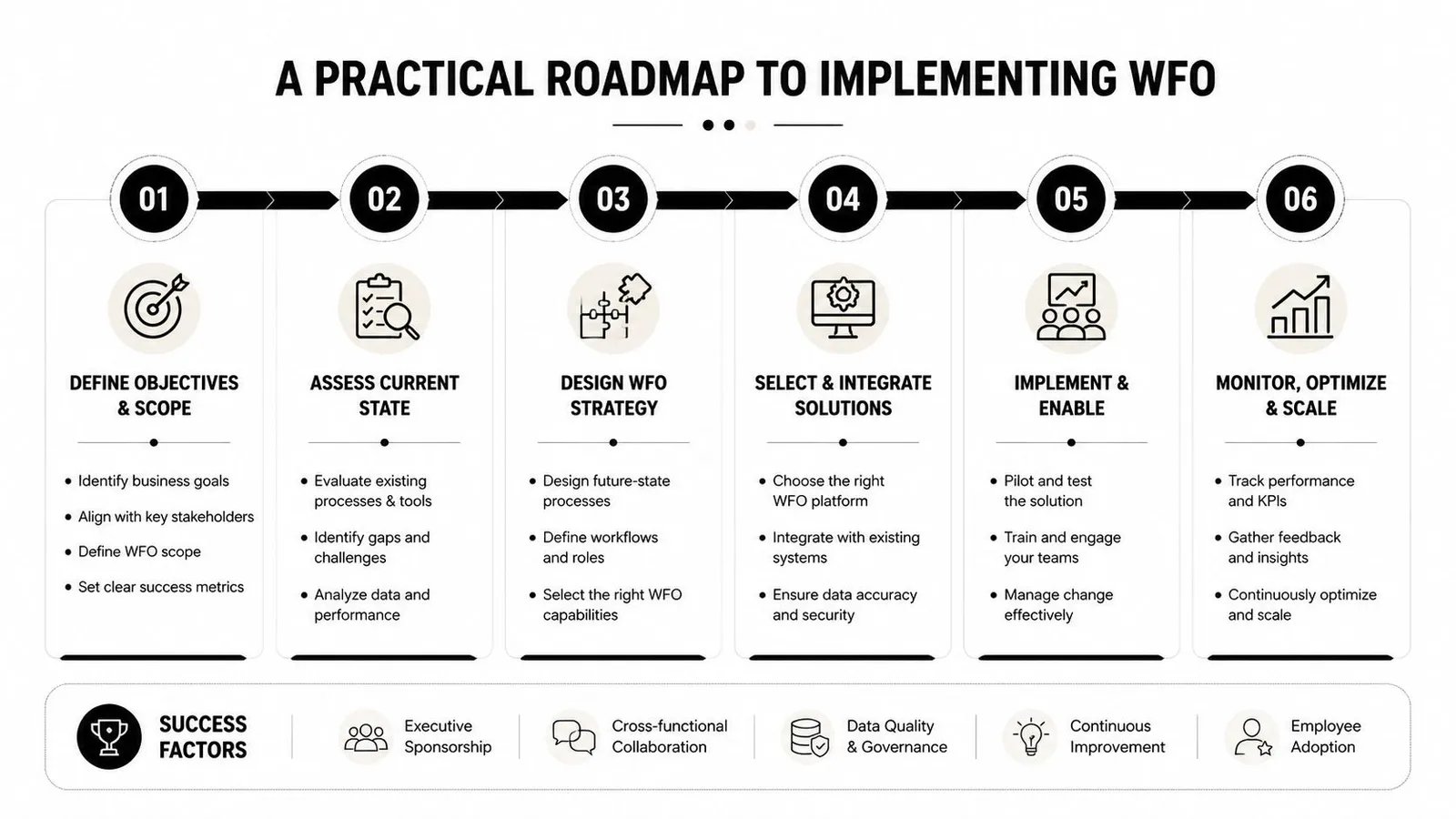
Most restaurants don't need a full transformation on day one. They need a cleaner operating sequence.
The fastest way to fail is trying to install a perfect labor system all at once. Managers get overwhelmed, the team doesn't trust the changes, and everyone drifts back to manual scheduling and text-message coverage.
Phase one and two
Start with a baseline. Track daily labor by daypart, compare it to sales, and note where managers made manual decisions that changed cost. Don't overcomplicate this stage. The goal is to stop guessing.
Then improve forecasting. Pull sales history from your POS and build rough templates for typical lunches, typical dinners, event nights, and soft days. If the team already knows Fridays after local games run heavy, that belongs in the schedule logic instead of living only in one veteran manager's head.
At this point, workforce optimization starts looking a lot like larger-scale workforce planning. The same principle applies whether you run one store or many. Your staffing choices should support the business you're trying to run, not just the week you're trying to survive. That broader connection is why resources on aligning talent strategy with company goals can be surprisingly useful even for restaurant operators.
Phase three and four
Once the forecast is decent, tighten the schedule itself. Build templates by role and daypart, then adjust from there. This is also where cross-training starts paying off.
Cross-training gives you more legal, realistic options when a shift changes. It improves labor flexibility and reduces the need for overstaffing, while also lowering the impact of no-shows and overtime because staff can cover multiple operational needs (Forbes).
Then focus on intraday management. Here, restaurants usually gain or lose the value of WFO.
Use a simple real-time routine:
- Check pace early: Compare actual sales and traffic to the working expectation before the shift is too far gone.
- Decide small, not late: One early cut or reassignment is easier than three rushed cuts later.
- Redeploy before you send home: If someone can clean, prep, stock, or bridge a weak station, that may protect the next rush.
- Review after close: Note which decisions helped and which ones created service pain.
The best labor move in a slow hour is often reassignment first, cut second.
What usually breaks the process
A few mistakes show up over and over:
- Ignoring availability: Schedules that hit the budget but ignore real availability create callouts and resentment.
- Scheduling without a labor budget: If there's no target, every shift becomes a negotiation.
- Treating software like a decision-maker: Tools can surface options. Managers still need standards.
- Skipping post-shift analysis: If no one reviews what happened, next week repeats the same miss.
A workable WFO process should feel calmer after a few cycles, not more complicated. If it's adding friction without improving decisions, simplify it.
How Do You Choose the Right Workforce Optimization Tools?
Most restaurant operators don't need more features. They need fewer blind spots.
That changes how you should evaluate workforce optimization software. Don't start with the demo. Start with the moments where your labor process breaks. Friday lunch runs light. A bartender calls out. Sales soften at 3 p.m. Payroll takes too long. Then ask whether the tool helps in those exact moments.
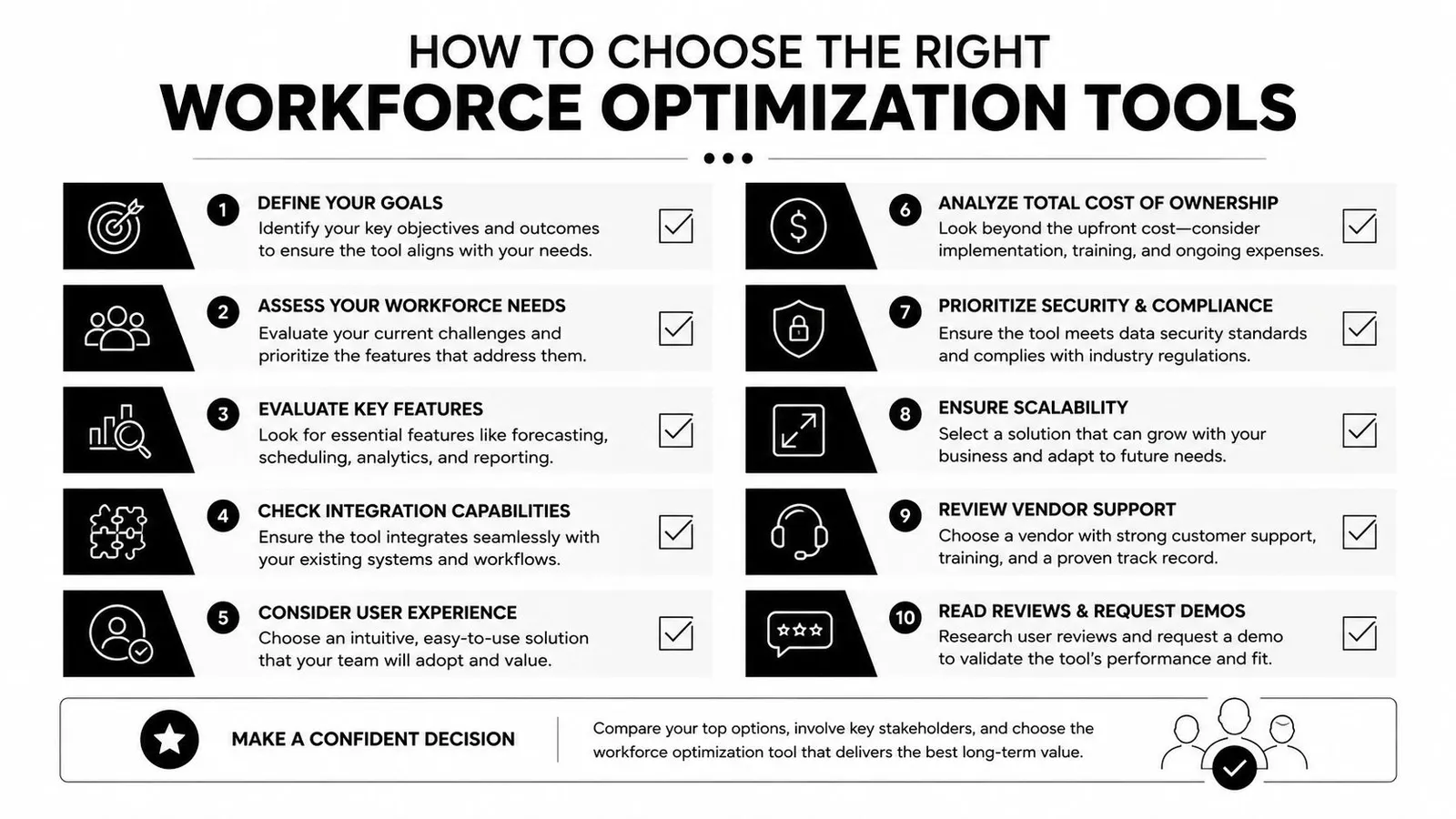
One gap matters more than most. The underserved angle in many WFO discussions is the intraday execution gap, meaning the need to make immediate staffing changes when labor starts spiking during the shift, not just to build a clean schedule in advance (Workhuman).
Questions that actually matter
Use questions like these when you evaluate a platform:
- Does it connect to the POS? Forecasting is much stronger when sales data flows in directly instead of being rekeyed.
- Can it show projected labor before publishing the schedule? That's where expensive mistakes are cheapest to fix.
- Does it help during the shift? Real-time projections, alerts, and labor drift visibility matter more than pretty dashboards.
- Can employees handle swaps and releases without chaos? If coverage still lives in text threads, the process is fragile.
- Does it reduce admin work after service? Tip calculations, timecard review, and payroll prep should be easier, not buried in more clicks.
- Can managers act from the information quickly? If a system requires too many screens to answer one labor question, it won't get used in a rush.
The right tool isn't just a scheduler. It's a decision support system for live restaurant operations. Planning matters, but execution is where labor targets are won or lost.
If you want a system built around that day-to-day reality, AnchOps is worth a look. It's designed for restaurant labor planning before the schedule posts and labor control during the shift, with scheduling, sales-based forecasting, tip automation, timecard review, and mid-shift labor visibility in one workflow.
Your back-of-house partner is ready
AnchOps handles scheduling, tip calculations, labor costs, and timecards — so you can focus on your restaurant, not your paperwork.