Overtime Tracking for Restaurants: A Practical Guide
Published on
By Tony Newcome — Founder of AnchOps · Owner, Pizza Harbour
This article was drafted with AI assistance and reviewed by Tony Newcome, a working restaurant operator.
Restaurant overtime tracking means catching labor drift while you can still act on it — during the week, not at payroll review. Federal law requires time-and-a-half past 40 hours a week; the operational fix is live visibility into hours, clean timecards before payroll, and coverage decisions made with the overtime math in front of you.
That's how overtime usually shows up in restaurants. Not as one big mistake. As a pile of small decisions made during a busy week.
Good overtime tracking fixes that. It gives managers a way to see labor drift while they can still do something about it, clean up timecards before payroll turns into a scramble, and stop treating overtime like a surprise line item.
Table of Contents
- Why Overtime Tracking Is More Than a Legal Chore
- The Friday night problem
- Why reactive review fails
- Understanding Overtime Laws for Restaurants
- What the rule is
- What it means in a restaurant
- Common Payroll Pitfalls in Overtime Tracking
- Where restaurants get burned
- Mistakes that create rework
- How to Accurately Track and Calculate Overtime
- Start with clean timekeeping rules
- Track the premium separately
- A simple calculation workflow
- Proactive Strategies to Prevent Unplanned Overtime
- Build schedules that leave room for reality
- Control shift changes before they create overtime
- Use alerts while the shift is still happening
- Automating Overtime Tracking with Your POS
- What automation actually changes
- Why future reporting matters now
- Your Overtime Tracking Implementation Checklist
- Use this in order
Why Is Overtime Tracking More Than a Legal Chore?
The Friday night problem
A lot of managers think overtime is a payroll issue. In a restaurant, it's really an operations issue that payroll exposes later.
One rough dinner service can push the whole week off plan. A line cook stays late for cleanup. A bartender picks up an extra close. A manager approves a cover shift because the priority is getting through service. All of those calls can be right in the moment and still create avoidable overtime by the end of the workweek.
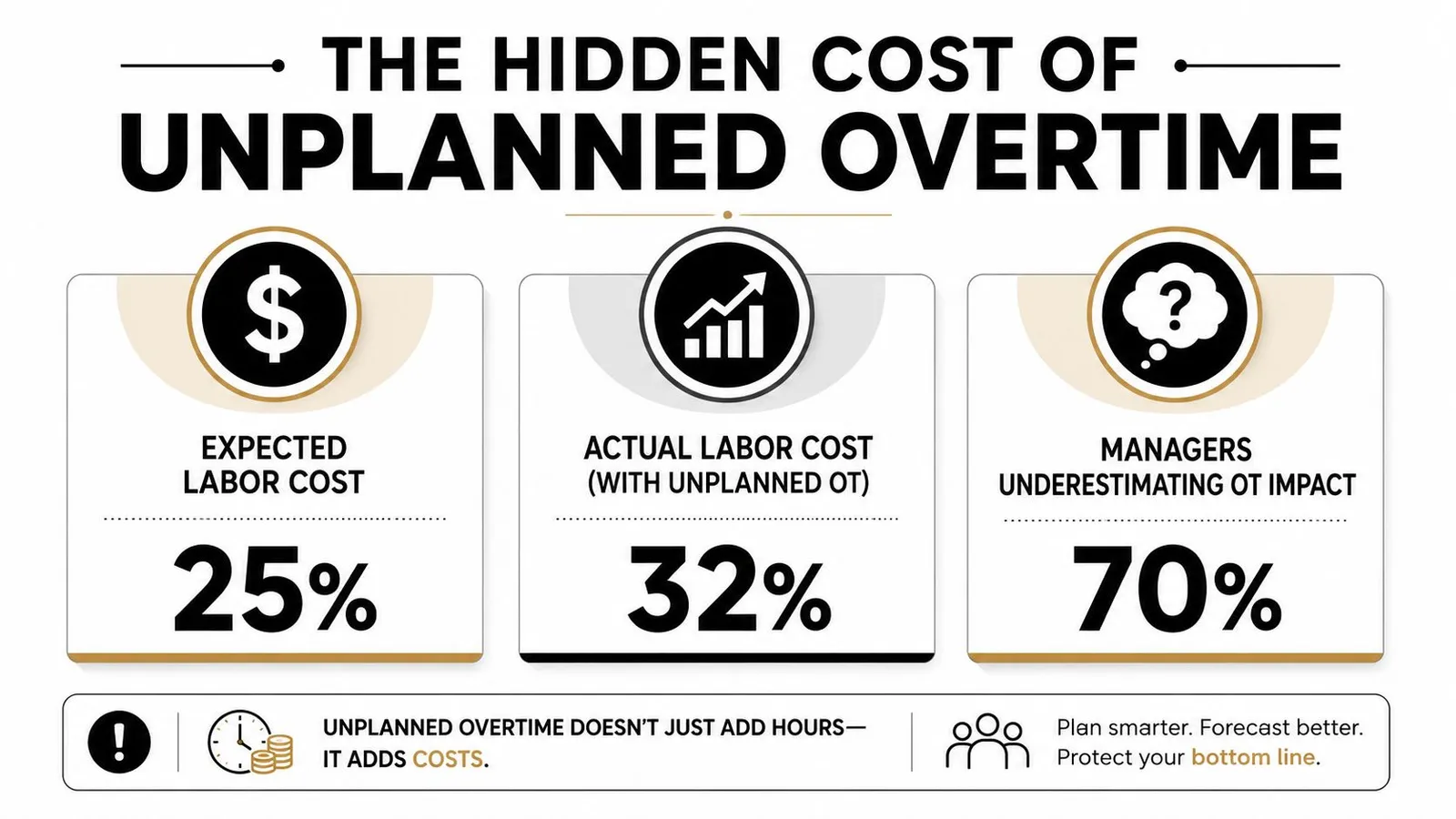
The hidden problem is that bad time records make every overtime decision harder. Intuit reports that U.S. employers say they have to correct errors on 80% of submitted timesheets, and those inaccuracies cost workers between $1,400 and $6,000 a year, with an estimated $22 billion national impact, according to Intuit's time and attendance statistics.
That matters in restaurants because overtime is calculated off recorded hours, not what the schedule said should happen.
Why reactive review fails
If your process is “we'll catch it in payroll,” you're already late. By then, the hours are worked, the shifts are closed, and managers are trying to remember why someone missed a break punch three days ago.
What works better is a system that ties scheduling, punches, and approvals together. If you're trying to streamline time and labor, the useful question isn't just whether staff hit overtime. It's whether your team can see labor drift early enough to change coverage, approve exceptions cleanly, and close the week without manual reconstruction.
Practical rule: Overtime tracking should happen during the week, not after the week.
A restaurant that reviews labor only after payroll sees overtime as a result. A restaurant that tracks hours daily sees overtime as a controllable operating signal.
That shift changes how managers behave. They stop approving extra coverage casually. They look at cumulative hours before saying yes to a shift swap. They treat missed punches like a cost issue, not just an admin annoyance. That's where margins get protected.
What Are the Overtime Laws for Restaurants?
What the rule is
The federal rule is simpler than most restaurant teams make it. Under the FLSA, overtime is triggered after 40 hours in a single workweek, the workweek is a recurring 168-hour period, and overtime must generally be paid at 1.5 times the regular rate, as explained in this overview of overtime tracking and compliance.
The part that causes confusion is the workweek itself. It is not “whatever payroll week feels convenient,” and it is not based on one long shift or a single busy day. It's a fixed seven-day window that your business defines and repeats.
If your workweek starts Wednesday at 12:00 a.m., then every hour has to be counted inside that same recurring window. Managers get in trouble when they think in calendar days while payroll has to think in workweeks.
What it means in a restaurant
Restaurants create edge cases all the time:
- Split shifts: A split shift doesn't create a separate overtime bucket. Those hours still roll into the same workweek total.
- Multiple locations under one owner: If an employee works at more than one location inside the same operation, managers need to look at total weekly hours, not just the store schedule they can see locally.
- Tipped employees: Tipped staff aren't outside overtime rules just because their pay structure is different.
- Long event days: One long catering day may feel like “overtime” to the floor manager, but federal overtime tracking still centers on the full workweek.
If managers don't know when the workweek starts, they can't manage overtime correctly.
This is also where policy discipline matters. A manager shouldn't be guessing whether a post-close cleaning hour belongs to one week or the next. The clock, the schedule, and payroll setup all need to use the same workweek definition.
For operators dealing with state-specific pay rules, daily overtime questions, or double-time scenarios, it helps to compare your local requirements against federal basics before you configure payroll. A practical reference is this guide on what double time means in payroll.
A clean overtime process starts with one shared rule. Everyone needs to know when the week starts, when overtime triggers, and which hours count toward it.
Common Payroll Pitfalls in Overtime Tracking
Where restaurants get burned
Restaurants make overtime mistakes for a simple reason. The operation is messy by nature. Schedules change, people trade shifts, tipped wages complicate pay, and managers often patch holes in service before they think about payroll.
That's why restaurants are especially exposed. Independent coverage notes that irregular schedules, split shifts, and tipped wages make restaurants uniquely vulnerable to overtime errors, and it points to geofenced clock-ins and real-time manager alerts as practical controls in this overview of tracking overtime.
Mistakes that create rework
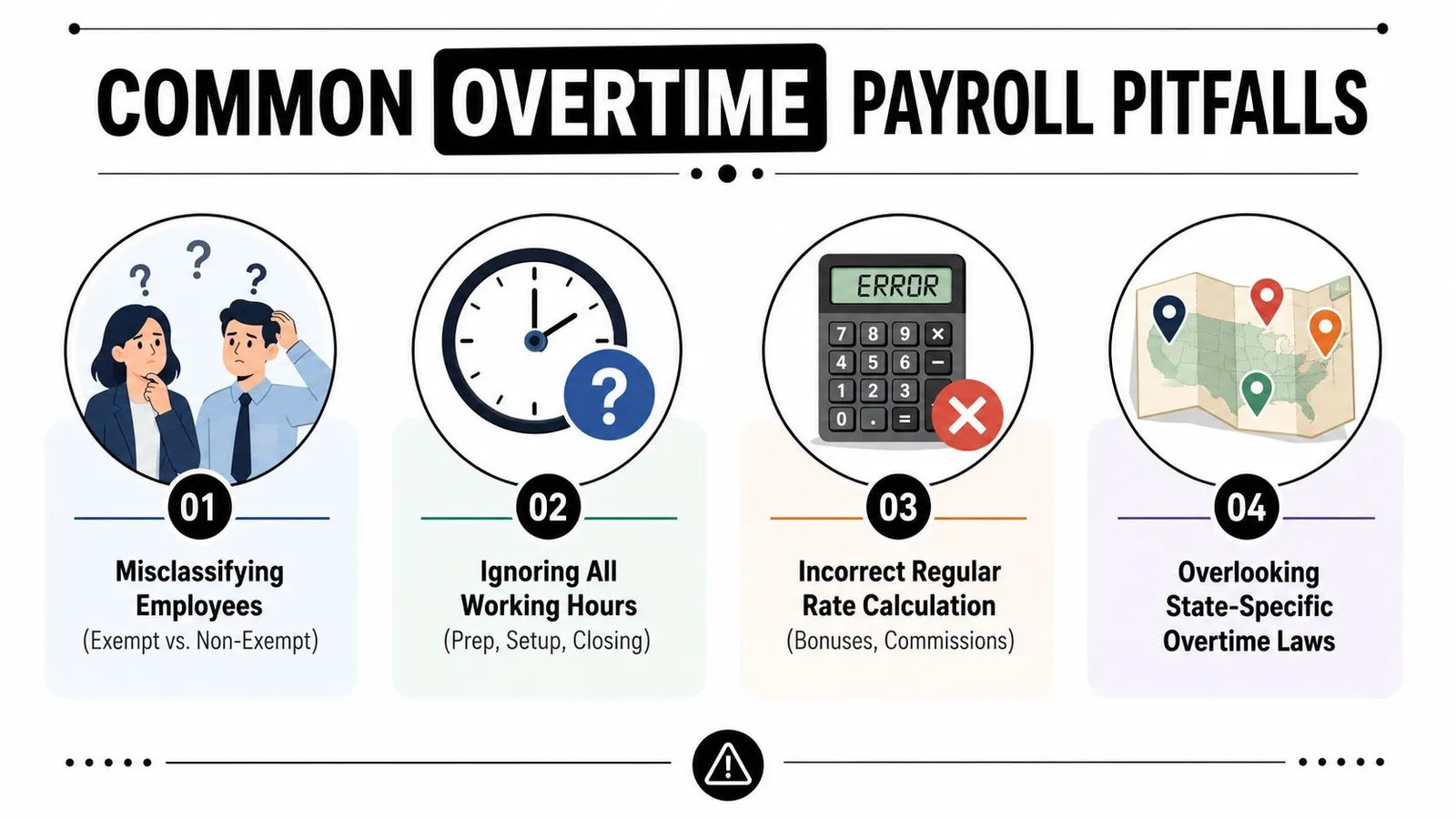
The most common problems usually look small at first:
Manual edits with weak documentation
A manager fixes a punch after the shift but doesn't note why. Payroll sees the change later and has no context. That creates rework and opens the door to disputes.Ignoring work outside the posted shift
Prep time, pre-shift setup, cash-out, side work, and closing tasks all count if the employee is working. Restaurants often build schedules around floor coverage but forget the labor before open and after close.Treating each location or department separately
An employee can look fine in one schedule and still cross into overtime when hours from another unit are added.Using a payroll process that lumps everything together
When regular pay, overtime hours, and adjustments are all mixed in one review step, managers can't spot where the extra labor actually came from.
Here's the trade-off. Manual flexibility feels easier during service. It becomes expensive at payroll.
A lot of operators hit the point where they need outside help tightening process, approvals, and payroll setup. If you're cleaning up a growing back office, it's worth looking at payroll solutions for growing Florida companies that can support cleaner labor records and fewer last-minute corrections.
Clean payroll starts with clean operations. Most overtime errors were created on the floor days before they showed up in payroll.
The fix usually isn't “train payroll harder.” It's tighter punch rules, clearer approval steps, and fewer off-system exceptions.
How Do You Accurately Track and Calculate Overtime?
Start with clean timekeeping rules
Accurate overtime tracking starts before calculation. It starts with rules your staff and managers can realistically follow during a rush.
Keep the policy simple and specific:
- Clock in when work starts. Not when the schedule starts if the employee is already doing prep.
- Clock out when work ends. Not after side work is forgotten and added later from memory.
- Record break exceptions the same day. Don't wait until payroll review.
- Approve edits with notes. Every change should show who made it and why.
- Review cumulative hours daily. Don't wait for the end of the week.
If your team is still bouncing between schedules, text threads, and separate spreadsheets, a centralized labor workflow matters more than another policy memo. A system built around restaurant labor cost tracking makes managers check hours, timecards, and projected labor in one place instead of stitching together answers at payroll close.
Track the premium separately
For compliance and reporting, payroll should separate regular hours, overtime hours, and the overtime premium, which is the extra half-time amount, as discussed in this article on overtime reporting requirements.
That distinction matters because operators often lump overtime into one number. That may get someone paid, but it makes reporting and year-end cleanup harder than it needs to be.
A cleaner setup uses separate earnings logic:
| Pay element | What it represents | Why it should be separate |
|---|---|---|
| Regular hours | Hours paid at the regular rate | Forms the base pay record |
| Overtime hours | Hours above the overtime threshold in the workweek | Shows when overtime occurred |
| Overtime premium | The extra half-time portion | Supports reporting without manual rebuild |
A simple calculation workflow
Use a repeatable workflow every week.
First, total all hours worked in the defined workweek. Next, identify how many of those hours are regular and how many fall into overtime. Then determine the employee's regular rate for that week under your payroll setup. Finally, calculate the extra premium owed on the overtime hours and store it separately.
For restaurants, the practical lesson is this: don't build a process that depends on someone “remembering what happened.” Build one that leaves an audit trail.
A workable manager checklist looks like this:
- Before midweek: Check who is trending toward overtime based on punches, not just the published schedule.
- Before final payroll approval: Review every edited punch and every missed meal or break exception.
- Before export: Confirm overtime is split correctly between hours and premium.
- After payroll: Look for patterns by role, daypart, and manager approval habits.
That last step is where operators usually find the issue. Overtime often isn't random. It tends to cluster around the same closers, the same callout windows, or the same manager who approves extra coverage without checking weekly totals first.
Proactive Strategies to Prevent Unplanned Overtime
Build schedules that leave room for reality
The best overtime tracking system in the world won't save a bad schedule. If your base schedule already runs too close to the edge, one callout or one strong sales night can push key employees past the threshold.
Smart scheduling means building around expected pressure points, not ideal conditions. In practice, that usually means identifying which shifts routinely run long, which positions are hardest to replace midweek, and which closers are carrying too many total hours before the weekend even starts.
A strong schedule also gives managers options. If nobody else can cover grill, overtime becomes structural. If two employees can step into that station, the manager has room to adjust.
Control shift changes before they create overtime
Most accidental overtime doesn't come from the original schedule. It comes from shift swaps, covers, and “can you stay a little longer” decisions.
Policy, therefore, needs teeth:
Require approval before swaps are final
Don't let employees trade shifts casually in a group text and expect payroll to sort it out later.Show weekly totals during approval
A cover request should display how many hours the employee already has. Without that, managers are approving blind.Set a rule for emergency coverage
If someone must stay, define who approves it and how the next shift gets adjusted.
For restaurants trying to fix this upstream, it helps to standardize the schedule creation process itself. A guide on how to create a restaurant staff schedule can help managers move away from patchwork scheduling that creates labor problems later in the week.
Use alerts while the shift is still happening
The most useful overtime control isn't a report. It's an alert a manager gets while there's still time to act.
If a line cook is nearing overtime during a slow late-night stretch, a real-time alert gives the manager choices. Cut a support position. Swap closing duties. Send one person home earlier and keep another who has more room in the week. Those moves are operational, not payroll-based.
Restaurant-specific tools can help. Platforms that connect scheduling, time entries, and labor visibility can surface overtime risk before payroll review. AnchOps, for example, is one option that syncs labor data with restaurant operations and gives managers mid-shift visibility into labor drift.
The easiest overtime hour to manage is the one that hasn't been worked yet.
What doesn't work is a culture where managers are told to “watch overtime” but don't have real-time hour totals, don't control swap approvals, and can't see cumulative labor by employee during the week. That setup guarantees surprises.
Automating Overtime Tracking with Your POS
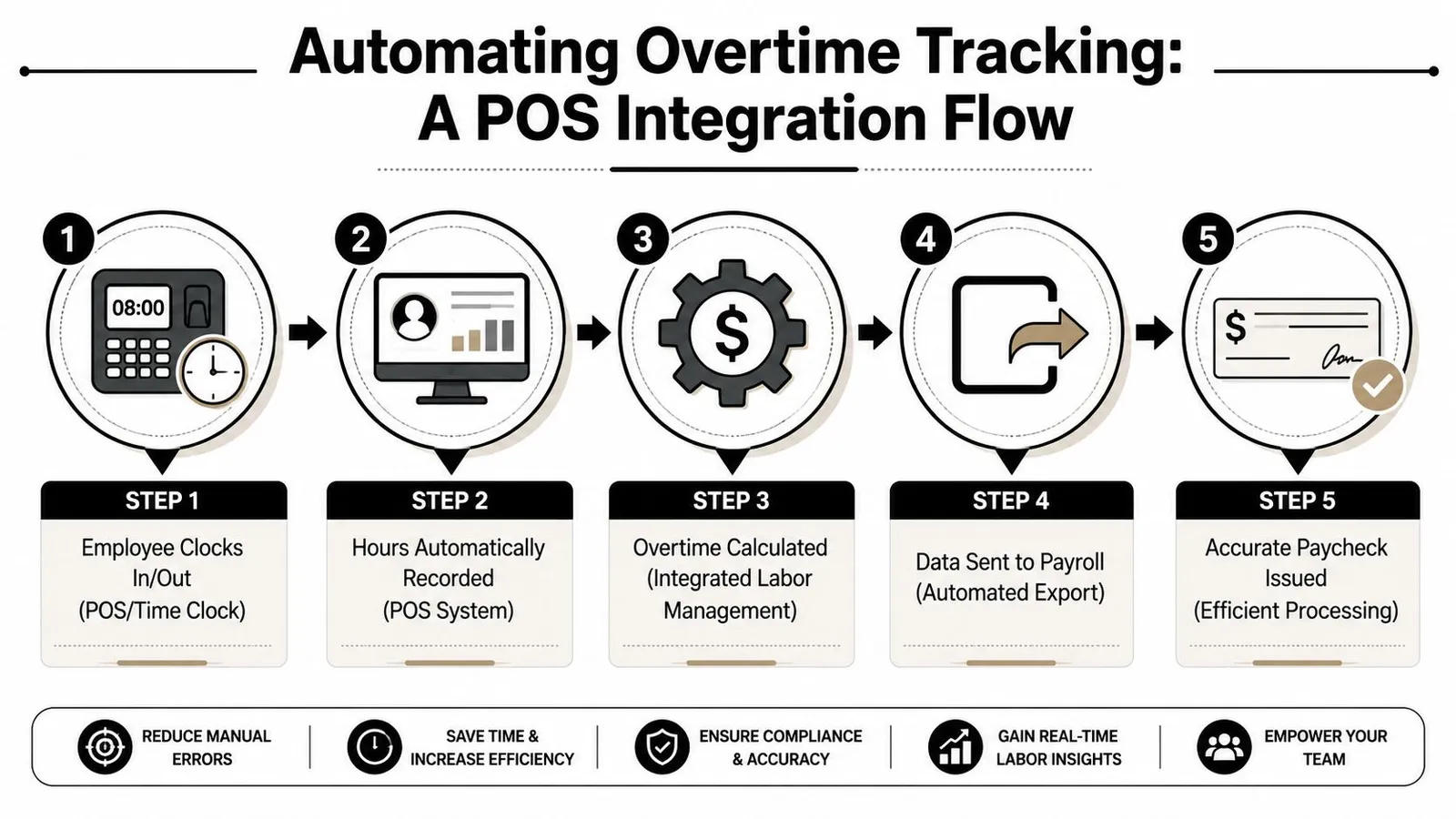
A key benefit of POS-connected overtime tracking is that it removes delay. Employees clock in and out, hours flow into the labor system, and managers can work from live records instead of handwritten corrections and end-of-week spreadsheets.
What automation actually changes
With a connected setup, four things get easier:
- Punch accuracy improves because managers aren't re-entering time from scraps of paper.
- Overtime visibility improves because cumulative hours update as the week moves.
- Payroll prep gets cleaner because approved timecards export in a consistent format.
- Tip-related workflows stay closer to the time record instead of being calculated separately at the end.
That matters because manual systems break under restaurant conditions. Too many edits. Too many exceptions. Too much dependence on one person remembering why a shift changed.
A short demo helps make that workflow concrete:
Why future reporting matters now
Automation also helps with reporting changes that are coming. Starting in 2026, many employers will need to separately track and report the premium portion of FLSA overtime on W-2s using Box 12 code TT, and systems should be configured to handle that requirement automatically, according to this summary of the new overtime and tip payroll reporting requirements.
That doesn't mean every restaurant needs a giant tech stack. It does mean your current setup should be able to separate overtime correctly, preserve audit trails, and export payroll data without manual cleanup every pay period.
Your Overtime Tracking Implementation Checklist
Use this in order
A workable overtime process is usually boring by design. That's a good thing. It means managers know the rules, payroll gets clean records, and labor costs don't jump because nobody caught an avoidable schedule decision.
Use this checklist as an operating reset:
Define the workweek clearly
Put the start and end of the workweek in manager training, payroll settings, and written policy.Tighten clock-in rules
Make sure prep, setup, side work, and closeout time are captured the same way every shift.Require documented timecard edits
Every manual adjustment should have a reason and manager approval attached to it.Review hours before the week ends
Don't leave cumulative hour checks until payroll day.Separate overtime components in payroll
Keep regular hours, overtime hours, and overtime premium distinct.Control swaps and covers
No shift change should be approved without looking at total weekly hours.Use manager alerts
Give shift leaders visibility while they still have time to adjust staffing.Audit repeat causes
Look for patterns by role, daypart, and manager behavior instead of treating each overtime event as isolated.
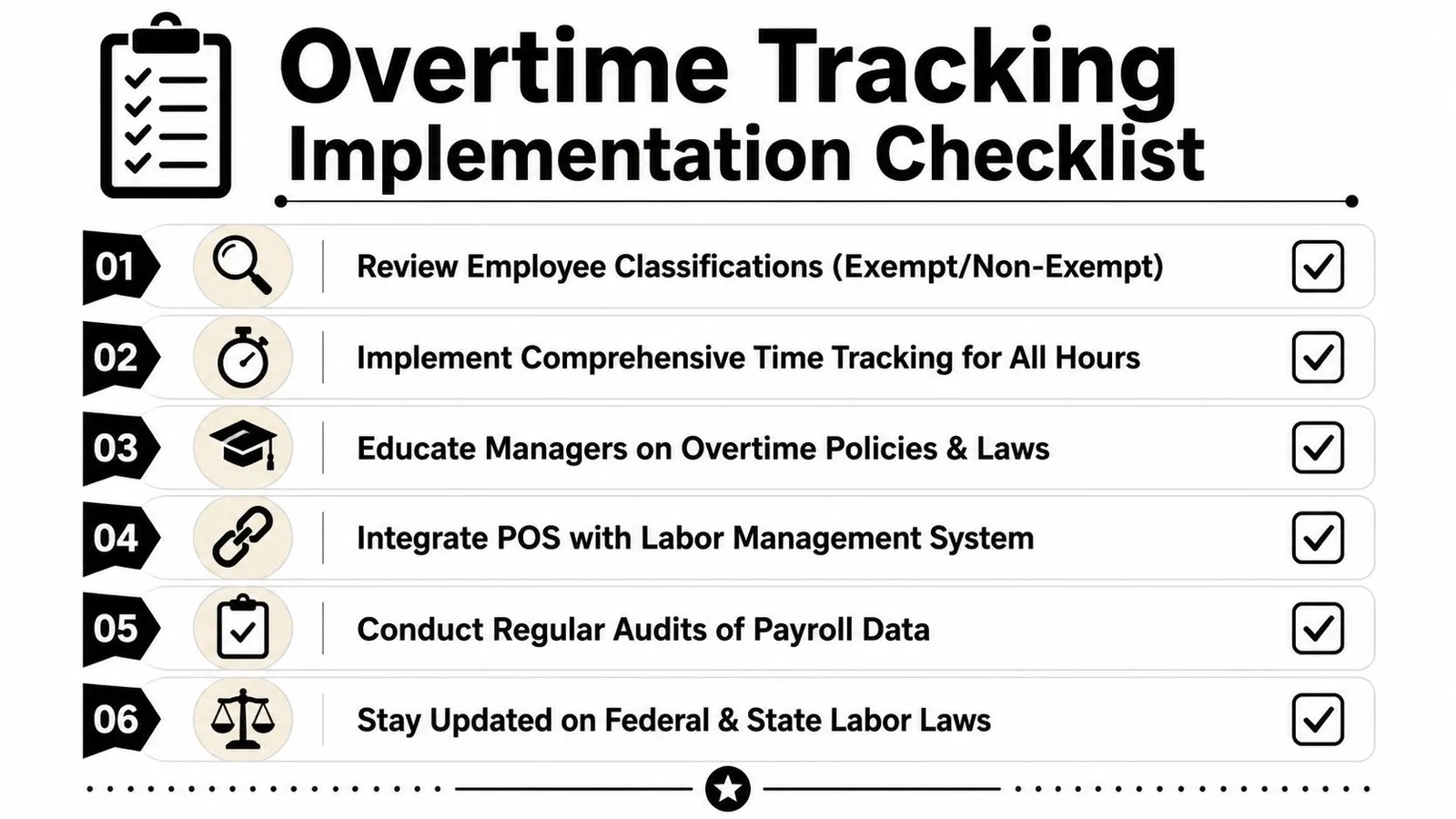
Strong overtime tracking doesn't depend on heroic payroll cleanup. It depends on simple rules followed consistently on the floor.
If you can get punches right, approvals right, and weekly visibility right, most overtime problems become manageable. Not because overtime disappears, but because it stops surprising you.
If you want a simpler way to control overtime before payroll, AnchOps gives restaurant teams scheduling, labor tracking, timecard review, and real-time visibility in one workflow. It's built for operators who need to spot labor drift during the week, not after the damage is done.
Your back-of-house partner is ready
AnchOps handles scheduling, tip calculations, labor costs, and timecards — so you can focus on your restaurant, not your paperwork.