What Is Double Time: Calculate Payroll & Prevent Costs
Published on
By Tony Newcome — Founder of AnchOps · Owner, Pizza Harbour
This article was drafted with AI assistance and reviewed by Tony Newcome, a working restaurant operator.
Double time is pay at twice an employee's regular hourly rate. Unlike time-and-a-half overtime, it's rarely required by federal law — California is the main state that mandates it, after 12 hours in a day or on the seventh consecutive workday. Calculate it as 2× the regular rate for qualifying hours, and schedule to prevent it from happening by accident.
A cook stays late because two people called out. A supervisor closes, then comes back to open because nobody else can cover. Service is saved, guests are happy, and the schedule looks heroic until payroll lands. Then one shift sticks out like a grease fire on the labor report. The problem wasn't that you staffed too many people. The problem was that one person crossed a pay threshold you weren't watching.
That's what makes what is double time such an important question for restaurant operators. It isn't just a payroll definition. It's a scheduling trigger, a margin leak, and in some markets a compliance issue. If you run one location, it can sneak up on you during a rough week. If you run multiple locations, it can get buried inside transfers, split shifts, and managers trying to solve today's problem without seeing tomorrow's cost.
I've seen operators obsess over food waste, discounts, and voids while missing the labor premium created by a single long day. Payroll gets complicated fast when daily limits, weekly overtime, and house policy all collide. If your team also deals with different jurisdictions, resources like UK payroll solutions for SMEs can be useful for understanding how payroll support changes when rules vary by market. The core lesson is the same everywhere. If you don't define the trigger, your managers will trip it by accident.
Table of Contents
- The Hidden Cost of a Single Long Shift
- The real operational mistake
- What good operators do differently
- Double Time vs Overtime Understanding the Pay Rates
- Why the two rates need separate attention
- The operator view of the math
- How to Calculate Double Time Pay Step by Step
- A simple restaurant shift example
- A weekly audit method that works
- When Is Double Time Required by Law
- Federal rules versus state rules
- A quick reference for operators
- How to Prevent Accidental Double Time Costs
- Where accidental double time starts
- What prevention looks like in a restaurant
- Automating Compliance with AnchOps and Toast
- Why manual tracking breaks down
- What automation changes during the shift
The Hidden Cost of a Single Long Shift
A new GM usually looks at labor the same way at first. Too many people on the floor means labor is high. Too few people means service suffers. That's true, but it misses the hidden problem. One long shift can cost more than an extra body on the schedule if it pushes the wrong employee into a premium pay bucket.
Say your strongest line cook works through prep, service, and close because the night went sideways. On the floor, that feels efficient. You didn't bring in another person, and the kitchen held together. On payroll, that same decision can turn into a much more expensive day than anyone expected.
Practical rule: A labor problem isn't always about headcount. Sometimes it's about one person staying too long.
This is why operators get caught off guard. Managers think in coverage. Payroll thinks in classifications. The system doesn't care that the shift was necessary. It cares how many of those hours were regular, how many were overtime, and whether any crossed into double time.
The real operational mistake
The mistake usually isn't ignorance of the rate. Most managers know premium pay exists. The mistake is failing to watch when the trigger happens. Restaurants create these situations constantly:
- Callout coverage: A reliable employee gets asked to “just stay and finish the rush.”
- Weak handoffs: The opener stays into dinner because the closer is late or undertrained.
- Consecutive day scheduling: A schedule patch turns into a full week without a true reset day.
- Manual edits: Someone clocks out late, a manager adjusts the punch later, and nobody rechecks the premium hours.
None of that looks dramatic in the moment. That's why it's expensive.
What good operators do differently
Experienced operators coach managers to treat premium hours like different speed limits. Regular time is normal driving. Overtime is the first ticket. Double time is the bigger penalty that hits when the shift goes far past a safe threshold. Once managers see it that way, they stop asking only, “Can this person stay?” and start asking, “What rate kicks in if they do?”
That shift in thinking is what keeps labor predictable.
What Is the Difference Between Double Time and Overtime?
Overtime and double time sit in different pay buckets, and managers need to treat them that way during the shift, not after payroll closes. Overtime is typically paid at 1.5 times the regular rate. Double time is paid at 2.0 times the regular rate, as outlined in OnPay's double time pay primer.
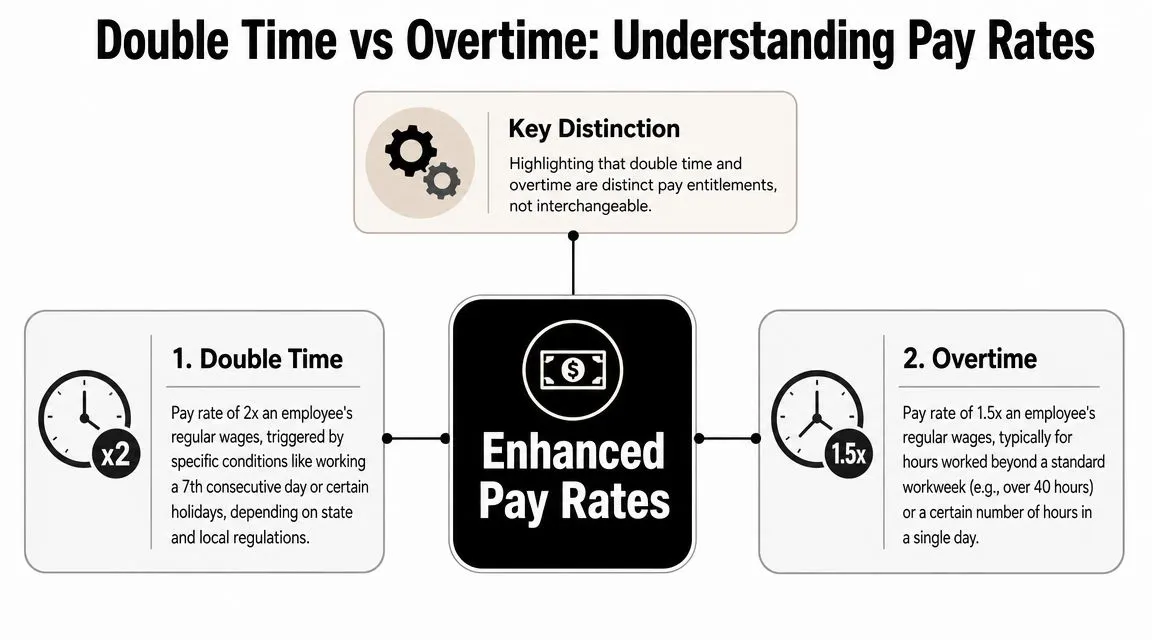
Why the two rates need separate attention
Operators get into trouble when they hear “premium pay” and stop there. That shortcut creates bad decisions on the floor. A manager approves another two hours for a line cook, assumes it is the usual overtime premium, and misses that the next block of time may cost much more depending on the rule that applies.
A better comparison is different speed limits on the same road. The employee is still working. The cost changes once the shift crosses a threshold.
That matters because labor control is not just about hours worked. It is about which hours are still regular, which have moved into overtime, and which have crossed again into double time. If managers only watch total hours, they react too late.
The operator view of the math
For a $20 per hour employee, double time means $40 per hour in that premium bucket. That is the number managers should know before they ask someone to stay.
| Pay bucket | Multiplier | What it means in operations |
|---|---|---|
| Regular time | 1x | Planned labor at the scheduled rate |
| Overtime | 1.5x | Extra coverage with a higher hourly cost |
| Double time | 2x | High-cost coverage that usually signals a scheduling failure, callout scramble, or missed handoff |
This is why experienced GMs build alerts around thresholds, not just weekly labor percentages. A labor report can look fine at noon and still get hit by expensive premium hours after dinner if no one is watching the trigger points. Running a quick check with a restaurant labor cost calculator before approving an extended shift helps managers see the actual cost while they still have options.
Track hours by pay bucket, not just by total.
Payroll systems should separate regular, overtime, and double-time hours cleanly. That setup does more than keep payroll tidy. It shows where scheduling discipline broke down and where managers need to intervene earlier on the next schedule.
How Do You Calculate Double Time Pay?
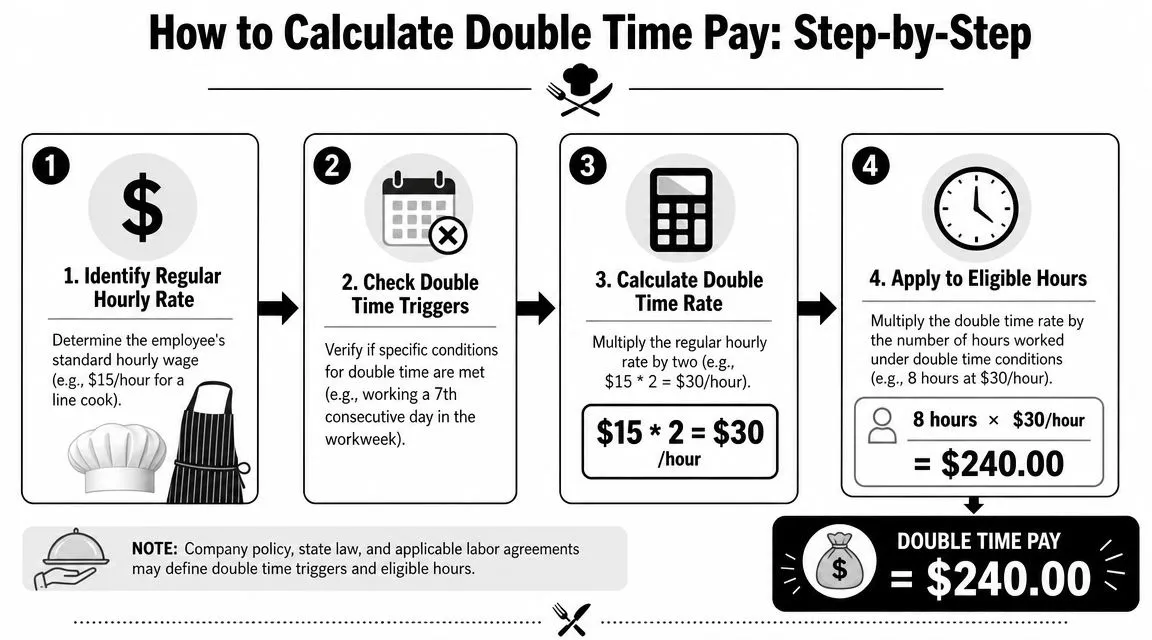
The math itself isn't hard. The hard part is sorting the hours into the right buckets before payroll runs. Managers usually make mistakes because they try to total the week first. That's backward. Start with the trigger, then assign each hour to its proper rate.
Here's a visual breakdown of the basic flow.
A simple restaurant shift example
Use the common California-style example because it shows all three buckets clearly. An employee works a 14-hour shift. If your applicable rule requires double time after 12 hours in a day, the hours are divided like this:
- First 8 hours at the regular rate
- Next 4 hours at the overtime rate
- Final 2 hours at the double-time rate
That method reflects the California-style structure described in the background legal examples and aligns with the state trigger discussed later in this article.
If the employee's regular hourly wage is known, the manual process is simple:
- Regular pay: regular rate × first 8 hours
- Overtime pay: regular rate × 1.5 × next 4 hours
- Double-time pay: regular rate × 2.0 × final 2 hours
You're not applying one rate to the whole shift. You're slicing the shift into pay zones.
For a quick labor planning check before payroll, tools like the restaurant labor cost calculator help managers sanity-check labor impact before they publish or revise a schedule.
A weekly audit method that works
The more realistic restaurant problem is a mixed week. An employee may have regular hours, some overtime hours, and a small block of double time. When that happens, use this audit order:
Review each day individually
Daily triggers are where double time often appears first. Don't start by adding the week.Mark any premium hours by day
Pull out the hours that qualify for overtime or double time under the rule set you use.Check the full workweek after that
Weekly overtime can still matter, but it shouldn't overwrite daily premium classifications.Confirm consecutive day issues
In operations with daily premium rules, the seventh straight day can change the pay treatment again.
If payroll ever looks confusing, rebuild the week from the time punches, not from the paycheck summary.
Managers who skip that process usually make one of two mistakes. They either pay all extra hours at the same premium, or they miss the daily trigger entirely because the weekly total looked ordinary.
A short walkthrough can help your team see how this works in practice:
What works in the field is a simple rule: the minute a shift starts stretching, stop thinking about coverage only. Start asking which hour bucket the employee is entering next.
When Is Double Time Required by Law?
A lot of managers assume double time is a federal rule. It isn't. There is no federal double-time mandate. Under federal law, overtime is generally 1.5x after 40 hours in a workweek. Double time is largely driven by state law or employer policy, with California being the most well-known for explicit rules such as pay premiums for hours over 12 in a single workday, as summarized by Harvest's double time calculator guide.
That point changes how you manage a restaurant group. If you operate in more than one state, you can't assume the labor logic from one store applies to the next. A manager transferred from a weekly-overtime market into California can create payroll errors fast if they schedule by habit.
Federal rules versus state rules
Federal law gives you the baseline overtime framework. State law or company policy may add double-time obligations on top of that. For restaurant operators, the practical lesson is simple. You need location-specific scheduling rules, not one universal playbook.
California is the example most operators know, and for good reason. It's commonly cited for double time after 12 hours in a single workday and after 8 hours on the seventh consecutive day in a workweek, as described in the verified material above. Those are operational triggers, not abstract legal trivia. They affect how you approve doubles, clopens, and emergency coverage.
A table helps make the difference clearer.
A quick reference for operators
| State | Double Time Trigger |
|---|---|
| California | Commonly cited as applying after 12 hours in a single workday or after 8 hours on the seventh consecutive day in a workweek |
| States following only federal baseline rules | No general state-level double-time mandate identified here. Overtime generally applies after 40 hours in a workweek under federal law |
| States where employer policy or contract may add premium pay | Trigger depends on the policy, agreement, or applicable local rule |
The point of that table isn't to turn a GM into counsel. It's to show why “we always do it this way” is dangerous payroll logic.
Here's what usually fails in multi-unit operations:
- One handbook for every store: Clean on paper, messy in practice.
- Manager memory: People remember overtime. They forget daily premium triggers.
- End-of-week review only: Too late. The costly decision already happened on day six or day seven.
What works better is building local rules into your timekeeping and approval process. If you also manage teams outside the U.S. or want another example of how working-time rules create operational obligations, Beacon Recruitment's guide to the Organisation of Working Time Act 1997 is a useful reference point for seeing how labor compliance changes by jurisdiction.
Managers don't need to memorize every statute. They do need a system that tells them when a shift has stopped being ordinary.
How to Prevent Accidental Double Time Costs
At 4:30 p.m., the opener is already running behind, a line cook calls out, and the closing manager asks the same reliable employee to stay late again. That decision can feel harmless in the moment. By the next morning, it may be one of the most expensive labor choices on the schedule.
Accidental double time usually comes from operations drift, not a deliberate staffing plan. A shift stretches, a meal break gets pushed, someone covers a gap, and nobody stops to ask whether the extra hour is still cheap labor or premium labor. In restaurants, that line matters.
The compliance risk is not theoretical. In a recent representative year, the U.S. Department of Labor's Wage and Hour Division recovered hundreds of millions in back wages for workers, according to the Wage and Hour Division fiscal year data. Premium-pay mistakes sit inside that larger wage-and-hour problem, and restaurants create those mistakes fast because coverage decisions happen in real time.
Where accidental double time starts
Operators usually lose control in the same few spots.
- Schedules built with no cushion: One callout turns a normal day into a long day.
- The same employee keeps saving the shift: Your strongest person becomes the pressure valve, and pressure valves get expensive.
- Managers watch total hours but miss trigger hours: Forty hours in a week gets attention. Twelve hours in a day or a seventh straight day often does not.
- Punch edits happen in isolation: A corrected in-punch or missed break entry can change pay treatment, not just clean up the timecard.
I tell new GMs to treat pay rates like speed limits. The first stretch of hours runs at one rate, overtime is a higher limit, and double time is a different zone altogether. If a manager does not know which road the employee is on before approving coverage, they are driving blind.
What prevention looks like in a restaurant
Start earlier than payroll review. Once the shift is over, the money is already committed.
Use these habits on the floor and in the schedule:
- Set hour guardrails before the week starts. Flag employees who are already carrying heavy schedules and protect their final shifts first.
- Protect rest days on purpose. Consecutive-day patterns are where many operators get surprised, especially in California.
- Make managers choose the cheaper coverage option, not the fastest familiar option. Splitting four extra hours across two employees can cost less than keeping one person deep into premium pay.
- Review edits with pay impact in mind. A timecard fix is not only an attendance correction. It can push someone into a different pay bucket.
- Coach to ask a better question. Not “Who wants more hours?” Ask, “Who can cover this without creating premium pay?”
One more trade-off matters. The best employee is often the worst emergency fix from a labor-cost standpoint. Strong performers solve service problems, but if they are already near a premium threshold, using them again can turn a manageable callout into a margin hit.
When wage disputes do happen, managers benefit from understanding how premium-pay mistakes turn into claims. For operators dealing with California-specific issues, this overview of understanding California wage disputes is a practical legal reference. On the scheduling side, many avoidable labor overruns start with routine habits, which is why this breakdown of restaurant scheduling mistakes that cost money is useful training material for every GM.
Automating Compliance with AnchOps and Toast
A Friday dinner rush is when manual tracking usually falls apart. A server stays late after a callout, a closer picks up one more hour, a manager fixes a missed punch, and payroll risk changes before anyone notices.
Why manual tracking breaks down
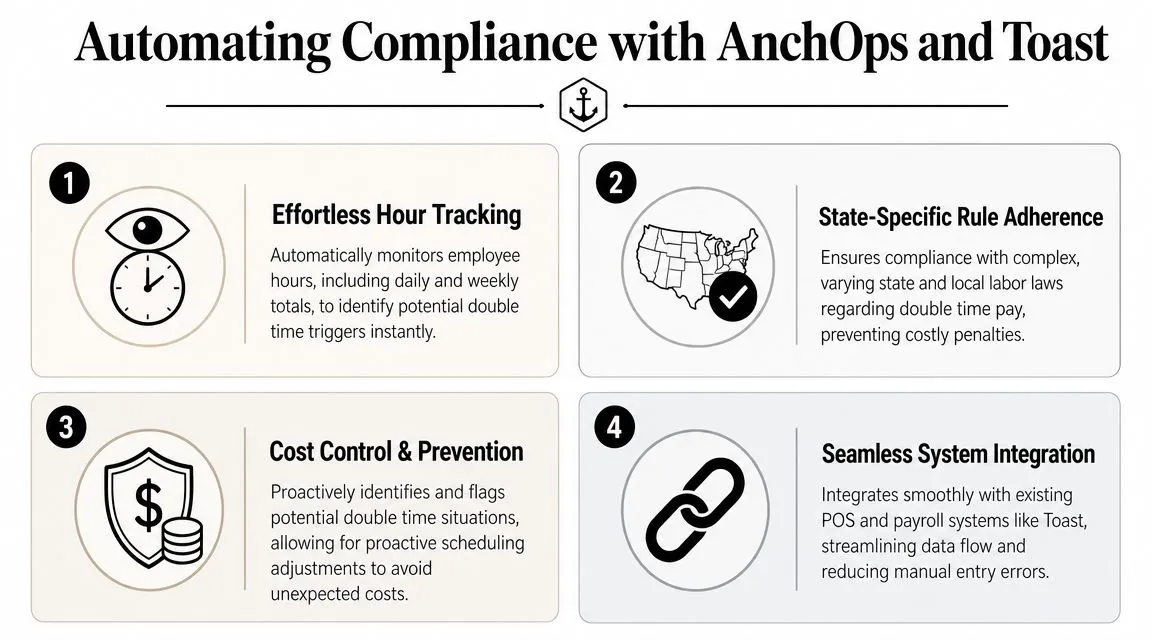
Manual tracking fails because double time is an operations problem first and a payroll problem second. Managers make coverage decisions in real time, under pressure, and premium pay can be triggered by a small change in who stays, who swaps, or who gets an edited clock-out.
By the time someone reviews daily hours, weekly totals, and rest-day patterns in a spreadsheet, the cost has already hit the timecard. At that point, the job is no longer prevention. It is damage control.
Integrated labor tools reduce that delay. Toast-connected workflows and rule-based labor systems can flag pay-risk patterns before payroll approval, while there is still time to fix the schedule or move coverage.
What automation changes during the shift
A platform such as AnchOps features for restaurant labor management syncs scheduling and time data, applies the pay rules you configure, and shows managers where a shift is getting expensive. That matters because the decision is rarely, “Did we calculate double time correctly?” The decision is, “Can we cover this table section, close this station, or finish this prep list without pushing the wrong employee into premium pay?”
That is the difference between using automation as a calculator and using it as an operating tool. One tells you what happened. The other helps you stop preventable labor cost before the shift ends.
If you want fewer payroll surprises and tighter control over labor before the shift gets expensive, AnchOps gives restaurant teams a practical way to schedule, track time, review labor, and catch premium-pay issues earlier. It is built for operators who need cleaner payroll inputs and better labor decisions during real service, not after the week is already over.
Your back-of-house partner is ready
AnchOps handles scheduling, tip calculations, labor costs, and timecards — so you can focus on your restaurant, not your paperwork.