Effective Restaurant Shift Management: Boost Profits &
Published on
By Tony Newcome — Founder of AnchOps · Owner, Pizza Harbour
This article was drafted with AI assistance and reviewed by Tony Newcome, a working restaurant operator.
Restaurant shift management is running the shift in real time — flying the plane, not just filing the flight plan. The schedule is a starting line; profitability comes from tracking the right metrics before, during, and after service, running tight pre-shift briefings, and making mid-shift labor calls while they can still change the outcome. A perfect Sunday schedule breaks by Tuesday.
Then Tuesday happens.
One cook calls out. Lunch starts slow, so you keep everyone on. Then a nearby office orders a large catering pickup and the line backs up. Your strongest cashier gets stuck solving app-order issues. A server asks to leave early because of a family situation. By 7 p.m., the shift you thought you had turns into a string of small labor decisions that either protect the night or subtly undermine it.
That's why so many restaurant managers feel like they're losing a fight they already prepared for. The schedule matters, but it's only the starting point. Once the doors open, shift management becomes a live operating job. You're balancing labor, service, fatigue, communication, and the mood of the floor in real time.
If you're still treating shift management like a weekly admin task, you're making the hardest part of the job harder. Building the roster is one skill. Running the shift after reality hits is a different one. If your current process still depends on spreadsheets, texts, and memory, it may be time to rethink how you create a staff schedule from the ground up.
Table of Contents
- Your Perfect Schedule Is About to Break
- Where managers usually get trapped
- The real job after the schedule posts
- Shift Management Is Flying the Plane Not Just Filing the Flight Plan
- What the schedule handles
- What actual shift management looks like
- The loop strong managers run all shift
- Leadership matters as much as math
- Key Metrics to Track Before During and After the Shift
- Before the shift
- During the shift
- After the shift
- What not to do with metrics
- Pre-Shift Best Practices for a Stronger Starting Line
- Build from patterns, then mark the pressure points
- Review the shift in the order it can fail
- Make fairness practical, not sentimental
- Use a pre-shift checklist that leads to live decisions
- Put guardrails around flexibility
- Mid-Shift Tactics to Control Labor Cost in Real Time
- When sales are running soft
- When the rush shows up early or out of nowhere
- When a no-show or call-out hits midstream
- A simple live decision grid
- How Labor Tools Automate Your Shift Management Strategy
- What software should take off the manager's plate
- Automation should match the way the shift actually runs
- The practical payoff
Your Perfect Schedule Is About to Break
A manager spends an hour smoothing out the week. They line up availability, avoid obvious overtime, and make sure the strongest closer isn't also opening the next day. On paper, it works.
By service time, the paper version is gone.
The first crack is usually small. Someone's late because traffic is bad. Prep ran behind because a delivery came short. A cashier is on the clock, but not really usable yet because training still slows everything down. Then the day splits in one of two directions. Either sales come in soft and labor starts drifting high, or the building gets slammed in one wave and suddenly you're short in the worst place.
That's the pain point most operators recognize. The schedule didn't fail because it was careless. It failed because a restaurant shift is a moving target. Guest traffic changes. Employees call out. Tasks take longer than expected. A static schedule can't absorb all of that on its own.
Where managers usually get trapped
The trap is reacting late.
Managers often wait until the dining room feels bad or labor feels obviously heavy. By then, the choices are worse. If you cut too late, you've already paid for dead time. If you call someone in too late, the rush hits before help arrives. If you move the wrong person, one station improves while another breaks.
Good shift management starts before the crisis is visible. By the time the floor is shouting at you, the decision window has already narrowed.
The real job after the schedule posts
A posted roster is a plan. Shift management is the work of steering that plan through the day. It means watching demand, reading the team, spotting drift early, and making labor calls while service is still recoverable.
Operators who get this right don't rely on one heroic manager making gut calls all night. They build habits. They know when to pause, what to check, and which levers to pull first.
That's where profits usually live. Not in the schedule alone, but in the dozens of decisions made after clock-in.
Shift Management Is Flying the Plane Not Just Filing the Flight Plan
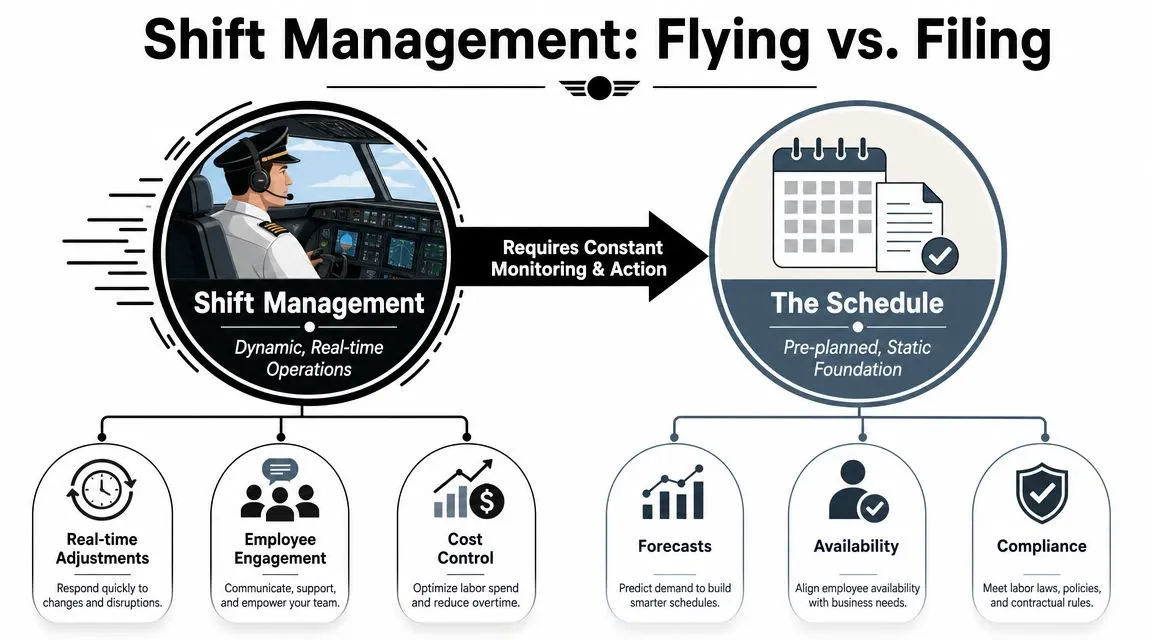
The easiest way to explain shift management is this. The schedule is the flight plan. It tells you where you intend to go, who's on board, and what the route should look like.
But the manager's job is flying the plane.
Weather changes. Fuel matters. The crew needs direction. If you only file the plan and never adjust in the air, you don't get credit for being organized. You just drift into problems faster.
What the schedule handles
A solid schedule gives you a foundation. It accounts for availability, expected demand, and compliance. That's necessary, but it's still static.
Modern operations have moved away from treating labor like a fixed weekly timetable. Shift management is now tied to historical sales patterns, attendance, and real-time operational updates because labor is one of the largest controllable expenses, as described in Shiftbase's definition of shift management.
That's the key distinction. The schedule sets the initial conditions. It doesn't run the shift for you.
What actual shift management looks like
Once service starts, the manager has to keep asking three questions:
- Is demand tracking the way we expected
- Is the team deployed where the work is
- Are labor decisions helping service or just hiding the problem
Those questions sound simple. In practice, they force real trade-offs.
If the front counter is quiet but digital orders are building, cutting the wrong front-of-house person can save labor while slowing fulfillment. If attendance is full but ticket times are slipping, headcount may not be the issue. You may have a skill mismatch, poor handoffs, or weak station assignment.
The loop strong managers run all shift
The best operators don't manage a shift as one long blur. They run a loop:
- Forecast the day from what they know before open.
- Execute the plan with role clarity and station assignments.
- Measure live conditions against what was expected.
- Adjust early before drift becomes damage.
That loop matters because a restaurant rarely breaks all at once. It usually drifts first. Labor creeps up. A station falls behind. One weak handoff causes three other delays.
Practical rule: Don't wait for a bad shift to announce itself. Catch the drift while it still looks manageable.
Leadership matters as much as math
Shift management also isn't just number tracking. It's communication.
A manager who merely watches dashboards but doesn't reset the team still loses. People need to know who's floating, who owns expo, who's covering breaks, and what gets deprioritized if the rush changes shape. The floor runs better when everyone hears the same plan at the same time.
That's why shift management is leadership, not paperwork. Filing the plan matters. Flying it is what protects the landing.
Which Metrics Should You Track Before, During, and After the Shift?
Most restaurants review labor after the damage is done. They pull a report, see that the day missed target, and talk about it tomorrow.
That's not enough.
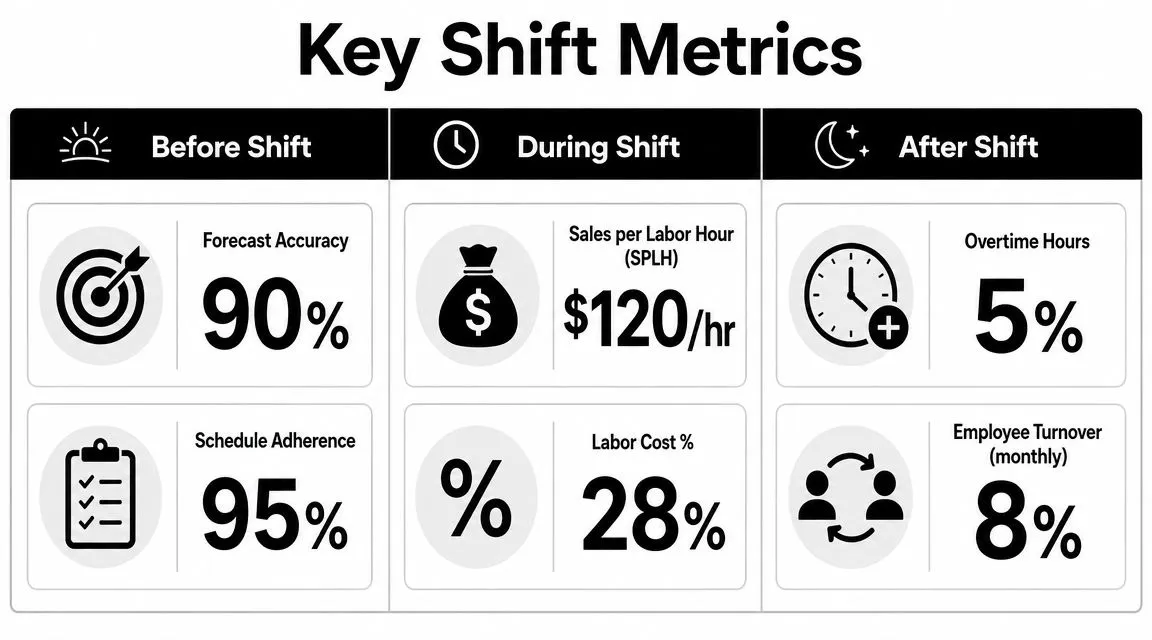
If you want labor control that changes outcomes, you need a short list of signals that tell you what's happening before, during, and after the shift. Not a giant dashboard. Just a handful of metrics tied to decisions.
Before the shift
Before anyone clocks in, the goal is simple. Stress-test the plan.
A useful pre-shift review includes these checks:
- Forecast versus staffing: Compare expected demand to the roster you're about to run. If the day looks soft, ask whether you built too much overlap. If it looks heavy, ask whether key stations are protected.
- Availability and role coverage: Don't just count bodies. Check whether the people scheduled can perform the stations that will matter.
- Projected labor before publish: If you're still doing this by feel, you're giving away control. A tool that estimates labor before the schedule goes live makes it easier to catch mistakes early, which is why operators benefit from reviewing labor cost before posting a schedule.
During the shift
Here, operators either steer the day or just observe it.
Meegle's guidance on shift productivity says managers get better operational insight when they track multiple signals together, such as shift utilization rate, task completion rate, and error rate, because attendance alone doesn't tell you whether a shift is effective. Those combined metrics help reveal workload imbalance, skill mismatch, or handoff problems rather than a pure headcount issue, as outlined in Meegle's overview of shift work productivity metrics.
In restaurant terms, that means watching combinations, not single numbers. For example:
| Signal | What it can mean |
|---|---|
| Strong attendance, weak task completion | The team is present but deployed poorly |
| Full staffing, rising errors | The station mix or skill mix is off |
| Good sales, low utilization in one area | Labor is trapped in the wrong role |
| Good coverage, slow handoffs | Process friction is blocking output |
A manager who only watches clock-ins misses half the story.
If the shift is fully staffed and still feels sloppy, stop blaming labor volume first. Check placement, training, and handoffs.
After the shift
Post-shift review should be short and practical. Not a manager therapy session.
Look back at:
- Overtime and undertime: These are direct signs of how well the day was controlled.
- Completed shifts versus planned shifts: Did the day run as scheduled, or did last-minute changes dominate?
- Attendance patterns by shift: Which dayparts produce lateness, call-outs, or fatigue?
- Productivity notes: Where did work pile up, and was the issue demand, prep, or skill?
What not to do with metrics
Don't turn metrics into trivia.
If you're tracking numbers that don't lead to an action, you're creating admin work, not control. Every metric should point to one of three decisions: keep staffing as is, redeploy people, or change hours.
That's the standard. If a metric can't help you act, it probably doesn't belong on your shift dashboard.
Pre-Shift Best Practices for a Stronger Starting Line
At 4:30, the dining room is calm, the line looks staffed, and the schedule says you are covered. By 6:15, one grill cook is buried, a server is already asking to be cut, and the host stand is backing up because the reservations hit earlier than expected. The shift did not fall apart because dinner was busy. It fell apart because the day started with bad assumptions.
Pre-shift work sets your margin for error. If the forecast is loose, the station plan is vague, or the wrong people are stacked on the wrong roles, you spend the rest of the shift reacting instead of steering.
Build from patterns, then mark the pressure points
Writing every schedule from a blank page wastes time and usually hides repeatable mistakes. Good operators start with known traffic patterns. Tuesday lunch is rarely a mystery. Friday dinner usually has a shape. The main job is spotting where the pattern may break.
Use recent sales history, reservations, event calendars, weather, and promo plans to set the first version of coverage. The National Restaurant Association's guidance on workforce planning supports using historical demand and current business conditions together, instead of treating the posted schedule as final truth, in its restaurant workforce and operations resources.
That first pass matters because it gives you something testable. It also gives you a cleaner starting point for in-shift labor calls later. Teams that start with a realistic base plan can cut or add hours with less chaos.
Review the shift in the order it can fail
Managers often check who is on the clock before they check what the shift needs. Reverse that.
Start here:
Demand Where can volume arrive early, bunch up, or fall short? Look at dayparts, not just daily sales.
Station mix Do you have enough strength in the roles that choke the operation first, such as grill, expo, bar, or host?
Skill mix Which employees can recover a weak station, train on the fly, or absorb a late rush without creating mistakes?
Support conditions Is prep complete, is key equipment working, and is product where it needs to be? Labor looks expensive when setup is sloppy.
A shift with the right headcount can still lose money if the strongest people are trapped in low-impact roles.
Make fairness practical, not sentimental
A schedule affects labor cost before anyone clocks in. Tired people move slower. Frustrated people call out. Employees who keep getting bad closes and short turnarounds stop helping you solve problems.
Truein makes a useful point in its shift scheduling article. Schedules built with flexibility, rest, and clear swap rules tend to reduce attendance problems and make staffing changes easier to manage.
I have seen this play out the hard way. A schedule can look balanced on paper and still be unfair in the way it distributes closes, doubles, and recovery time. That kind of “fair” schedule usually creates late arrivals, resentful handoffs, and managers burning time in text threads.
Fair scheduling protects labor dollars because stable teams are easier to deploy and easier to adjust mid-shift.
Use a pre-shift checklist that leads to live decisions
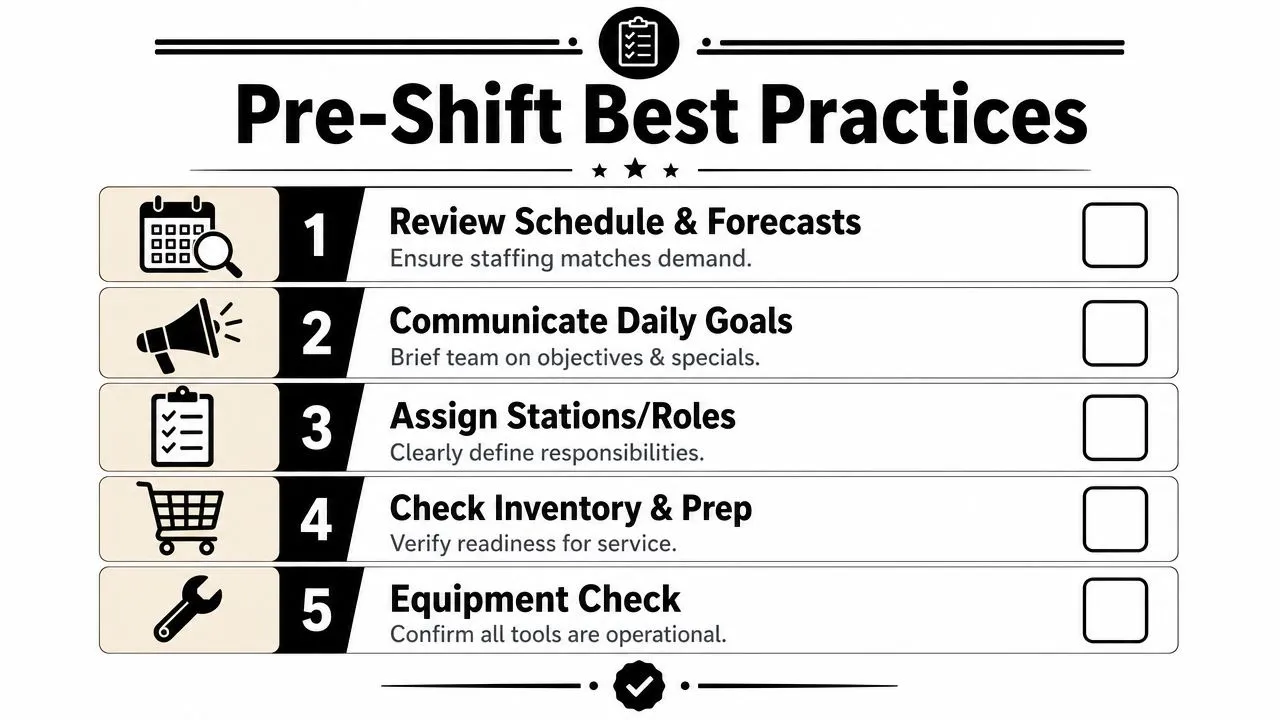
Keep the checklist short enough that managers will use it, and specific enough that it affects the floor.
- Check the forecast by daypart. Flag where sales could miss high or low.
- Match names to stations. Confirm every critical post has a primary and a backup.
- Identify fragility. Note trainees, likely late arrivals, weak handoff points, and anyone stretched into an unfamiliar role.
- Set cut order before service. Decide which reduction creates the least operational damage if sales run soft.
- Set call-in order before service. Know who can plug the bottleneck if volume jumps.
- Brief leads on the adjustment plan. A manager should not be the only person who knows what happens if the shift changes shape.
That last point gets missed a lot. Pre-shift planning should make mid-shift decisions faster. A good checklist is a control tool, not paperwork.
Teams that build software for live operations deal with the same problem. Plans lose value when information arrives late. This practical guide for product teams explains that principle from a data-sync angle, but the lesson carries over to restaurant labor. If updates lag, your decisions lag.
Put guardrails around flexibility
Shift swaps, open shifts, and self-service changes can help retention. They can also undermine coverage if nobody checks role fit.
Set clear rules. Who approves the change. What counts as equal coverage. Which stations require proven skill, not just an available body. Without those guardrails, the schedule turns into a collection of private deals, and the manager inherits the risk at lineup.
Strong pre-shift discipline does not make the day rigid. It gives you a cleaner launch, better options at 5:30, and fewer expensive surprises by 7:00.
Mid-Shift Tactics to Control Labor Cost in Real Time
At 6:15, the dining room is half full, the kitchen is stocked for a rush that has not shown up, and labor is already creeping high. By 7:00, the opposite can happen. A bus drops nearby, online orders spike, and the same shift suddenly feels understaffed. That is where labor cost gets won or lost. Not on the schedule draft. On the floor, while the shift is still moving.
A manager who waits for the end-of-day report is managing history. Real control happens in 15-minute decisions.

When sales are running soft
Slow periods hurt because labor keeps ticking even when covers do not. The mistake is waiting too long, then making one hard cut that creates a service problem later.
Work the problem in layers. Check sales against the last hour, the next expected wave, and the jobs still left to finish. Then ask:
- Which role can be reduced with the smallest service hit
- Who has already done the prep, stocking, or opening work that mattered most
- Who on the floor can flex without creating ticket mistakes, missed tables, or weak close
- What labor do you still need for breaks, cleanup, and a possible late pop
Good operators cut the least flexible labor last, not first. The person who can expo, run food, and cover a station often saves more money by staying than by leaving an hour early.
If you need a quick gut check on whether a cut helps, use a restaurant labor cost calculator to frame the decision against sales, not just headcount.
When the rush shows up early or out of nowhere
A surprise rush exposes weak in-shift management fast. Tickets drag. Hosts stop quoting accurate waits. Someone starts saying, "we just need another body," when the core issue is that the wrong body is standing in the wrong place.
The first move is redeployment. Shift people toward the bottleneck before you call anyone in. In one store, that may mean pulling a strong server assistant to food running for 20 minutes. In another, it means putting the manager on expo so the line can keep cooking instead of shouting.
Use this order:
Fix the choke point first
Find the station slowing everything behind it. Expo, fry, dish, bar, host stand. Whatever is backing up the system gets attention first.Strip out low-value work
Pause side work, deep cleaning, extra prep, or admin tasks that can wait until the push passes.Shorten the communication chain
Put one person in charge of the adjustment. Too many voices during a rush create hesitation.Call backup with a specific assignment
Ask for a role, start time, and expected need. "Can you bartend from 7 to 10?" gets better results than "Can anyone come help?"
Teams outside restaurants run into the same problem with delayed updates and bad timing. This practical guide for product teams explains it from a systems angle, but the lesson applies on the floor too. If the information arrives late, the correction arrives late.
Small moves made early usually beat big moves made late.
When a no-show or call-out hits midstream
A call-out in the middle of service feels personal because it blows up the plan you started with. Chasing the original plan usually makes it worse.
Replace the function, not the person. Figure out what must happen in the next 30 to 60 minutes, what can be combined, and what can be postponed without the guest noticing. I have seen one strong lead and a simplified station map outperform a frantic scramble to fill every gap exactly as scheduled.
For multi-unit operators, the best backup is often nearby, not ideal. Cross-store coverage works when managers know who can handle the role, how long the transfer takes, and which store can spare the labor without creating a second problem. Workforce analysts at UKG discuss this kind of location-to-location staffing planning in their guidance on managing staff across multiple business locations: https://www.ukg.com/blog/workforce-management/managing-staff-multiple-business-locations
A simple live decision grid
Use this in the moment:
| Situation | First move | Avoid |
|---|---|---|
| Sales below expectation | Cut in layers, starting with low-impact hours | Keeping everyone on because "it might turn" |
| Rush building fast | Redeploy strongest available staff to the bottleneck | Calling for help before fixing floor coverage |
| Errors and ticket times rising | Check role fit, handoffs, and station pressure | Adding labor without changing deployment |
| Call-out before peak | Rebuild around the work that must get done | Trying to recreate the original chart exactly |
Mid-shift labor control is not about squeezing hours out of people. It is about making cleaner decisions while there is still time to matter. Guests should feel steady service. The P&L should feel the discipline later.
How Do Labor Tools Automate Shift Management?
The shift usually breaks when the manager gets buried in small decisions. A no-show hits at 4:15. Sales come in softer than expected at 5:00. Two people start texting about swaps. By 6:00, labor is off plan and nobody has had time to make a clean call.
That is where manual systems fail. They ask one person to remember too much, react too late, and keep the whole day in their head while service is moving.
What software should take off the manager's plate
Good labor software removes the repetitive work that slows down real decisions on the floor. The goal is not prettier schedules. The goal is faster, better calls during the shift.
In practice, that means the system should help managers:
- Build schedules from real constraints such as availability, sales patterns, overtime rules, and role qualifications
- See projected labor before publishing so bad assumptions get caught early
- Compare scheduled hours to actual sales and clock data during service so adjustments happen while they still matter
- Alert managers when labor starts drifting instead of waiting for the nightly report
- Handle shift offers, swaps, and coverage requests in one place instead of scattered texts and side conversations
- Support cross-location coverage so one store can borrow help from another without guessing who is trained and available
That last point matters for operators with more than one unit. Shared talent only works if managers can see who is approved for which role, where they can work, and which location can spare the hours. Workplaces reports on internal talent marketplaces and cross-functional staffing describe the same operating idea at a larger scale: a visible internal labor pool makes it easier to move qualified people to the highest-need spot. https://www.workplaces.org/reports/internal-talent-marketplaces
Automation should match the way the shift actually runs
A lot of tools can send reminders. Fewer can support the kind of in-shift control operators need when sales move, call-outs happen, or the dining room and kitchen fall out of balance.
The useful systems reflect real operating rules. They track who can cover grill versus expo, show labor against live business conditions, and reduce admin work without forcing managers to bounce between the POS, text threads, and spreadsheets. For operators using Toast, AnchOps is one example. It syncs employees, orders, time entries, and payments to help forecast labor, build schedules from availability and sales history, and surface projected labor before publish. If you want to pressure-test targets before changing your setup, a restaurant labor cost calculator is a practical starting point.
Operators can also borrow automation ideas from outside restaurants. Teams that deal with repetitive inbound communication often solve similar workflow problems around routing, consistency, and reducing interruptions. Rosie's call automation solutions is one example of that broader automation logic.
A quick walkthrough helps make the automation piece more concrete:
The practical payoff
Software does not replace shift leadership. It gives managers the time and visibility to lead the shift instead of chasing it.
That changes the job in a useful way. Managers spend less time collecting numbers, checking messages, and rebuilding the same coverage plan by hand. They spend more time catching labor drift early, fixing deployment during service, and making cleaner trade-offs while there is still time to protect both guest experience and payroll.
That is how labor tools improve shift management. They turn labor control into a live operating practice, not an after-the-fact report.
If your team is tired of managing labor through spreadsheets, group texts, and after-the-fact reports, take a look at AnchOps. It's built for restaurant operators who want to control labor before and during the shift, with scheduling, live labor visibility, team communication, and payroll prep in one workflow.
Your back-of-house partner is ready
AnchOps handles scheduling, tip calculations, labor costs, and timecards — so you can focus on your restaurant, not your paperwork.