Restaurant Payroll Software: Cut Admin Time in 2026
Published on
By Tony Newcome — Founder of AnchOps · Owner, Pizza Harbour
This article was drafted with AI assistance and reviewed by Tony Newcome, a working restaurant operator.
Restaurant payroll software cuts admin time when it handles the things that make restaurant payroll hard — tip pooling, split roles, blended overtime rates, missed punches — by pulling hours straight from your POS. Look for five core features and judge systems by how they handle tips and integrations. Payroll is the final output of labor management; software built that way wins.
A manager is fixing missed punches from lunch, someone is texting about a tip-out that looks wrong, and the overtime report doesn't match the schedule. Meanwhile, tomorrow's schedule still needs work. That's the part many operators hate most. Payroll doesn't stay in the office. It spills into staffing, service, and manager time.
In restaurants, payroll is rarely just “run payroll.” It's tip math, split roles, rate changes, break rules, overtime, and constant small corrections that stack up by the end of the week. If you only deal with payroll after the shift is over, you're already behind. The better approach is to treat payroll as the final output of labor management. If scheduling, forecasting, time tracking, and tip rules are clean upstream, payroll becomes a review step instead of a rescue mission.
Table of Contents
- Beyond Payday Why Restaurant Payroll Is So Complicated
- Where the friction really comes from
- What Is Restaurant Payroll Software Anyway
- It's not just check printing
- What the software should connect
- Why the proactive angle matters
- Five Core Features Your Restaurant Payroll Needs
- Timekeeping and punch management
- Automated tip pooling and distribution
- Direct POS integration
- Scheduling sync
- Payroll-ready exports
- The Business Case for Upgrading Your Payroll System
- Upgrading payroll improves the whole labor system
- The return shows up in places operators feel immediately
- Audit readiness and compliance matter more as you grow
- Generic payroll tools usually break at the edges
- A Practical Checklist for Choosing Your Software
- Questions to ask in the demo
- What to verify after the demo
- Setting Up Your System and Integrating with Toast
- Start with clean data
- Build the workflow managers will actually use
- Common mistakes to avoid
- Your Restaurant Payroll Questions Answered
- How should software handle overtime when one employee works at different pay rates?
- What matters most for multi-location payroll?
- What's the difference between payroll software and a broader outsourced service?
Why Is Restaurant Payroll So Complicated?
The mess usually starts long before payday.
A server picks up half a host shift. A bartender clocks in under the wrong role. A closer forgets to clock out. Delivery tips sit in one system, hours sit in another, and managers try to stitch it all together after service. By the time payroll is due, the work isn't about checking numbers. It's about reconstructing what occurred.
That's why restaurant payroll feels heavier than payroll in many other businesses. Operators aren't paying a fixed salary workforce with neat schedules. They're paying a moving target with tipped employees, multiple job codes, different pay rates, and a stream of exceptions that can't be handled well in a generic spreadsheet.
The money at stake is real. The general rule is to keep restaurant payroll costs between 25% and 35% of total revenue, with quick-service restaurants often aiming for 25% to 28% and full-service restaurants often landing around 30% to 35% according to restaurant payroll cost benchmarks. If you're trying to keep that under control, it helps to regularly calculate your restaurant labor costs instead of waiting until the payroll file exposes the damage.
Practical rule: If payroll is the first time you see labor problems, your process is too late.
There's also the policy side. Vacation accruals, carryover questions, and manager overrides often become payroll problems because the rules weren't clear earlier in the process. A simple reference like this guide on calculating vacation time can save a lot of confusion before those hours hit payroll.
Where the friction really comes from
A few patterns show up in almost every operator headache:
- Tip-heavy pay structures: Servers, bartenders, and support staff don't just earn wages. They work inside tip pools, tip-outs, and service workflows that need clean math.
- Constant timecard edits: Missed punches and role changes force managers to review shifts manually.
- No single source of truth: POS, scheduling, and payroll often tell slightly different stories.
- End-of-week cleanup: Instead of preventing issues during the week, teams try to fix everything in one rush.
When payroll is manual, managers spend closing time fixing admin. When payroll is connected to labor operations, they spend that time running the floor.
What Is Restaurant Payroll Software, Anyway?
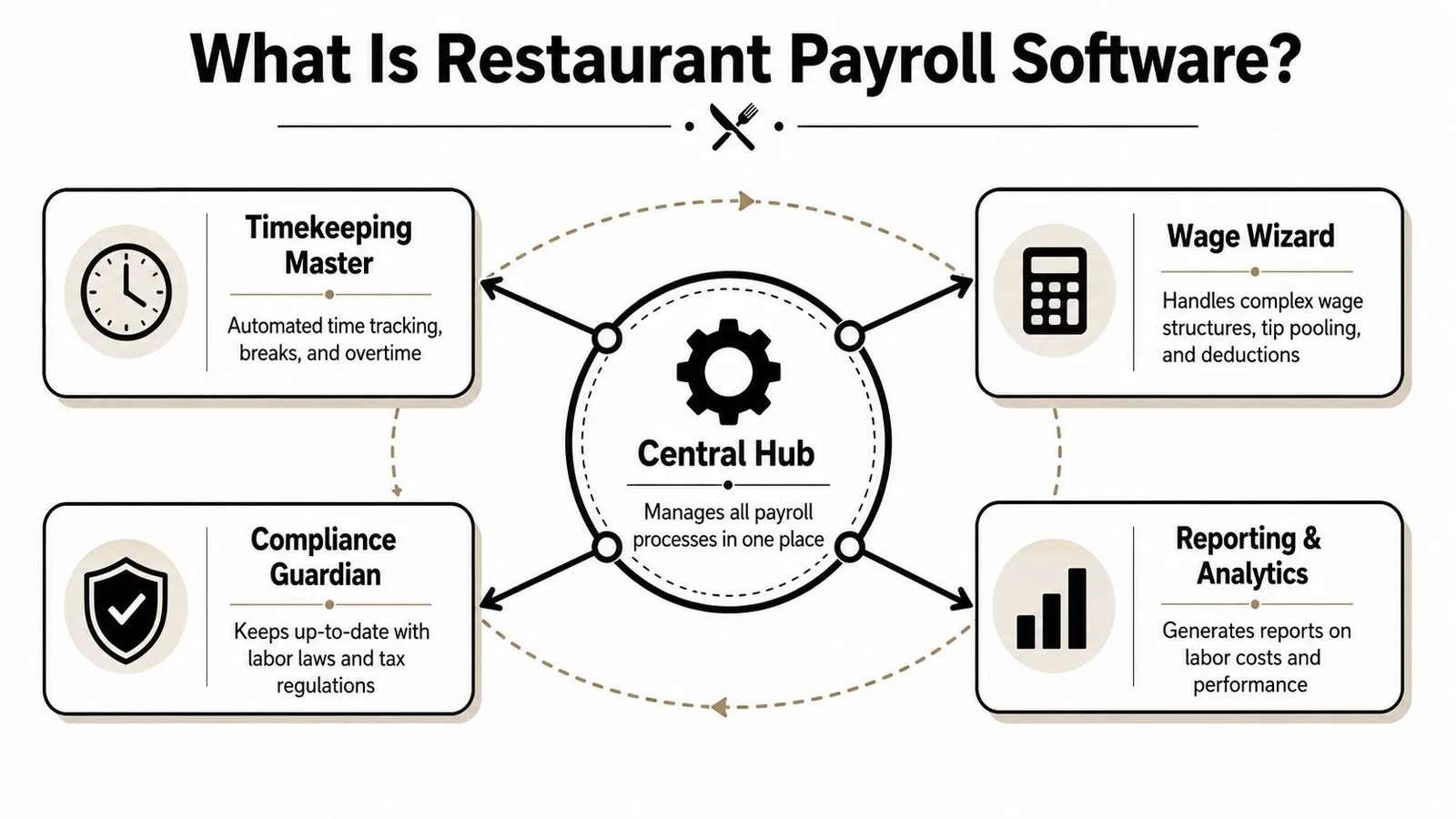
Restaurant payroll software is the operating system that connects your labor data.
The central hub in an airport manages flights, gates, baggage, crews, and timing to prevent chaos. In a restaurant, payroll software performs the same essential function for hours, tips, pay rates, overtime, and reporting. It takes data from timekeeping, scheduling, and the POS, then turns that into pay employees can trust and records the business can defend.
It's not just check printing
A lot of operators assume payroll software is mainly for direct deposits and tax forms. That's only part of it. Good restaurant payroll software pulls in punches, job roles, sales-linked tip data, and pay rules automatically so managers aren't retyping the week by hand.
It also creates a chain of custody for labor data. If an employee asks why their check looks short, someone should be able to trace the answer back to the original clock-in, role, and tip rule quickly. That's what separates restaurant-specific tools from generic payroll systems that treat labor like one flat total.
A significant historical requirement influenced this development. The IRS requires employers to report all tips received by employees using Form 8027, which made automated tip capture and allocation a mandatory component of restaurant payroll, as explained in this overview of modern restaurant payroll and IRS tip reporting.
What the software should connect
At a practical level, the system should pull together these streams:
| Input | What it contributes | Why it matters |
|---|---|---|
| Time clock | Hours, breaks, missed punches | Prevents manual timecard rebuilding |
| Schedule | Planned labor and roles | Helps catch labor problems before they hit payroll |
| POS | Sales, tips, service activity | Supports tip calculations and wage compliance |
| Payroll engine | Gross pay, deductions, taxes | Produces the actual paycheck and records |
A strong setup makes payroll feel boring. That's a good sign.
Why the proactive angle matters
The biggest change in how smart operators use these tools is simple. They don't wait for payroll day to discover labor overruns. They use software that starts with forecasting and scheduling, then carries accurate shift data into payroll automatically.
That changes payroll from a back-office event into the final confirmation that the week was managed well.
Which Five Features Does Restaurant Payroll Software Need?
Plenty of products can process wages. Fewer can handle the complexities of a restaurant. If the system can't absorb labor data from the floor and convert it into compliant payroll without side spreadsheets, it's going to create more admin than it removes.
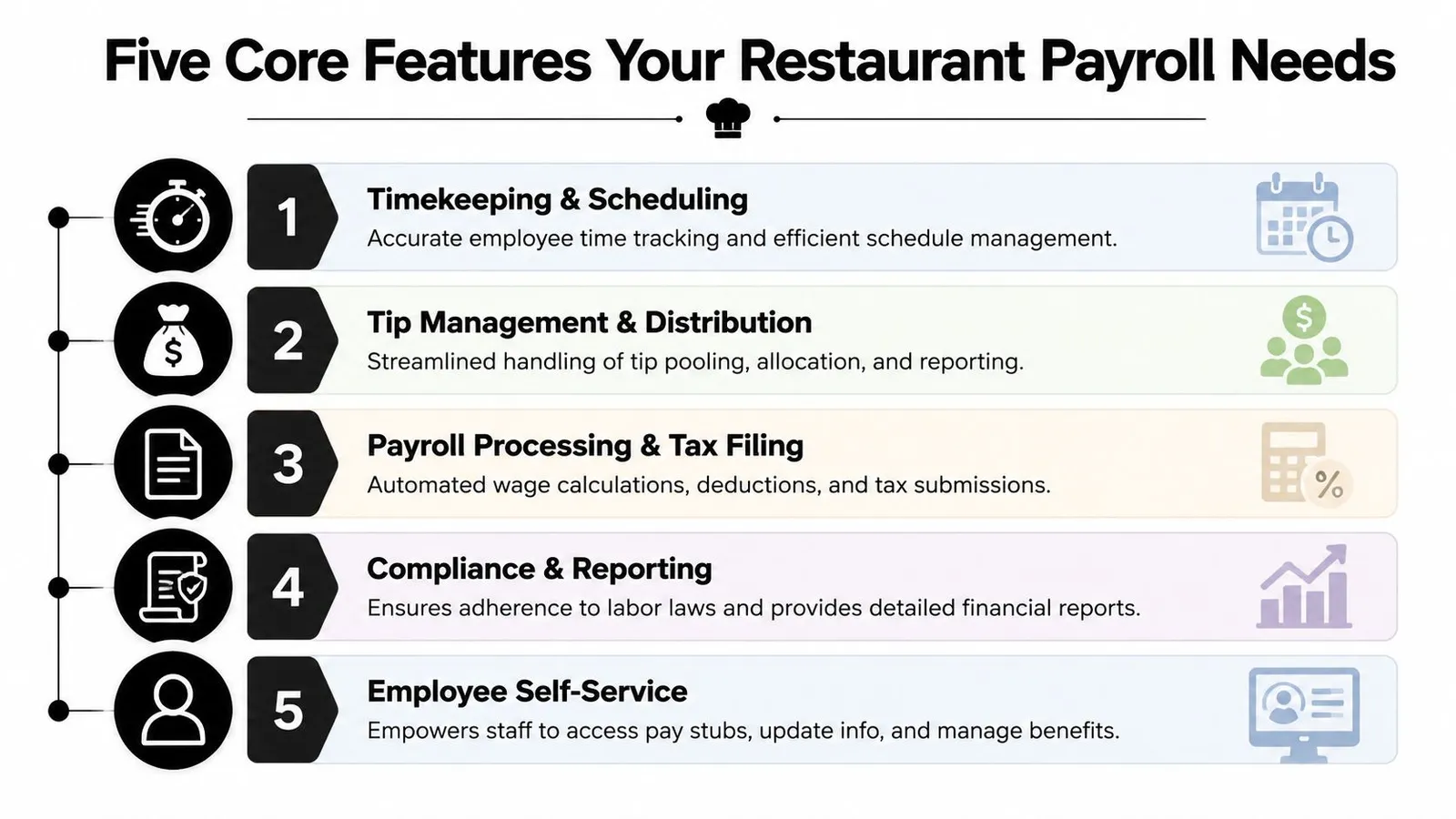
Timekeeping and punch management
This is the first filter. If time data is wrong, payroll will be wrong too.
Good systems make it easy to review missed punches, early clock-ins, late clock-outs, break exceptions, and role transfers in one place. Bad systems bury each issue in separate screens, so managers skip review until payroll day and then fix everything in a rush.
Look for software that lets a manager approve timecards cleanly and see exceptions before the pay run starts.
Automated tip pooling and distribution
In this context, generic systems often fall apart.
Restaurants need payroll tools that can apply tip pool rules natively, not through a workaround. If your process still involves handwritten tip-outs, calculator apps, or a manager building formulas in a spreadsheet, you're carrying avoidable risk. If you're comparing products, these Allied Tax payroll software recommendations are useful as a general starting point, but restaurants should push deeper on tip handling than most general small-business lists do.
A practical gut check helps here. If a vendor says “we support tips,” ask whether the software calculates distributions from source data or whether your team still has to prepare the numbers first. Those are very different products.
You can also compare your current process against operational tip workflows like this guide to tip calculation. It helps expose where the manual work is really hiding.
Direct POS integration
“Connects to POS” sounds good in a demo. It doesn't tell you enough.
A key question is what gets synced. Hours only? Or hours, sales-linked tips, job roles, and the details needed for payroll math? Compliant restaurant payroll software must integrate with major POS systems to handle the tip credit mechanic, where employers can claim up to $7.12 of the federal minimum wage of $7.25 as a credit, provided the employee's tips plus base wage meet the minimum, according to this explanation of restaurant payroll software and tip credit compliance.
That work can't be guessed. The software needs real-time data to calculate it correctly.
Scheduling sync
This is the feature too many payroll conversations ignore.
If scheduling and payroll don't talk to each other, managers only learn about overtime, labor drift, or role mismatches after the shift is over. A better setup lets the schedule inform payroll before the week gets expensive. Planned labor, approved availability, and actual punches should all flow together so payroll becomes the result of a controlled operation, not a cleanup project.
Payroll-ready exports
The final step should be simple. Review, approve, export.
A strong system creates clean payroll-ready files with the fields your payroll processor needs. A weak one forces someone to copy figures between systems and hope nothing breaks on the way over.
The best payroll workflow removes re-entry. Every time a manager has to key data in twice, the process has already failed.
The Business Case for Upgrading Your Payroll System
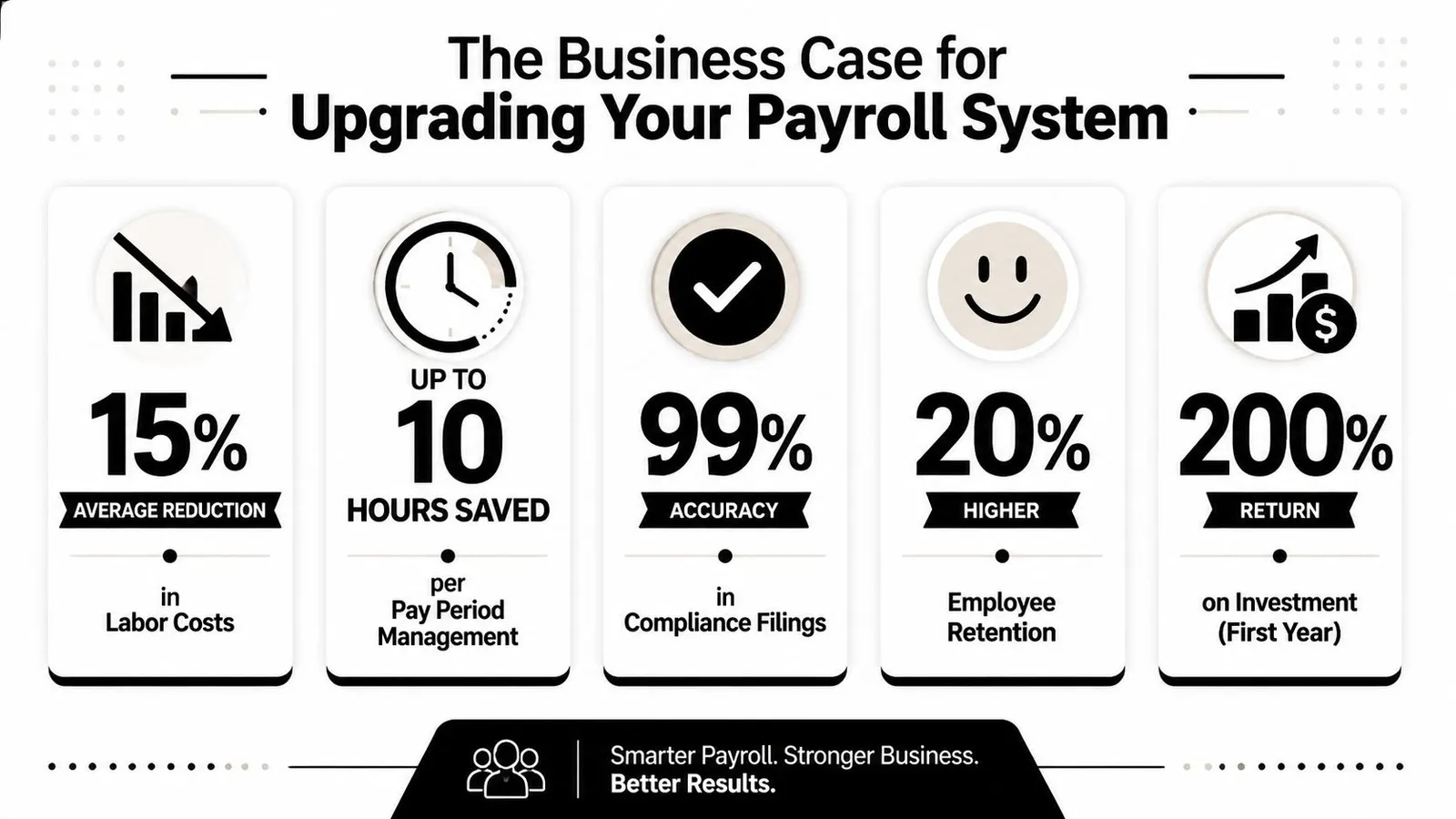
Friday at 3 p.m., the dining room is filling up, a cook is asking about missing hours, and a manager is still fixing timecards from Tuesday. That is the true cost of an outdated payroll process. The problem is not just admin work. It is operational drag that shows up in service, retention, and cash control.
Upgrading payroll improves the whole labor system
A better payroll system closes the loop on labor management.
If schedules, punches, role changes, and tip data flow into payroll automatically, payroll stops being a weekly cleanup exercise. It becomes the final checkpoint on work that was already controlled during the shift. That matters because savings primarily come from fewer fixes, fewer surprises, and fewer manager hours spent reconciling records after the fact.
I have seen operators focus only on how long payroll takes to run. That is too narrow. The stronger business case is that connected payroll supports cleaner scheduling discipline, faster approvals, and tighter labor accountability across every pay period.
The return shows up in places operators feel immediately
Manual payroll usually survives because its costs are scattered. One error hits manager time. Another hits staff morale. Another lies dormant until an audit, a claim, or a turnover spike forces someone to dig through old records.
Upgrading changes that trade-off:
- Manager time goes back to the floor: Less re-entry and fewer spreadsheet checks mean more time for coaching, prep, and service oversight.
- Employee trust gets stronger: Accurate pay, clear tip reporting, and faster corrections reduce the arguments that drain culture.
- Audit trails get cleaner: Approved edits, source timestamps, and pay logic tied to actual records make disputes easier to resolve.
- Multi-unit growth gets easier: A process that works in one store needs standard rules and reporting if you plan to add locations.
- Bookkeeping gets simpler: Clean payroll data is easier to reconcile with accounting workflows and outside support like QuickBooks Bookkeeping Services.
A payroll mistake is rarely just a payroll mistake. It becomes a text thread, a manager intervention, a reissued payment, and a distracted shift.
Audit readiness and compliance matter more as you grow
Growth exposes weak payroll habits fast.
One location can sometimes get by on manual fixes and tribal knowledge. Two or three locations usually cannot. Different managers edit timecards differently. Tip handling starts to vary by store. Approval discipline slips. Then the owner or controller ends up comparing reports that were built from inconsistent inputs.
Good restaurant payroll software creates a record of who changed what, when they changed it, and what source data supported the calculation. The U.S. Department of Labor outlines employer recordkeeping responsibilities under the Fair Labor Standards Act in its recordkeeping guidance for wages, hours, and payroll documents. That is not abstract compliance language. It is the difference between answering a wage question in minutes and spending half a day rebuilding a pay period.
Generic payroll tools usually break at the edges
Restaurants create payroll problems at the edges of the shift. An employee trains for two hours at one rate, works the line at another, picks up a closing shift, and earns tips that need to be allocated correctly. Generic payroll platforms can process a paycheck. They often struggle with the operational details that produce the paycheck.
That is why the upgrade decision is bigger than software selection. It is a decision to standardize how labor data moves from schedule to punch to approval to pay. Once that chain is clean, payroll becomes faster because the operation is cleaner.
The best payroll system does not just cut checks accurately. It makes labor control easier all week, so payroll runs as a byproduct of a well-managed shift.
A Practical Checklist for Choosing Your Software
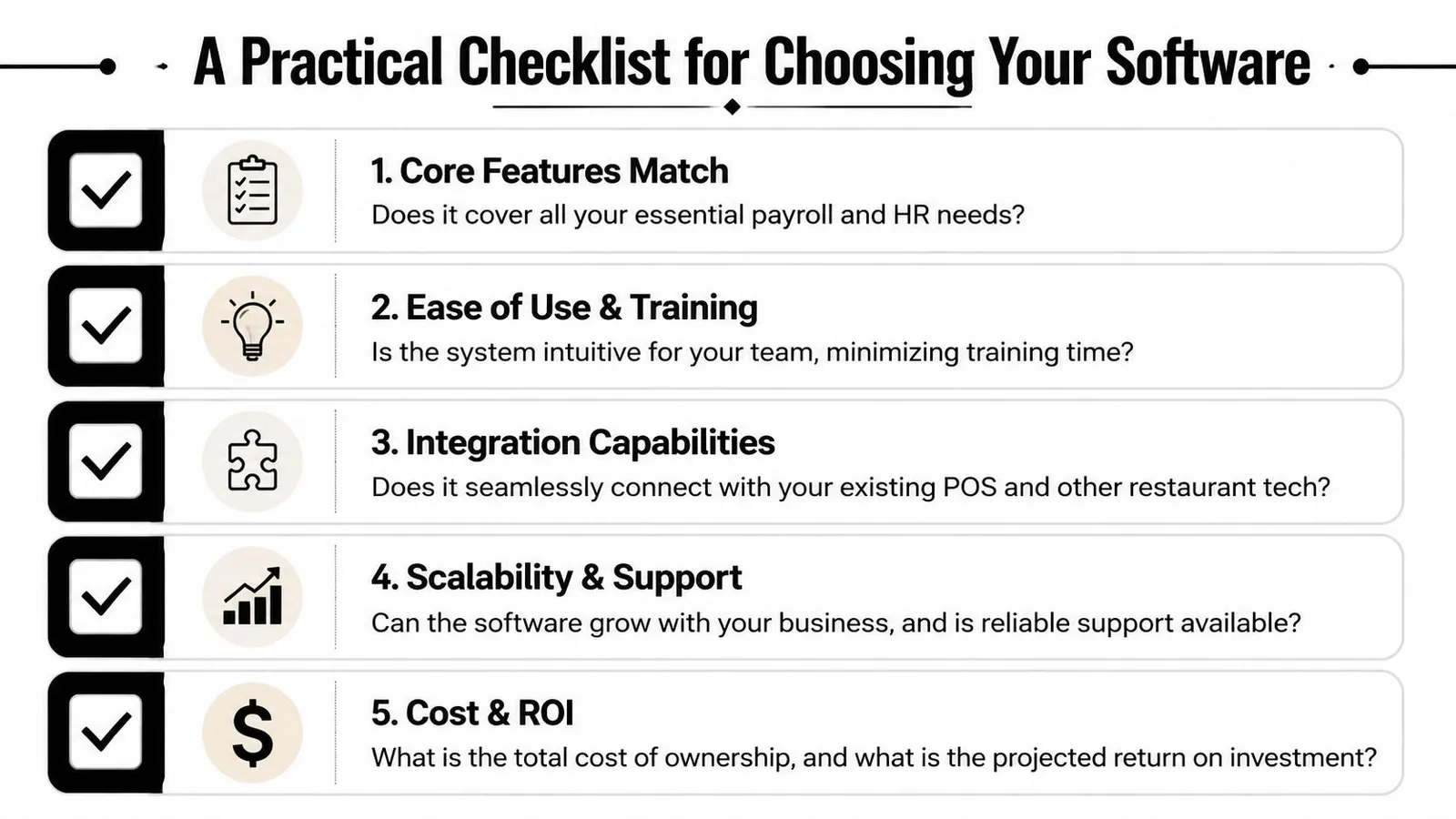
The fastest way to choose the wrong platform is to sit through a polished demo and accept broad claims like “easy integration” or “great for restaurants.” You need sharper questions than that.
A solid evaluation process doesn't start with branding. It starts with your hardest payroll problems. Missed punch cleanup. Tip-out logic. role changes mid-shift. overtime handling. multi-location reporting. Once those are on paper, it becomes easier to see whether a vendor is solving the work or just describing it.
Questions to ask in the demo
Use direct questions. If the answer gets vague, that's useful information.
- Show me the tip workflow: Ask the vendor to walk through how tip pooling, tip-outs, and service distributions are calculated from actual source data.
- Show me a timecard correction: A real demo should show how a manager fixes missed punches, transfers roles, and approves hours.
- Show me the export: Don't settle for “we integrate with payroll.” Ask to see the exact payroll-ready output.
- Show me exception handling: Ask what happens when someone works multiple jobs, misses a break, or has a wage makeup issue.
- Show me multi-entity support: If you run more than one entity, ask how taxes and reporting are separated.
If your accounting side is still patching together multiple tools, outside bookkeeping support can help clarify what your payroll data needs to produce. For operators already deep in that ecosystem, QuickBooks Bookkeeping Services can be a useful reference point when you're mapping payroll outputs to your books.
What to verify after the demo
Demos are controlled. Verification matters more.
Here's a practical post-demo checklist:
| Check | What to confirm |
|---|---|
| POS depth | Does it pull only hours, or also the details needed for tips and role-based pay? |
| Manager workflow | Can managers review and approve cleanly without bouncing across screens? |
| Policy fit | Can it reflect your real rules without custom spreadsheet work? |
| Support quality | Will support understand restaurant issues, or only generic payroll issues? |
| Implementation burden | Who handles setup, testing, and rule validation before go-live? |
Ask vendors to solve one of your ugliest real payroll scenarios live. That's more valuable than any feature list.
The right choice is rarely the tool with the most tabs. It's the one that removes the most manual decisions from your weekly process.
Setting Up Your System and Integrating with Toast
Implementation is where good buying decisions still go sideways. A strong platform can disappoint if the setup is rushed, the data is messy, or managers don't trust the workflow.
If you're integrating with Toast, start by treating setup like an operations project, not an IT task.
Start with clean data
Before you sync anything, clean up the basics.
Make sure employee names, job roles, pay rates, and active status are correct in both systems. Align the role names your managers practically use on the floor with the roles used for payroll. If one system says “server” and another says “dining room,” someone will eventually be forced to reconcile the mismatch by hand.
Then lock down your operating rules. Tip-out logic, overtime handling, break policies, and approval permissions need to be defined before the first real pay period. If your team uses Toast, it helps to review a process built around automating tip pooling with Toast POS so you can map exactly where data should flow and where managers should review it.
Build the workflow managers will actually use
A rollout succeeds when managers can work inside it during a busy week.
That means keeping the review path short. Managers should know where to fix punches, where to confirm tips, and when to approve timecards. If they need a long checklist every pay period, they'll fall back to side texts and spreadsheets.
A practical rollout usually follows this order:
- Import employee records
- Map jobs and pay rules
- Test punches and tip data
- Run a parallel payroll review
- Train managers on exception handling
- Go live only after the review matches expectations
This walkthrough gives a useful sense of how connected restaurant labor tools are being presented in practice:
Common mistakes to avoid
- Choosing generic HR software first: Restaurants often end up forcing tip and shift logic into tools that weren't built for it.
- Skipping parallel testing: Always compare the new workflow against a real historical payroll before trusting it live.
- Training only one person: If payroll knowledge sits with one manager, every absence becomes a risk.
- Ignoring schedule-to-payroll flow: The cleaner the setup between schedule, punches, and payroll, the less rework you'll have later.
When setup is done well, Toast stops being a separate record you have to reconcile manually. It becomes part of one continuous labor workflow.
Your Restaurant Payroll Questions Answered
How should software handle overtime when one employee works at different pay rates?
It should calculate weighted-average overtime, not just apply overtime to whichever rate looks highest. Under the Fair Labor Standards Act, if an employee earns $10/hour for 20 hours and $12/hour for 20 hours, the regular rate is $11/hour, as shown in this guide to restaurant payroll overtime calculations. Software that can't do that automatically creates compliance risk.
What matters most for multi-location payroll?
The system has to support separate legal entities cleanly. Restaurant payroll platforms must support multi-location management with distinct EINs per entity so tax reporting is filed correctly across jurisdictions, according to this overview of restaurant payroll software for multi-location operators. If a product tries to flatten multiple entities into one reporting structure, that's a serious red flag.
What's the difference between payroll software and a broader outsourced service?
Payroll software provides the operating system to run labor, time, and pay with cleaner automation and better internal control. A broader outsourced service may handle more HR administration for you, but that doesn't automatically mean it handles restaurant-specific payroll details better. For most operators, the key question isn't whether a provider offers more services. It's whether the tool matches how the restaurant runs shifts, tips, roles, and approvals day to day.
If you want payroll to stop being a weekly repair job, start earlier in the labor workflow. AnchOps helps restaurants control labor before payroll by tying scheduling, forecasting, time review, and tip automation into one practical system. It's built for operators who want fewer spreadsheets, cleaner shifts, and payroll files that are ready when the week ends.
Your back-of-house partner is ready
AnchOps handles scheduling, tip calculations, labor costs, and timecards — so you can focus on your restaurant, not your paperwork.